
Lab-series snapshot
- Coursework scope
- Individual SEC-260 labs completed in supplied 2021 Kali, Windows, IIS, Apache and OpenSSL environments.
- Work completed
- I captured and interpreted HTTP and TLS exchanges, inspected certificates, operated a small OpenSSL certificate authority, configured IIS and Apache controls, and reviewed the resulting server logs.
- Protocol and server focus
- HTTP request and response flow
- TLS and certificate validation
- Local certificate authority
- Heartbleed analysis
- IIS request policy
- Apache filtering and logs
- Demonstrated outcome
- I progressed from reading one plain-HTTP exchange to configuring trust and request controls and interpreting their logs. The exercises did not create a production hardening baseline or a deployed public-key infrastructure.
Work completed and results
I completed this lab series during SEC-260 in autumn 2021. The teaching environment and exercise structure were supplied; I interpreted the traffic, inspected the certificates, operated the local CA, configured the servers and analysed the resulting logs. I have corrected several explanations I wrote in 2021 where later study gave me a more precise understanding.
| Lab area | Work completed | Result | Limit |
|---|---|---|---|
| HTTP | Followed DNS, TCP and HTTP rows; tested GET, HEAD, error responses and a listener-port change |
Connected name resolution and transport setup to a 200 OK response |
One historical session rather than a current service assessment |
| TLS and PKI | Inspected certificates and a TLS 1.2 handshake; used session-key logging; operated one local issuance workflow | Distinguished certificate validation, key establishment and protected application data | I did not record every leaf, chain and negotiated-suite field together |
| Heartbleed | A sourced research note | My understanding of the vulnerability and its recovery implications | No Heartbleed exploit or vulnerable host was tested |
| IIS | Planned and applied request filtering, IP restrictions, HTTPS and FTP settings | Demonstrated where those controls were configured | Most stages recorded configuration rather than a paired blocked request |
| Apache | ModSecurity audit records, mod_evasive configuration and messages-log output |
Specific 403 decisions and temporary client blacklisting in the lab |
One short exercise, without a tuned custom ruleset or performance testing |
The useful result is not that these settings were universally secure. It is the connected workflow: observe a request, understand what TLS changes, establish a small trust chain, apply server-side policy and then use logs to determine what the controls actually did.
Following an HTTP request
My first exercise described HTTP as an application-layer request-response protocol, then compared it with DNS, FTP, IMAP, POP3, RDP, SMB, SMTP and SSH. I used PUSH where I meant PUT and treated an index file as the automatic result of requesting a host. The current HTTP semantics specification, RFC 9110, gives the more precise method meanings:
| Method | Relevant semantics |
|---|---|
GET |
Transfer a current representation of the target resource |
HEAD |
Use GET semantics without transferring the response content |
POST |
Ask the target resource to process the request content according to its own semantics |
PUT |
Create or replace the state of the identified target resource with the request content |
The selected virtual host, route, application and server configuration decide what / returns. Neither an index.html file nor a PHP script is an inherent HTTP outcome.
A Wireshark capture from a Kali Linux virtual machine followed one plain-HTTP request to apache.org. The packets show the complete sequence rather than only the browser result:
| Stage | Packets | Observation | Interpretation |
|---|---|---|---|
| DNS | 1 to 4 |
The lab client asked its DNS server for A and AAAA records; the A response included 151.101.2.132 |
Name resolution supplied the IPv4 destination used by the next packets |
| TCP | 6 to 8 |
SYN, SYN, ACK and ACK completed between client port 39906 and server port 80 |
The transport connection was established before HTTP data was exchanged |
| HTTP | 9 and 19 |
GET / HTTP/1.1 was followed by HTTP/1.1 200 OK (text/html) |
The server returned an HTML representation for that request in this session |
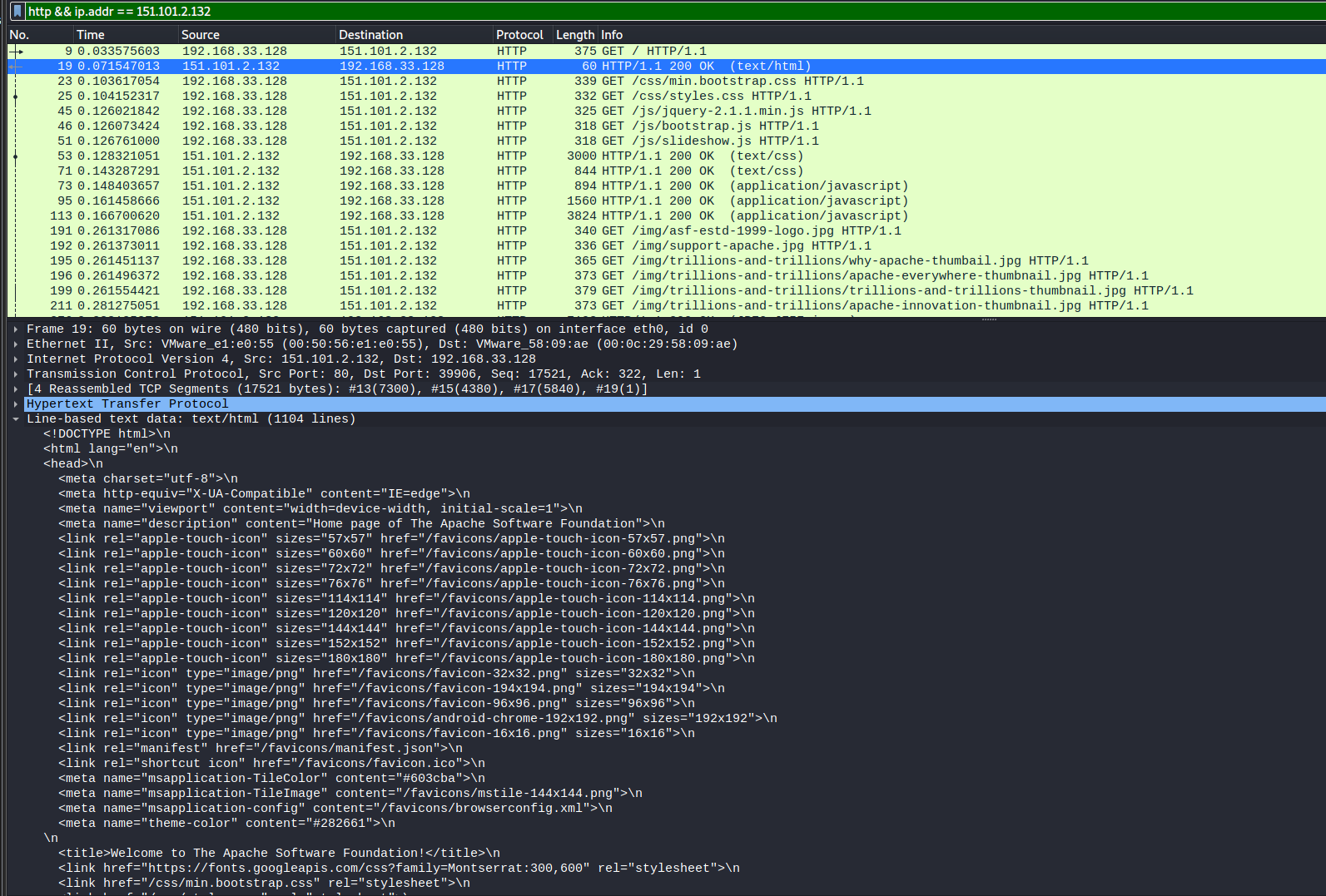
200 OK response. The packet list also shows the request and subsequent asset retrievals; it represents one historical session, not the current address or configuration of apache.org.I used these display filters:
dns
tcp && ip.addr == 151.101.2.132
http && ip.addr == 151.101.2.132
Because this was unencrypted HTTP on port 80, Wireshark could display request paths, headers and returned HTML. That visibility became the baseline for the TLS exercises: encryption protects application content in transit, but connection endpoints, timing and other transport metadata can remain observable.
Separate labs used HEAD, generated 400, 401, 403 and 404 responses, and moved an Apache listener from port 80 to 8008. Those exercises showed that the URL, socket, host firewall and service configuration must agree. They did not make a non-default port a security control by itself.
TLS, certificates and session secrets
The TLS work combined handshake inspection with certificate and key-log exercises. One browser figure recorded a public wildcard certificate for *.champlain.edu, an RSA 2048-bit public key, a subject alternative name field and validity ending on 13 August 2022. My lab notes attributed the certificate to DigiCert.
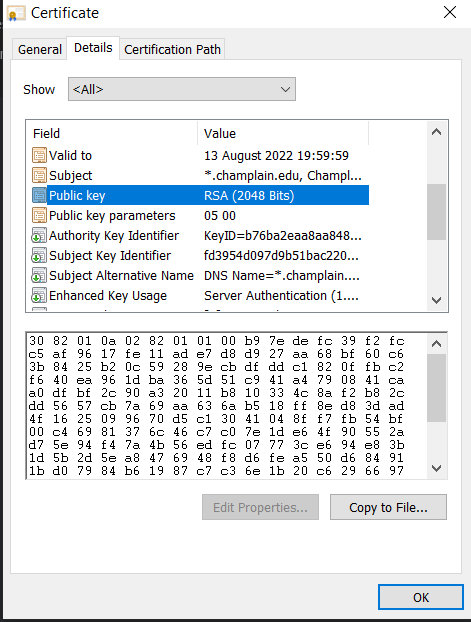
A separate Wireshark exercise captured a TLS 1.2 handshake and fragments of another certificate object. Those fragments showed a validity interval from 8 March 2013 to 8 March 2023, a DigiCert Global Root CA issuer sequence and an RSA public-key algorithm. I did not record the subject and subject alternative names in the same view, so I cannot identify that object as a particular site’s leaf certificate.
At the time I described every TLS session as the client generating a session key and encrypting it with the RSA key in the certificate. That only describes older RSA key-transport suites. The captured TLS 1.2 rows included a Server Key Exchange, which is enough to show that an RSA certificate did not by itself establish the key-exchange method. In an ephemeral Diffie-Hellman suite, the certificate authenticates the server’s handshake contribution while the peers derive fresh shared key material. TLS 1.3 uses its own handshake design and does not restore the old static RSA key-transport model.
The three roles should therefore remain separate:
- a certificate and its chain support authentication of the named service;
- the handshake negotiates protocol parameters and derives traffic secrets;
- authenticated symmetric encryption protects later application records.
A browser does not decrypt a certificate with the issuer’s public key. It validates signatures along a chain towards a trusted root and checks applicable constraints such as the requested DNS name, validity period, key usage and certificate policy. Possessing a public certificate does not reveal the associated private key.
Another lab launched a browser with SSLKEYLOGFILE configured and gave the resulting key-log file to Wireshark. The matching session secrets allowed Wireshark to dissect the protected application data for those recorded sessions. As the Wireshark TLS documentation explains, this method obtains per-session secrets from an endpoint that already participates in the connection; it does not break TLS or recover the server’s private key. The capture and key log must describe the same sessions. The original screenshot is not reproduced because it contains the session secrets themselves.
TLS 1.2 was relevant to the 2021 exercise, but it is not presented here as a current minimum-version recommendation. RFC 8996 formally deprecated TLS 1.0 and 1.1; current deployments should be assessed against their supported TLS 1.2 and TLS 1.3 configurations, certificate validation and application requirements.
Building a local certificate authority
I then operated a small OpenSSL certificate authority inside the lab, connecting the CA state, server request and issued certificate:
| Step | Result | Meaning |
|---|---|---|
| CA database | Empty index.txt and serial file initialised to 1000 |
OpenSSL had state for recording issued certificates and allocating serials |
| CA key | 2048-bit RSA key protected with the historical -des3 option |
The CA had a signing key; Triple DES reflects the 2021 exercise, not a current recommendation |
| CA certificate | Self-signed with a 365-day validity period | The lab created its own trust anchor |
| Server request | Separate 2048-bit RSA key and certificate-signing request | The server key remained distinct from the CA key |
| Issued certificate | Serial 4096 (0x1000), 27 September 2021 to 27 September 2022, sha256WithRSAEncryption, CA:FALSE |
The CA signed one end-entity certificate and advanced its database |
The server request was copied to the CA over SCP, signed with openssl ca, and returned as a certificate. The screenshot records both 1 out of 1 certificate requests certified and Data Base Updated, so it supports a completed issuance rather than only a planned command.
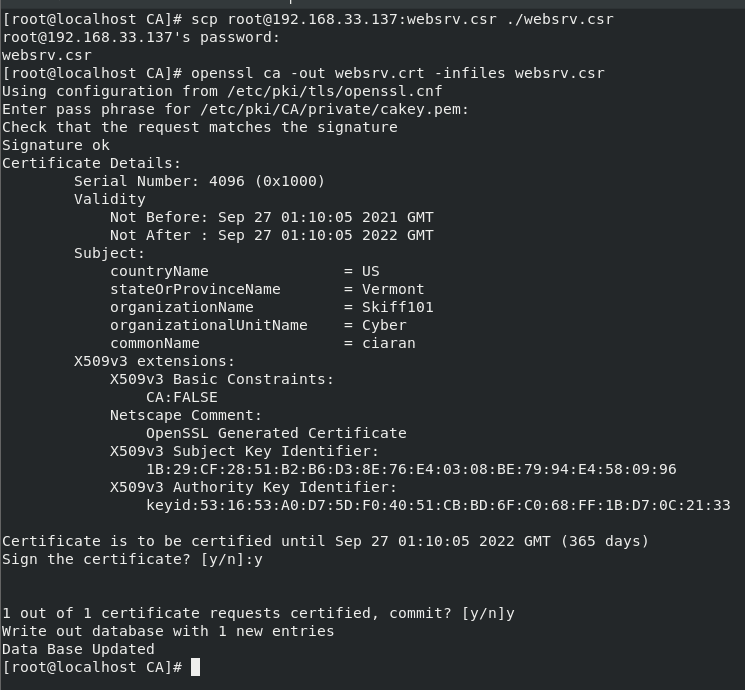
4096 and updating the CA database. No private-key or passphrase material is published.This was a useful model of the roles in PKI, but not a production CA design. I used one combined root and issuing authority, one-year certificates and no subject alternative name in the displayed end-entity extensions. I did not implement offline root protection, separate issuing tiers, revocation testing, constrained profiles, automated renewal, audit control or hardware-backed keys.
Heartbleed: correcting the protocol boundary
The Heartbleed exercise was research, not an exploitation lab. I did not test CVE-2014-0160 against a vulnerable host. Its value here is the technical correction it prompted.
The TLS heartbeat extension carries a message type, a declared payload length, payload bytes and padding. The vulnerable OpenSSL implementation failed to check that the received payload was as long as the declared value before copying data into its response. A deliberately short payload with an excessive declared length could therefore cause an out-of-bounds read of adjacent process memory.
The OpenSSL security advisory described the issue as a missing bounds check capable of revealing up to 64 KiB of memory in one heartbeat response. It affected the OpenSSL 1.0.1 line through 1.0.1f and the early 1.0.2 beta, with 1.0.1g and 1.0.2-beta2 providing the fixes. It was not a flaw in every server using SSL or TLS up to a particular protocol version, as I claimed at the time.
That distinction changes the incident response:
- update the vulnerable OpenSSL package before restoring trust;
- replace private keys and certificates where exposure cannot be excluded;
- invalidate affected sessions and tokens;
- rotate credentials only after the service has been remediated;
- investigate the exposure window while recognising that absence of an application log is not proof that no heartbeat read occurred.
I also examined extended-validation certificates. EV adds organisational vetting to the issuance policy; it does not make a connection use stronger cryptography than another certificate with the same TLS parameters. Browser presentation has also changed since the coursework. Mozilla moved the EV organisation indicator out of Firefox’s address bar in 2019 and documented the decision in its Firefox 70 security-indicator update.
Applying IIS controls
The IIS exercise moved from protocol interpretation to server policy. I wrote a short plan and then configured the supplied instance.
| Control | Setting | What it demonstrated | Important limit |
|---|---|---|---|
| Request limits | Maximum URL and query-string length set to 40 |
Where IIS enforces request-size policy | 40 was a deliberately restrictive demonstration value and would break many ordinary routes |
| File extensions | Unlisted extensions denied; PDF explicitly allowed | An allow-list policy for requested file extensions | It did not inspect file content or prove that every upload and execution path was safe |
| Static IP restriction | 10.0.5.1 to 10.0.5.100 allowed; other clients denied with an aborted connection |
Network-source policy and a TCP reset deny action | The screenshot records configuration, not a complete blocked-traffic test |
| Dynamic IP restriction | Five concurrent requests, or twenty requests within 200 milliseconds | Request-rate and concurrency controls | Thresholds need application traffic and false-positive testing |
| HTTPS binding | Self-signed certificate on port 443; I removed the port-80 binding |
An encrypted listener and certificate binding | No trusted public chain, redirect behaviour or HSTS validation was shown |
| FTP authentication | Both Anonymous and Basic authentication appeared disabled; the logon-attempt control was set to deny a source after four failed attempts within 60 seconds | Authentication state and a failed-login threshold | No accepted login method or resulting source block was captured, and encrypted FTP transport was not established |
Microsoft’s current IIS Request Filtering documentation still separates request limits, file-extension rules, URL sequences and verbs. That supports the control categories, not the lab’s exact thresholds. A production configuration should be derived from the application, tested against normal traffic and monitored through the relevant IIS status and substatus fields.
Removing port 80 forced this exercise onto the configured HTTPS listener, but it did not demonstrate a complete migration strategy. A public service would normally combine a trusted certificate with an intentional redirect policy, HSTS where appropriate, renewal monitoring and validation of every hostname it serves.
Apache decisions in the logs
The Apache exercises produced clearer results than the IIS configuration stages because they connected each request to the server outcome and rule record.
ModSecurity was running with the OWASP Core Rule Set 2.2.9 in the historical CentOS lab. Three audit excerpts recorded 403 Forbidden decisions:
| Test input recorded in the audit log | Outcome | Rule record | Interpretation and limit |
|---|---|---|---|
| Directory-traversal-style query | 403 |
ID 950103, Path Traversal Attack |
The configured CRS blocked this one controlled request |
| Encoded XSS-like query string | 403 |
ID 950901, SQL Injection Attack |
The request was blocked, but the rule label did not match the apparent payload category; a block is not proof of accurate classification |
Request without an Accept header |
403 |
ID 960015, Request Missing an Accept Header |
A strict protocol rule can reject non-browser or unusual legitimate clients and therefore needs tuning |
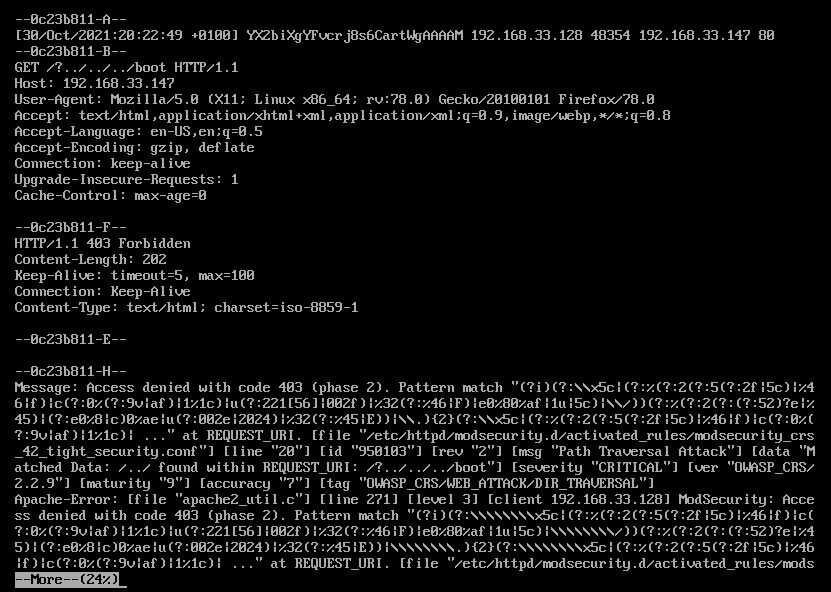
403 response and rule ID 950103; it does not establish broad coverage beyond this test.I configured the standard CRS and interpreted its audit output; I did not write a custom ruleset. This was configuration and rule analysis rather than custom detection engineering.
I configured mod_evasive with these values:
DOSPageCount       2
DOSSiteCount       50
DOSPageInterval    20
DOSSiteInterval    1
DOSBlockingPeriod  50
I incorrectly called 20 the number of requests before blocking. In the displayed configuration it was DOSPageInterval, while the count fields were 2 and 50. The messages log recorded the lab client being blacklisted twice:
Oct 28 17:36:58 localhost mod_evasive[67391]: Blacklisting address 192.168.33.128: possible DoS attack.
Oct 28 17:42:50 localhost mod_evasive[67441]: Blacklisting address 192.168.33.128: possible DoS attack.
Those lines establish that mod_evasive added the client to its temporary blacklist during the test. They do not identify which threshold fired, measure the actual traffic rate or show how many legitimate requests would have been rejected.
Neither ModSecurity nor mod_evasive repaired an application vulnerability. They added request inspection and rate response around the server. The audit records also show why logging matters: a 403 alone says that access was denied, while the rule ID, message, request and client context help an administrator decide whether the block represented useful detection, broad matching or a false positive.
A separate SYS-255 exercise covered ordinary Apache access-log fields. This SEC-260 retrospective stays focused on the security controls rather than duplicating that log-parsing work.
Limits of these labs
- I did not preserve a replayable set of packet captures, certificate files and complete server configurations.
- The TLS work recorded selected certificate and handshake fields but not one complete leaf, chain, hostname and cipher-suite record.
- The Heartbleed work was a research note; it did not validate vulnerable OpenSSL behaviour against a test host.
- Most IIS stages recorded configured state rather than a paired request and server response.
- The Apache results came from a short controlled exercise using historical versions, not a representative application workload or tuned production ruleset.
- No performance, false-positive or long-running reliability study was conducted for the filtering and rate controls.
Current value
These labs reflect a 2021 environment. Browser interfaces, OpenSSL defaults, certificate lifetimes, IIS features, Apache modules and recommended TLS configurations have changed. The page should therefore be read as a historical account of progression, not as a current hardening checklist.
The progression is still relevant. The HTTP capture connected a browser action to DNS, TCP and an application response. TLS then separated service authentication, key establishment and protected application data. The local CA exercise showed how signing state and server identity fit together. IIS and Apache moved the work from observing traffic to controlling it, while the audit and messages logs showed why a control is only operationally useful when its decision can be explained.