
Lab-series snapshot
- Coursework scope
- Individual 2021 SYS-255 weekly exercises across college-supplied Windows and Linux virtual machines in a VMware/vSphere teaching environment.
- Work completed
- I configured and examined DNS, DHCP, Active Directory, Group Policy, Apache, PowerShell remoting, SSH, Linux accounts and file permissions, then tested the resulting client or service state.
- Infrastructure focus
- DNS records and resolution
- DHCP lease flow
- Active Directory and Group Policy
- Apache services and logs
- Remote management
- Linux ownership and permissions
- Recorded results
- I recorded a DNS referral and NXDOMAIN response, a complete DHCP DORA exchange, applied Group Policy, Apache 200/404 requests, remote Windows and Linux sessions, and group-owned Linux directories.
Historical lab record — reviewed 24 August 2026. This page reports what happened in the 2021 exercises; it is not a current build guide or a production deployment. The visible private addresses, hostnames, domains and account names belong to retired university lab systems. No credentials are published.
How the weekly exercises fit together
SYS-255 used Windows Server, Windows workstations and Linux hosts provided through the college’s remote-access and vSphere environment. The exercises were organised around the routine dependencies of a managed network: an address must be issued, a name must resolve, an identity must be recognised, policy and permissions must allow the intended action, the service must be listening, and its logs must describe the result.
Taken together, the exercises show how each administrative layer depended on the others. The focused companion pages examine individual areas in more depth, while this page keeps the practical sequence visible across the module.
These were weekly exercises rather than one unchanging topology. I worked with both ciaran.local and ciaran-byrne.local, while separate DHCP exercises used servers at 10.0.5.3 and 10.0.5.8. Those values belong to different assigned exercise states and should not be read as one simultaneous configuration. I did not record why every assignment value changed.
The larger Kubernetes and Elastic observability build came from the same module but has its own project page. The sections below cover the surrounding administration exercises.
DNS records and troubleshooting
I used packet captures and command-line queries to examine how clients and DNS servers exchanged requests. One exercise sent the query to the lab DNS server at 10.0.5.5 on port 53 and covered:
Arecords for IPv4 host addressesCNAMErecords that make one name an alias of another canonical nameMXrecords that identify mail exchangers and their priorityPTRrecords for reverse address-to-name lookupsNSrecords that identify authoritative name servers for a zone- successful answers, referrals, non-authoritative responses and
NXDOMAIN
I captured a referral involving a.edu-servers.net, an NXDOMAIN response for the deliberately missing ciaranbyrne.edu name, and a non-authoritative answer for champlain.edu. Comparing each request and reply exposed the client and resolver addresses, source and destination ports, transaction identifier, requested name and type, response code, authoritative-answer flag, and returned answer or referral records.
Most of the observed queries used UDP port 53. TCP also forms part of DNS transport, including fallback after a truncated UDP response and zone transfer where permitted. In the original exercise I treated 512 bytes as a fixed UDP threshold; that is not a sound present-day rule because EDNS allows larger advertised UDP payloads and modern guidance treats reliable TCP support as essential. RFC 9210 describes the current transport expectations, building on EDNS in RFC 6891.
Two other early explanations also needed tighter wording. A hostname can have more than one A record, and an MX record normally names a mail host rather than containing that host’s address directly. Those corrections change the interpretation, not the underlying packet-analysis work.
DNS also supported the Windows domain. In one Active Directory exercise, I joined WKS01-CIARAN to ciaran.local, worked with separate standard and administrative accounts, and used nslookup to confirm the domain context. A workstation can resolve internet names and still fail to find a domain controller when it points at the wrong resolver, because controller location depends on the domain’s DNS records. Microsoft’s domain-controller locator documentation describes that dependency. The separate Active Directory lab follows the server, DNS-zone, directory-object and workstation-join workflow in more depth.
DHCP leases and the four-message exchange
The DHCP configuration exercise used a Linux server and a Windows workstation. ipconfig /all on wks01 identified 10.0.5.3 as the server for that exercise. I reviewed the corresponding server messages in /var/log/messages, captured the client exchange, then changed default-lease-time and max-lease-time in the server configuration and restarted the service.
The capture contained the expected four-message sequence:
- Discover — the client broadcast its need for configuration.
- Offer — the server proposed an address and options.
- Request — the client identified the offer it wanted to accept.
- Acknowledge — the server committed the lease and supplied the final configuration.
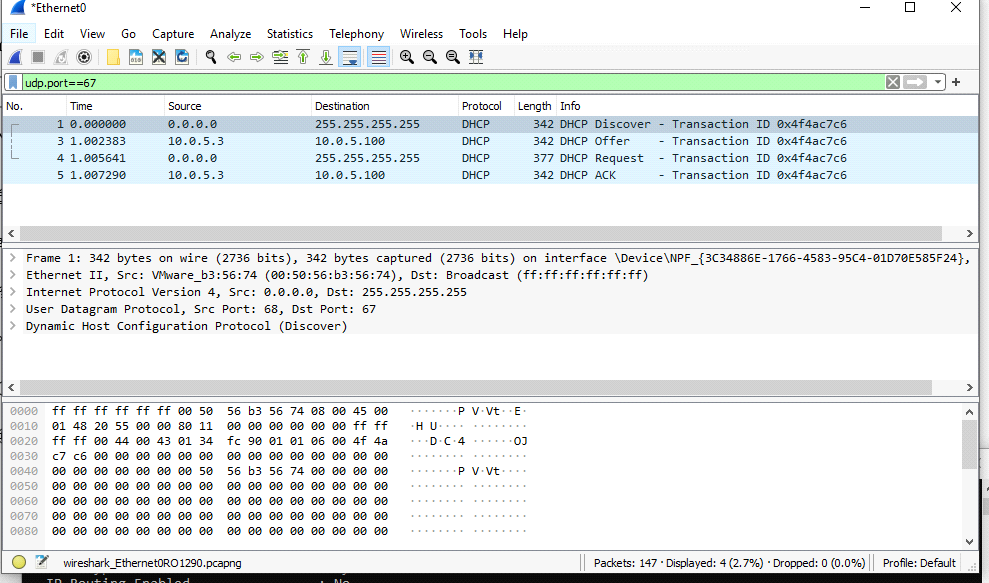
10.0.5.3 exercise. It validates message flow, not long-running DHCP availability.The exchange can also carry a subnet mask, router, DNS server and lease duration. A client may therefore receive an address but still have unusable connectivity when one of those options is wrong. Troubleshooting has to account for the subnet declaration, bound interface, available address range, firewall path, broadcast domain, server log and client packet flow rather than merely checking that the package is installed.
The separate “DHCP Is Down” exercise began with the client lacking a usable IPv4 lease or default gateway. After I renewed the lease, the workstation had 10.0.5.150 and identified 10.0.5.8 as its DHCP server; the server console also showed that lease. I did not record the exact fault or complete repair sequence, so I cannot attribute the recovery to a specific configuration change. The before-and-after state still demonstrates the result without reconstructing a cause that I did not preserve.
Active Directory objects and Group Policy
I worked inside a Windows domain, joined wks01 to the managed environment, and used both a standard account and an administrative account. Forest creation was not part of the result I recorded for this SYS-255 exercise; the separate Active Directory lab covers that build.
I then used:
gpresult /rto inspect policy applied to a clientgpupdate /forceto request reapplication of both user and computer policy- organisational units to scope users and computers
- a dedicated test account and workstation before applying policy more widely
Computer policy is evaluated for the machine, while user policy follows the signed-in account. Some settings take effect during startup or sign-in, even when a refresh has been requested. The current gpupdate command reference confirms that the default target is both policy sections and that /force reapplies all settings.
One test policy removed the Recycle Bin interface for the account named alice. Another, labelled DisableLastLogin, prevented the previous user’s identity from being displayed on the sign-in screen. The important administration work was not just the visible desktop change: it was linking policy to the intended container, checking inheritance and scope, refreshing the client, and inspecting the resultant policy.
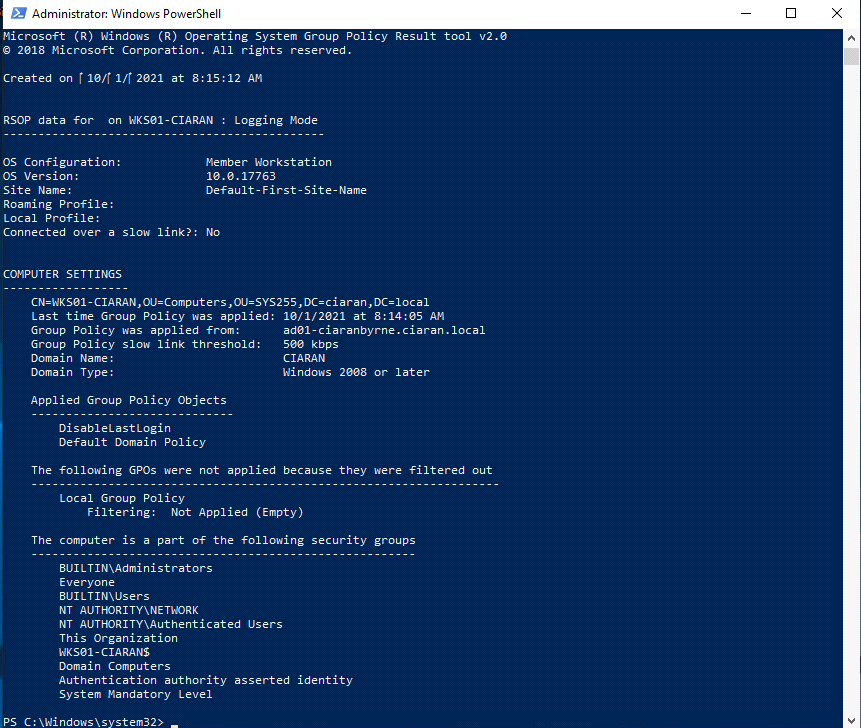
gpresult lists DisableLastLogin as applied to the workstation. The separate sign-in-screen test shows that the previous user’s identity was no longer displayed.The lab guidance recommended a test OU and workstation before broader linking. That gave me a controlled place to check the effect and discover unintended consequences. In a larger environment I would also verify replication, use Group Policy modelling/results, and retain a rollback route for settings that affect sign-in or remote administration; those production controls were not demonstrated by this exercise.
Apache service configuration and access logs
On Linux I installed Apache, allowed HTTP and HTTPS through the host firewall, and tested the server from a Windows client. I confirmed the default page, replaced it with a custom page and produced a simple loop-generated page. In a related exercise, I joined a Linux host to the managed domain, connecting the web-server work to identity and name resolution rather than treating it as an isolated package installation.
The logging exercise compared a successful request with a request for a missing resource. Both came from the retired lab client 10.0.5.150. The successful request was:
GET /?test=1 HTTP/1.1It returned HTTP 200 at 29/Oct/2021:12:25:47 -0400. A request for /totallyexists.html returned 404. The user-agent field identified an Internet Explorer compatibility string on Windows 10.
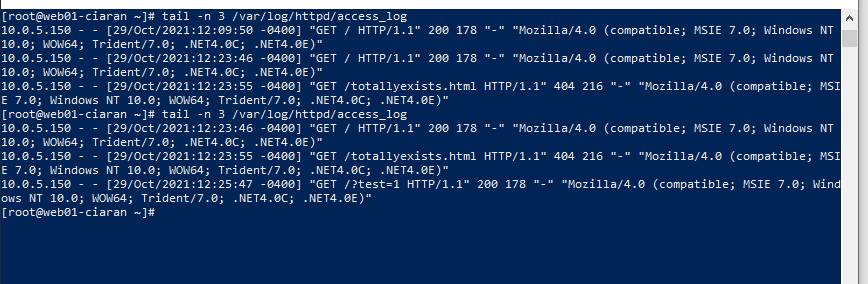
200 and 404 results.In my 2021 analysis, I labelled the final values 178 and 216 as response timings. In the combined-style log shown, that position records response-body bytes, not duration. The exact interpretation always depends on the configured LogFormat; Apache’s log-file documentation defines %b as the size of the response in bytes and shows separate directives for duration.
This was a useful introduction to logs as structured operational evidence. A 200 and a 404 describe different outcomes, but neither is meaningful without the request path, client, time, user agent, response size and surrounding activity. A query string such as test=1 is not suspicious by itself; its value comes from correlation with application behaviour and adjacent requests. The web protocol and server-security labs extend that analysis into HTTP capture, certificates and request filtering.
Remote administration across Windows and Linux
I reached the supplied virtual machines through the college View portal and vSphere console. The portal and console provided the access path into the teaching environment; the substantive administration work began inside the assigned virtual machines.
Inside the lab I used SSH for Linux administration and PowerShell remoting for Windows. I queried Active Directory computers, opened Enter-PSSession to FS01-CIARAN, ran remote ipconfig, and performed a separate remote hostname check. The remoting test encountered no host-firewall problem on that path, but a complete Windows remoting assessment would also need to examine the WinRM listener, firewall profile, authentication method, trust relationship and account rights.
On Linux I confirmed cross-host addressing and name resolution before opening an SSH session. In a later exercise, I set PermitRootLogin no and observed the denied root-authentication event in the log. That validated one control and result, not a complete SSH hardening baseline.
Across both platforms the same layers determined whether remote administration worked:
- the service had to be enabled and listening
- routing, DNS and firewalls had to provide the intended path
- the account needed the required rights
- the session needed appropriate authentication and encryption
- the service and authentication logs needed to preserve the outcome
Comparing PowerShell remoting with SSH made those shared dependencies clearer. A reachable port confirms only one layer; it does not prove that the management path is correctly restricted or that the account has the intended authority.
Linux accounts, files and permissions
The broader Linux exercises covered filesystem navigation, system configuration locations, text editors, users, groups, shells, network settings and active sessions. They also reinforced the connection between Linux and the rest of the lab: the workstation resolved and reached the Linux host, and the Linux user resolved and reached the gateway, Windows domain systems and public names before SSH was tested.
I created separate group-owned directories and files, then used chmod, chown and group membership to control access. The final listing shows marketing and management directories owned by their corresponding groups with mode 770, plus files owned by the intended users and groups.
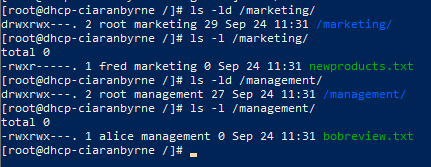
770 directory modes for the two exercise areas.Directory execute permission controls traversal, while file execute permission controls whether a file can be run. That distinction matters during service troubleshooting: a process may be able to read a file’s mode but still fail because it cannot traverse a parent directory; it may own its configuration but lack write access to its log directory; and newly changed group membership may not affect an existing session until the user’s group context is refreshed.
Permissions therefore sat alongside service accounts and remote access rather than forming an isolated command exercise. Broad read access can disclose service data, while ownership that is too restrictive can prevent an otherwise correctly configured service from starting.
Demonstrated results and limits
Across the series I configured and tested DNS, DHCP, Active Directory, Group Policy, Apache, PowerShell remoting, SSH, Linux accounts and permissions. The concrete results included protocol messages, resolved names, directory objects, an applied GPO, 200/404 log entries, remote command output, a denied root login and final permission modes.
I did not test a production deployment, sustained availability, failover, backup and recovery, or a comprehensive hardening baseline, and I did not isolate the exact cause of the “DHCP Is Down” exercise. The differing weekly hostnames, domains and server addresses also belong to separate exercise states rather than one immutable network. Those limits preserve what the lab genuinely demonstrates: an early administration method and the progression from isolated configuration tasks towards connected systems reasoning.
Product versions, distribution defaults, administration interfaces and security guidance have moved on since 2021. The durable lesson was a diagnostic order I later carried into security work: define the expected state, inspect the client, inspect the service, verify addressing and name resolution, check policy and permissions, read the logs, and test the outcome from another system. This series is the early coursework record of learning that systems fail—and are secured—through connected layers.