
Investigation summary
- Investigation scope
- Collaborative FOR-320 examination of two supplied Windows workstation E01 images from a fictional domain incident. The domain controller and suspected staging host were not supplied.
- Team contribution
- Jordan Kimball and I divided the examination, correlated the two workstations and combined our findings as a collaborative investigation.
- Evidence focus
- Registry and autorun persistence
- Sysmon and event logs
- Prefetch and application traces
- LNK files and Shellbags
- Remote logons and shares
- Cross-host timeline reconstruction
- Demonstrated result
- The two images supported script execution, persistence, credential-recovery tooling and staging activity, but not the initial compromise of the missing domain controller or a complete destination-side exfiltration account.
Case overview
This was a collaborative Windows digital-forensics investigation completed with Jordan Kimball for FOR-320 at Champlain College. We were supplied with two E01 workstation images from a fictional corporate domain and asked to determine what had happened, identify the systems and accounts involved, and recommend what evidence should be acquired next.
The available images came from PROG-WKS03 and IT-WKS01. They did not contain the beginning or the end of the incident. A domain controller named AD01 and a separate host named TEST-MACHINE appeared repeatedly in the artefacts, but neither was available for examination. I therefore treated the work as a reconstruction from two affected endpoints rather than presenting it as a complete account of the domain compromise.
The strongest evidence connected a normal workstation user context, a privileged domain account, a script hosted on the domain controller and a persistence mechanism on PROG-WKS03. A Sysmon process-creation event recorded cscript.exe launching UxTxlQwzP.vbs from a directory inside the james.middleton-adm profile on AD01 while the roger.melton context was active on the workstation. The same interpreter and script path appeared in a Run registry value, showing that the script had also been configured to execute at logon.
On IT-WKS01, prefetch and application-compatibility artefacts showed execution of PasswordFox.exe and ChromePass.exe. LNK, shellbag and RecentDocs records tied the tools to a shared machine_software directory under the privileged profile on AD01. The path was therefore supported by several independent artefact families rather than one recovered filename.
Remote-logon records added the movement and account context. Privileged sessions from the domain controller occurred during the same period as the script execution and credential-recovery activity. Earlier remote records and an unrelated unlock were not grouped into the incident because the surrounding evidence did not support that conclusion.
The programming workstation also contained evidence of staging activity. FTK Imager had been used shortly before acquisition, drive Z: was mapped to TEST-MACHINE at 192.168.1.100, and shellbags recorded access to a Memdumps\prog-wks03 directory. The supplied material also referred to NTLM-hash output, browser-profile data, cookies and a Gmail password on the remote share. The workstation evidence supported staging or copying towards TEST-MACHINE, but the destination image and network traffic were absent, so I do not describe every transfer as proven byte-for-byte exfiltration.
The working sequence was:
privileged credential material obtained on AD01
  -> AD01 used for later privileged access
  -> VBS script executed from the AD01 share
  -> the same script configured in a Run key
  -> password-recovery tools opened from the privileged share
  -> FTK Imager used on PROG-WKS03
  -> TEST-MACHINE share opened for memory-dump staging
Only the workstation stages could be reconstructed directly from the supplied images. The suspected credential dump on AD01 and the final contents of TEST-MACHINE required further acquisition.
We recommended resetting affected credentials, preserving and examining both missing systems, reviewing all privileged-account activity after 27 March 2019, and opening an insider-threat investigation inside the fictional scenario. The main technical result was not one isolated artefact. It was a cross-host timeline built from evidence metadata, registry hives, event logs, prefetch, shellbags, LNK files, recent items, mapped-drive state and network-share paths.
Two workstation images and a wider incident
This was a collaborative Windows forensics investigation completed with Jordan Kimball for Champlain College coursework. We were given two E01 images from separate Windows 10 workstations in a fictional corporate domain and asked to determine what had happened, how the activity moved between systems, and what evidence should be acquired next.
The supplied scenario pointed towards a compromised privileged account and possible misuse by an internal user. The two images did not contain the whole incident. A domain controller and another workstation appeared repeatedly in the artefacts, but neither was available for examination. That made scope control part of the work: we could state what the two images supported, identify the systems that probably held further evidence, and avoid presenting unexamined hosts as confirmed facts.
Jordan and I divided the examination and combined our findings. The investigation covered:
- basic evidence and system identification
- user profiles and installed applications
- executable and script activity
- persistence artefacts
- local and remote logons
- network shares and file access
- possible credential collection
- indications of data staging or exfiltration
The investigation had four practical questions:
- What could be established directly from each E01 image?
- Which artefacts linked the workstations to
AD01andTEST-MACHINE? - Which account, process and path relationships were supported by more than one source?
- Which parts of the incident remained outside the supplied scope?
The distinction mattered. The workstations could show that a privileged account was used, that a script executed from a domain-controller share, and that a remote staging directory was accessed. They could not show exactly how AD01 was first compromised or prove the final contents and onward use of TEST-MACHINE.
The systems visible in the case were:
| Host | Role in the supplied evidence |
|---|---|
PROG-WKS03 |
Programming workstation containing the persistent script, privileged logons, FTK Imager activity and the mapped staging share |
IT-WKS01 |
IT workstation containing credential-recovery execution and access to the privileged software directory |
AD01 |
Domain controller and source of the script, tools and later privileged sessions; not acquired |
TEST-MACHINE |
Destination containing a Memdumps share and other sensitive material; not acquired |
This was team work. Jordan and I divided the examination and combined the results, so I do not imply that I performed every individual extraction alone.
Establishing the evidence baseline
I started with the supplied E01 metadata and NTFS information in FTK Imager. We recorded the image hashes, acquisition dates, disk and volume sizes, and serial information before moving into interpretation. These details gave us a stable reference for each workstation and separated evidence facts from later conclusions.
| Evidence | SHA-1 | Disk / volume | Acquisition |
|---|---|---|---|
prog-wks03.e01 |
ab646bc506457ba80fafd3c8fee7b7203492639a |
26,843,545,600-byte disk; 26,197,622,784-byte basic-data volume; serial 8CB6-8B7D |
30 March 2019, 22:58:21 |
it-wks01.E01 |
ae576547f34c9a80dbdca1345901ed9a2e2e5a53 |
26.83 GB disk; 24.3 GB volume; serial E2BE-578D |
29 March 2019, 20:12:31 |
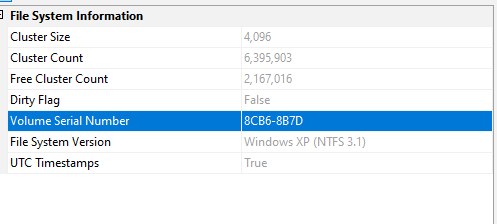
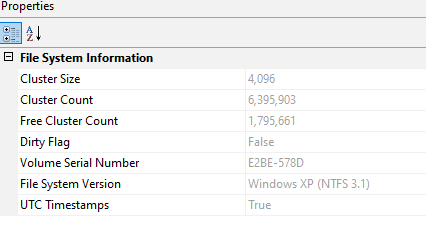
The acquired evidence was supplied with SHA-1 values, which we used for continuity. In a current investigation I would also calculate SHA-256. The important point is that the working copies remain verifiable against the unchanged source and that exports are recorded separately from the E01 files.
This was coursework evidence rather than a live seizure, so we did not complete a formal chain-of-custody form. A professional case file would also record:
- evidence identifier and description;
- acquisition authority and source;
- examiner, date, tool and version;
- hashes before and after transfer;
- storage and access history;
- every export or transformation;
- the time-zone convention used in the case;
- explanations for missing or contradictory metadata.
I kept acquisition facts separate from interpretation. A serial number or hash was an evidence fact. A conclusion about lateral movement depended on later correlation and could change if another image was acquired.
The metadata named ADI 4.2.0.13 as the acquisition program. One image named an examiner and the other did not. We recorded that difference rather than filling the missing field from assumption.
Time handling needed the same care. Registry data showed that both workstations were configured for Eastern Daylight Time, while the final timeline was normalised and labelled consistently. Without that step, activity from event logs, prefetch, shellbags, link files, and mounted shares could appear out of order.
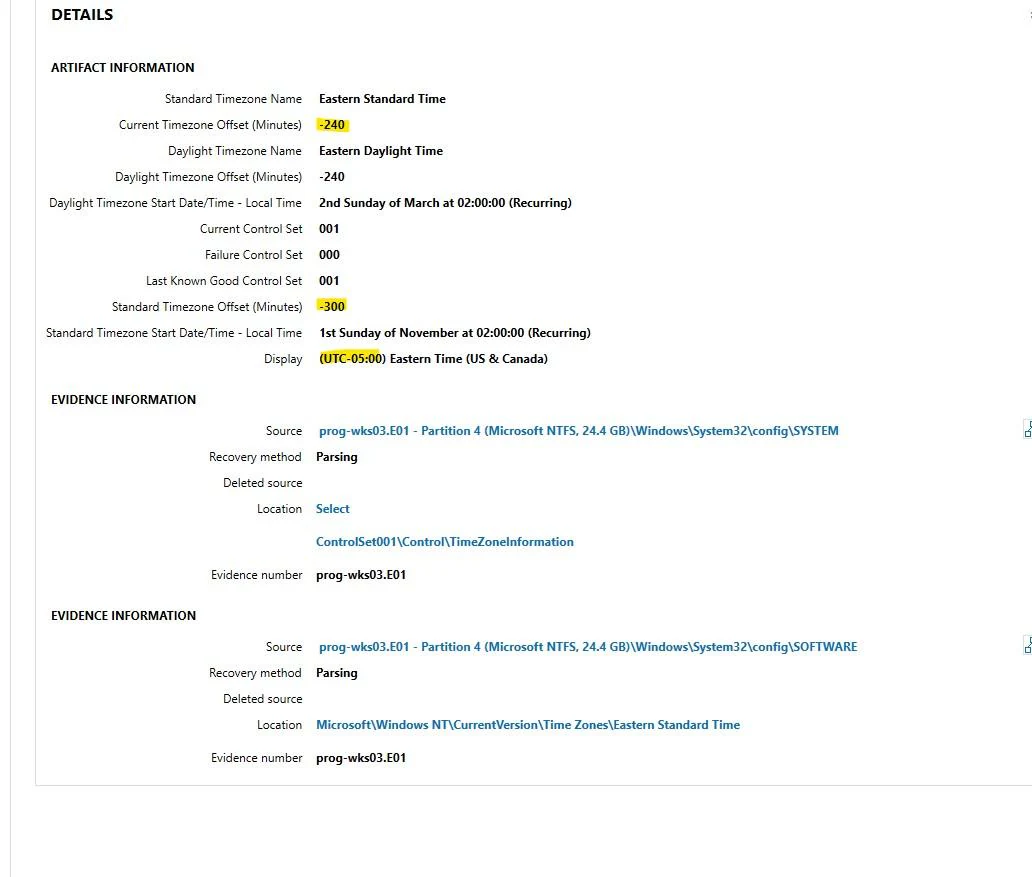
The case material presented more than one time convention: most times were treated as UTC unless otherwise noted, while the exported login tables were labelled UTC-4. I did not treat every displayed value as though it came from one perfectly synchronised clock.
I used time at three levels:
- exact source timestamps where the artefact and zone were clear;
- broader windows where parser output or exported-table presentation differed;
- sequence relationships where the order was reliable but the exact universal time needed caution.
That approach was important when comparing Sysmon, registry modification, prefetch, LNK creation, shellbag interaction, remote logons, mapped-drive access and E01 acquisition. It avoided producing a precise-looking timeline that the underlying evidence could not support.
The SOFTWARE and SYSTEM registry hives provided the basic host profiles. I used them to identify:
- Windows edition and build information
- registered user details
- installation or update timestamps
- configured time zone
- network interface history
- previous DHCP-assigned addresses
- DNS and domain configuration
- profile SIDs and local or domain account presence
Some values had to be treated cautiously. For example, the recorded DHCP lease date was implausible, so it was documented as an unreliable artefact rather than forced into the timeline.
The resulting system picture was:
| Host | Operating system | Last recorded address | Domain and DNS |
|---|---|---|---|
PROG-WKS03 |
Windows 10 Pro Education 1709 | 192.168.4.103 on 192.168.4.0/24 |
grru.local, DNS at 192.168.1.254 |
IT-WKS01 |
Windows 10 Pro Education 1709 | 192.168.1.101 on 192.168.1.0/24 |
grru.local, DNS at 192.168.1.254 |
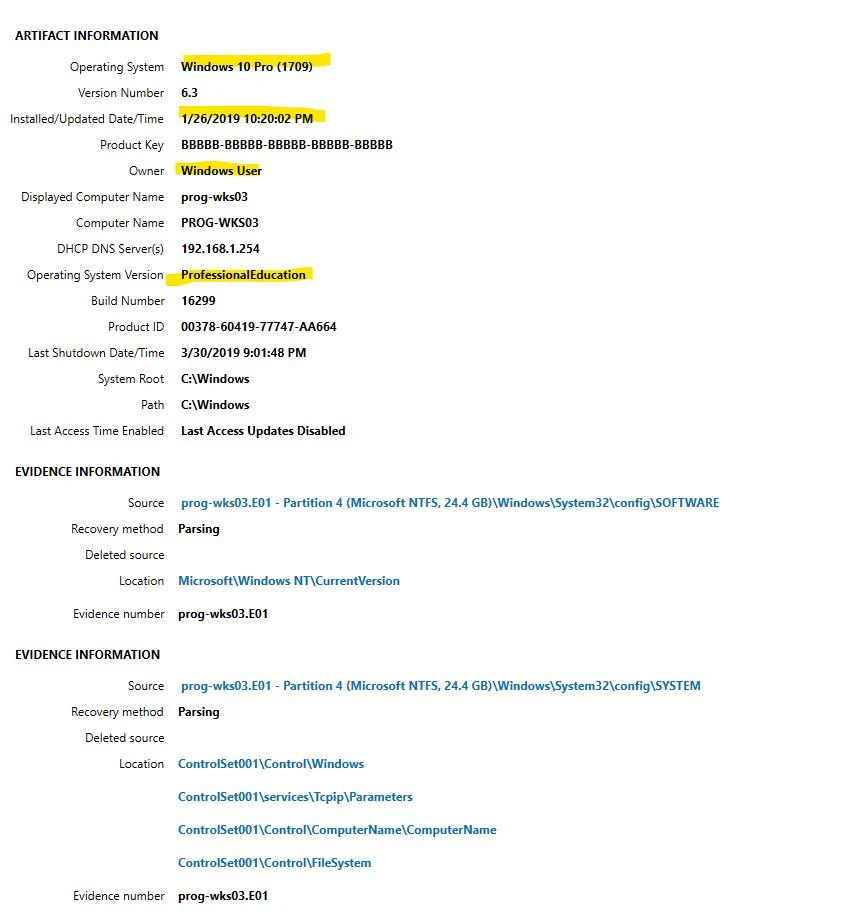
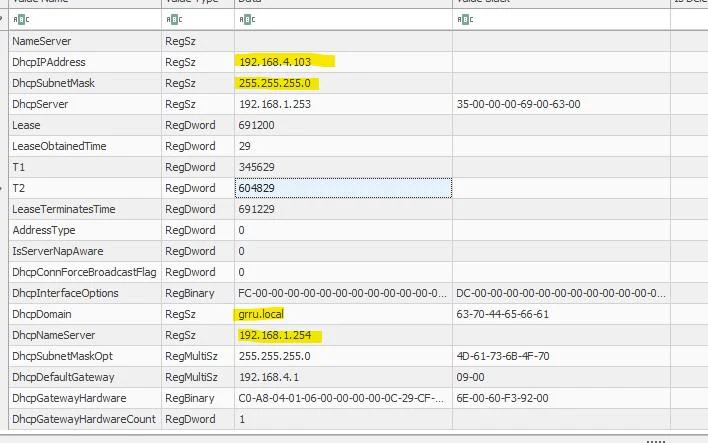
The workstations were recorded on different /24 networks but used the same domain controller and DNS address. That gave useful context for the later records showing 192.168.1.254 as the source of privileged sessions.
Registry network data is historical state. It can show the most recently retained address and configuration, but it does not prove that the same address applied to every event in the case. I used it to build the host profile and treated event-record source addresses as separate evidence.
Both addresses were DHCP-assigned. The registry presented a lease start in the year 19270 with an eight-day lease, which was plainly unusable as a real timestamp. The current IP and DNS values remained relevant, while the corrupt or misinterpreted date was excluded from temporal reasoning.
The profile list also established who had used each machine. PROG-WKS03 contained the local TestLocal account and domain profiles for roger.melton and james.middleton-adm. IT-WKS01 contained a local Admin account and domain profiles for james.middleton and james.middleton-adm. Profile creation times provided context, but a profile’s existence did not prove who was operating it at a later point.


A profile proves that Windows created local state for the SID and path. It does not prove that the named employee personally performed every later action from that directory. Attribution required event context, source systems, logon records and process evidence.
One USB device had been assigned a drive letter before the incident period. We found no temporal or content relationship between it and the indicators of compromise, so it was recorded as examined and not carried into the incident theory.
Examination method
No single parser covered the whole case. We used several tools and recorded the underlying source locations where possible:
| Tool | Use in the investigation |
|---|---|
| FTK Imager | E01 and NTFS metadata, file access and evidence export |
| Magnet AXIOM | Parsed registry, host, network, shellbag, mapped-drive and event artefacts |
| Registry Explorer | Direct review of SOFTWARE, SYSTEM, NTUSER.DAT and UsrClass.dat |
| PECmd | Prefetch execution timing and run counts |
| WinLogOnView | Reconstruction and filtering of Security event-log sessions |
| Excel | Filtering the exported logon tables |
| Sysmon data | Process image, command line, user, parent process and shared script path |
I treated the tools as views over the evidence rather than unquestioned answers. Where practical, we recorded the hive, registry key, event log or source path so the finding could be checked outside the first application.
The correlation sequence was:
identify an artefact
  -> record its source and timestamp
  -> identify account and host context
  -> find an independent artefact for the same activity
  -> compare path, process and time
  -> state what is confirmed
  -> state what still requires another system
This was especially important for prefetch, ShimCache, shellbags and remote logons. Each can be strong evidence, but none automatically explains user intent or the complete incident.
Execution traces across the registry and file system
The next stage was to identify applications and scripts associated with the suspected activity. Magnet AXIOM, Registry Explorer, and Eric Zimmerman’s PECmd helped correlate several different Windows artefact types.
Prefetch showed execution of password-recovery utilities on one workstation and repeated use of cscript.exe on both systems. Prefetch supplied approximate first-run and last-run times, run counts, and executable paths. ShimCache entries independently showed that the credential-recovery tools had existed and been executed on the IT workstation.
On IT-WKS01, PasswordFox.exe and ChromePass.exe each appeared in execution-related artefacts. PasswordFox.exe was associated with 4 March 2019, while ChromePass.exe was associated with 28 March around 18:59. On PROG-WKS03, FTK Imager first ran on 29 March and last ran immediately before acquisition on 30 March; cscript.exe was associated with activity from 28 to 30 March.
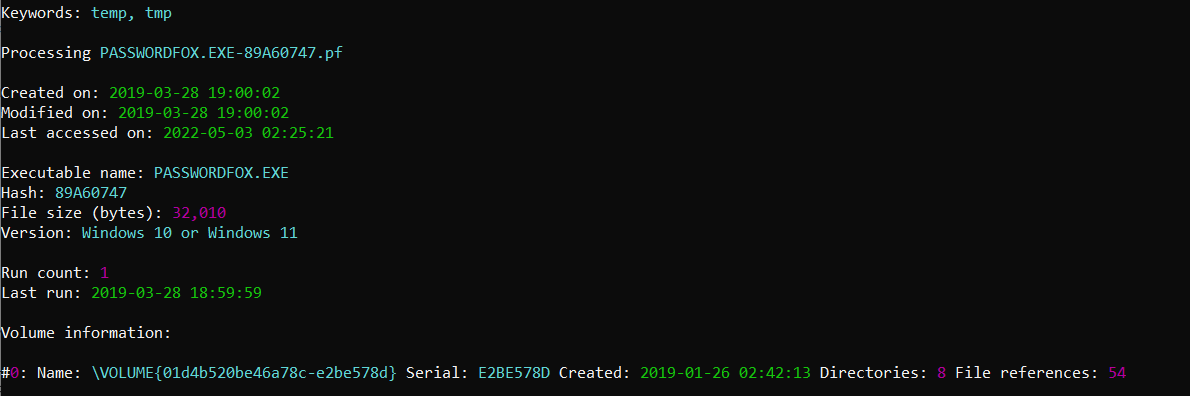
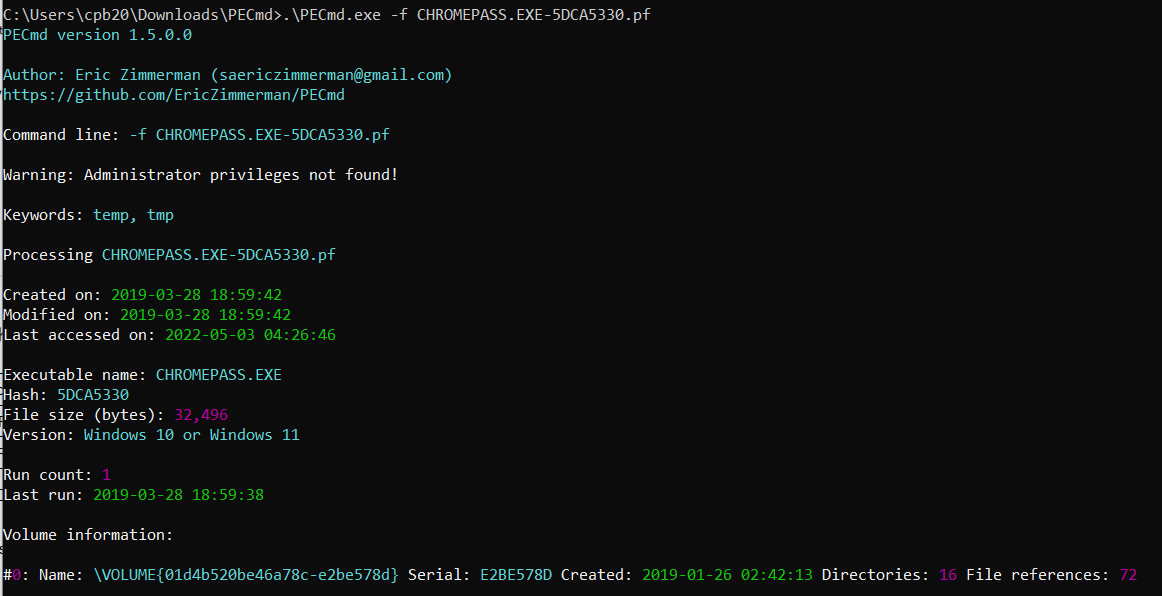
Prefetch was useful because it showed execution rather than only file presence. It did not show what data the utility recovered or who was physically at the keyboard. ShimCache supported that the programmes were present in execution-related state, while the share artefacts later established where the tools came from.
FTK Imager was not treated as malicious simply because it is a forensic utility. Its relevance came from the later mapped drive and shellbag pointing to a directory explicitly named for memory dumps.
The source times contain small inconsistencies, including first-run values that appear a few seconds after a stated last-run value. Rather than deriving a false second-by-second sequence, we used them to establish the broader execution window and relied on event, link, and shellbag timestamps for correlation.
Neither artefact was enough on its own. Prefetch is strong execution evidence, but it does not explain user intent. ShimCache records programme presence and execution-related state differently depending on the Windows version. I used the overlap between those artefacts, event logs, recent-item records, and network-share paths to build the account of activity.
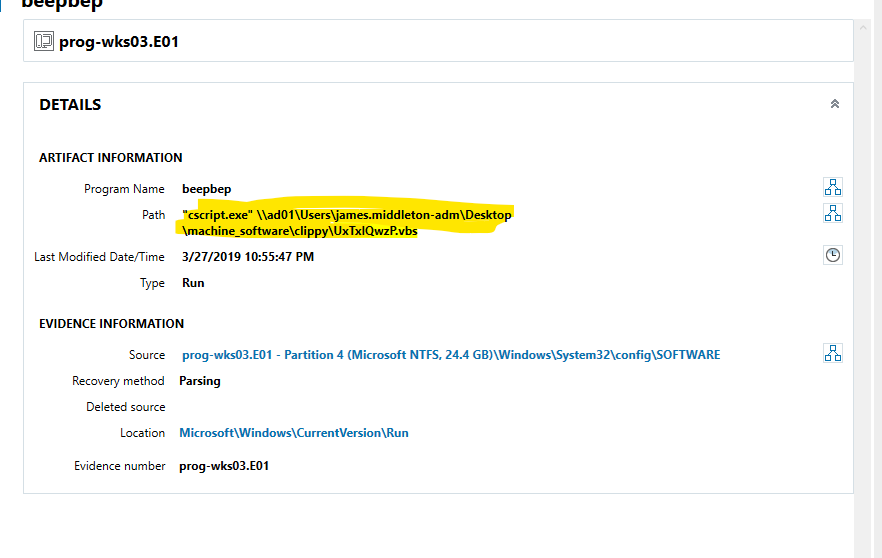
The suspicious script was named UxTxlQwzP.vbs and launched through cscript.exe from a share hosted on the domain controller AD01. A Run value beneath Software\Microsoft\Windows\CurrentVersion\Run referenced the same script and interpreter combination, indicating that it had been configured to execute at logon for persistence. Sysmon process-creation records from Microsoft-Windows-Sysmon/Operational.evtx then linked:
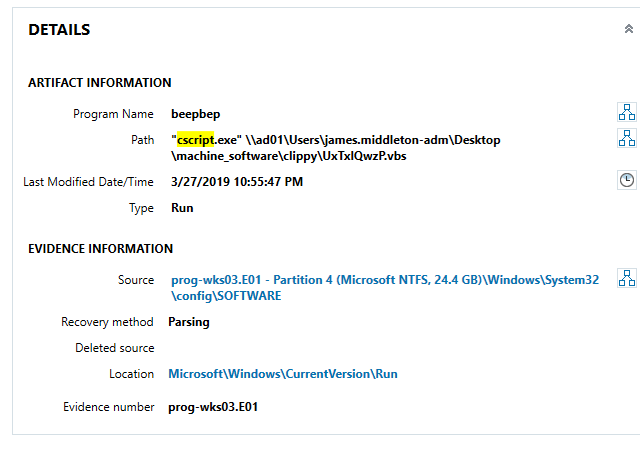
The value contained an entire trust path in one command:
Windows logon
  -> Run key
  -> cscript.exe
  -> AD01 share
  -> james.middleton-adm profile
  -> machine_software directory
  -> UxTxlQwzP.vbs
The script itself was not recovered from either workstation image. I could establish how it was invoked and where Windows expected to retrieve it, but not its complete contents or every action it performed. That made acquisition of the AD01 share a priority rather than an optional follow-up.
A Run value by itself also does not identify who created it. It shows the configuration stored in that key; the process and account context came from the event evidence.
- the user context active on the workstation
- the privileged domain account used to access the share
- the script interpreter
- the script path on the domain controller
That correlation was more useful than any single filename. It connected an account, a host, a network location, an execution method, and a persistence mechanism within the same period.
The key Sysmon event was recorded on PROG-WKS03 at 13:32:14 on 28 March 2019. It showed activity in the roger.melton user context, access involving the james.middleton-adm profile on AD01, and the same script-and-interpreter command found in the autorun entry. Within the supplied evidence, this was the strongest link between the ordinary workstation user, the compromised privileged account, and the persistent script.
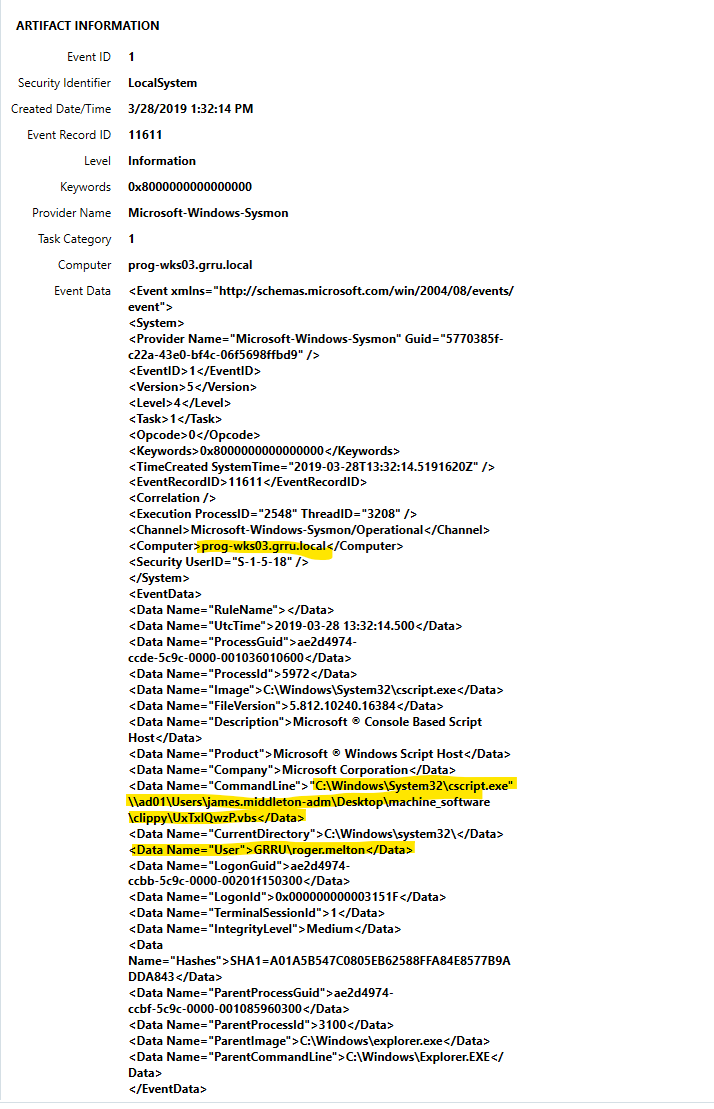
The event also recorded explorer.exe as the parent process and retained the workstation name, logon identifier, command line and image hash. Within this scope, it was stronger than describing the finding as “a suspicious VBS file.” It tied the execution to a user context and a remote privileged path.
The registry and Sysmon findings supported different parts of the conclusion:
| Artefact | What it established |
|---|---|
Run value |
The script was configured to execute at logon |
| Sysmon Event ID 1 | cscript.exe actually launched the same script path |
| User field | The active workstation context was roger.melton |
| UNC path | The script came through AD01 and the privileged profile |
| Parent process | The process lineage retained in the event |
Together they showed execution and an intended repeat mechanism. Neither proved the first compromise of the domain controller.
Reconstructing share access
Windows keeps several traces of folders and files opened through Explorer. The investigation used shellbags, recent-document records, mapped-drive entries, and LNK files to reconstruct access to network resources.
On the IT workstation, a link file and shellbag entries referred to:
\\AD01\Users\james.middleton-adm\Desktop\machine_softwareThat directory contained the password-recovery utilities. machine_software.lnk was created at 18:56:30 on 28 March, and the relevant shellbag was added at 18:58:42. The path also appeared in RecentDocs and aligned with the ChromePass.exe prefetch period. The same directory was therefore represented as a recently opened item, an Explorer navigation artefact, and the execution source of a relevant program.
The artefacts described different actions:
| Artefact | What it supported |
|---|---|
| LNK file | A recent reference to the target path or item |
| Shellbag | Explorer navigation state for the directory |
| RecentDocs | The path appeared among recent items |
| Prefetch | The executable ran on the workstation |
| Sysmon | A related script interpreter executed from the same shared area |
The overlap made the share conclusion stronger than any one record. It showed navigation to the directory and execution of material associated with it.
On the programming workstation, the affected privileged profile contained a mapped drive pointing to a separate lab host. Shellbags recorded access to a directory intended for memory dumps. AXIOM also exposed the mounted-share information from the user’s NTUSER.DAT hive.
The james.middleton-adm hive showed drive Z: mapped to TEST-MACHINE at 192.168.1.100. AXIOM recorded the share as accessed at 22:34:01 on 30 March. Shellbags in UsrClass.dat showed navigation to:
My Network Places:\TEST-MACHINE\Memdumps\prog-wks03\at 22:25:58, shortly before the E01 acquisition. FTK Imager had also been used on PROG-WKS03 in the same period. Together those artefacts supported the interpretation that a memory image or related data was prepared for the remote share.
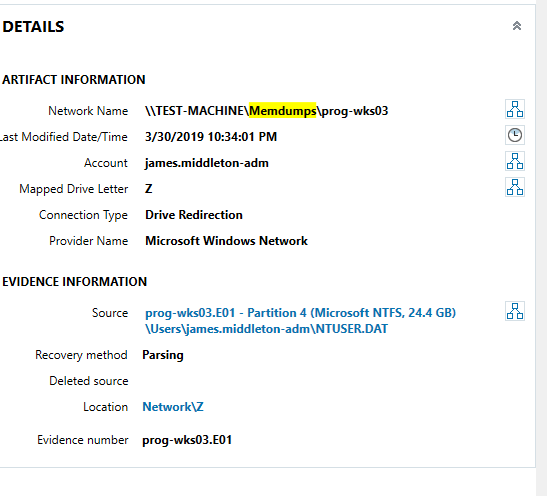
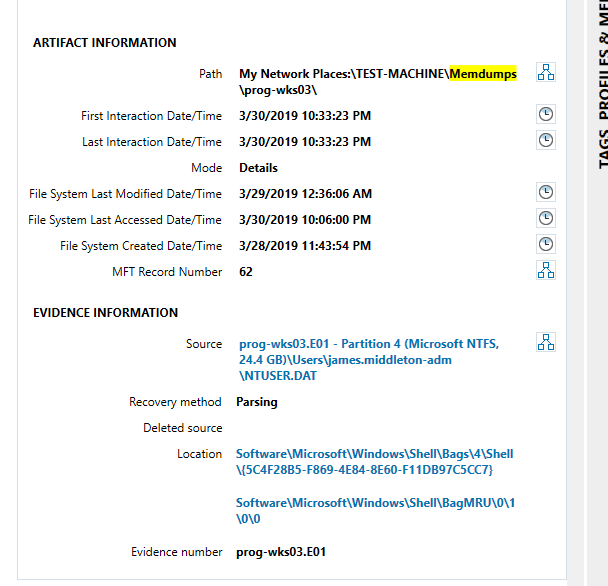
The sequence was:
FTK Imager used on PROG-WKS03
  -> privileged profile maps TEST-MACHINE as Z:
  -> Explorer state records Memdumps\prog-wks03
  -> workstation image acquired shortly afterwards
This was good evidence of staging and access to the destination path. It was not destination-side proof that every referenced file arrived intact or was transferred onwards.
The available material also referred to an ad01.txt file containing NTLM-hash output, Firefox profile data, a Gmail password, and cookies on the share. Those observations came from the scenario evidence and share artefacts, not from an acquired TEST-MACHINE image.
The evidence indicated that workstation and credential data had been staged or copied through that share. It did not prove every transfer byte-for-byte because the destination image and network captures were not supplied. We therefore described this as an indication of exfiltration and recommended acquiring the destination host.
Building the logon timeline
I extracted Security.evtx from both images and parsed the records with WinLogOnView. The resulting tables made it easier to compare:
- account and domain
- logon and logoff time
- source address
- logon type
- session duration
I filtered the records to isolate remote sessions and then cross-checked the results against AXIOM. Earlier sessions from the domain controller were consistent with normal domain activity, while later privileged sessions occurred during the same period as the script execution, share access, and suspicious utilities.
The principal remote events were:
| Host | Account | Time | Source | Type | Interpretation |
|---|---|---|---|---|---|
PROG-WKS03 |
roger.melton |
26 January, 23:55 | 192.168.1.254 |
Initial / service records | Before identified compromise activity |
PROG-WKS03 |
james.middleton-adm |
28 March, 18:35 | 192.168.1.254 |
Remote Interactive (10) | During the suspicious activity window |
PROG-WKS03 |
james.middleton-adm |
28 March, 21:35 | 192.168.1.254 |
Unlock (7) | During the suspicious activity window |
IT-WKS01 |
james.middleton-adm |
28 March, 18:55 | 192.168.1.254 |
Unlock (7) | Immediately before share and tool artefacts |
IT-WKS01 also contained an unlock from 192.168.3.103 on 23 February. We found no associated malicious activity and did not group it with the 28 March sequence. This was another reminder that a non-local source address and a privileged account are not sufficient to label an event malicious.
This distinction prevented every remote logon from being labelled malicious. Domain controllers legitimately authenticate users and support administrative activity. The evidential value came from timing, account context, source host, associated process creation, and what happened immediately before and after the session.
The later sessions supported the working theory that the domain controller had already been compromised and was being used to move into the two supplied workstations. Because the domain-controller image was absent, this remained a scoped conclusion rather than a complete reconstruction of the initial compromise.
The useful part of the logon review was not that a privileged account appeared remotely. That can be normal. The 28 March records became suspicious because they aligned with the share, tool and script artefacts. The 23 February unlock did not have that supporting context and was left outside the incident.
This is the difference between filtering and investigation. A query can return all Type 10 or Type 7 records. The analyst still has to decide which sessions belong to the same sequence and explain why.
Credential access and persistence
The combined artefacts suggested that domain credentials had been collected and that a privileged account had then been used across the environment. The supplied scenario included traces consistent with an NTLM hash dump on the domain controller, while the workstation images contained:
- password-recovery utilities executed from a remote share
- privileged remote logons
- a script-based autorun entry
- the same script path in Sysmon process events
- access to directories containing credential and browser-profile material
Our working sequence was:
privileged account material obtained on AD01
  -> AD01 used as the source of later remote sessions
  -> VBS autorun placed or executed on both workstations
  -> password-recovery tools opened from the AD01 share
  -> FTK Imager used on PROG-WKS03
  -> TEST-MACHINE share accessed for memory-dump staging
The first step could not be independently reconstructed without AD01. The later workstation steps were supported by combinations of event logs, prefetch, registry values, link files, shellbags, and mapped-drive state. Keeping those levels of confidence separate prevented the scenario narrative from replacing the actual image evidence.
The evidence also showed why naming a single “malicious file” would have been incomplete. The activity depended on ordinary Windows components, domain authentication, file shares, registry autoruns, and administrative access. Those are legitimate mechanisms that become suspicious when their sequence and context do not match expected behaviour.
Reconstructed timeline
| Date and time | Evidence | Interpretation |
|---|---|---|
| 4 March 2019 | PasswordFox prefetch | Credential-recovery utility executed once on IT-WKS01 |
| 27 March, 22:55 | Run value modification |
Shared VBS persistence configured before the main activity window |
| 28 March, 13:32 | Sysmon process creation on PROG-WKS03 | cscript.exe launched the shared VBS under the workstation context |
| 28 March, 18:35 | Privileged Remote Interactive logon to PROG-WKS03 | Domain-controller sourced session during the incident window |
| 28 March, 18:55 | Privileged unlock on IT-WKS01 | Session immediately before share and tool artefacts |
| 28 March, 18:56 | machine_software.lnk created |
Recent reference to the privileged software share |
| 28 March, 18:58 | Shellbag added | Explorer navigation to the same remote directory |
| 28 March, approximately 18:59 | ChromePass prefetch | Credential-recovery utility executed in the same period |
| 28 March, 21:35 | Privileged unlock on PROG-WKS03 | Continued privileged activity |
| 29-30 March | FTK Imager prefetch | Imaging activity on PROG-WKS03 |
| 30 March, approximately 22:25-22:34 | TEST-MACHINE mapped drive and shellbag | Access to the remote memory-dump directory |
| 30 March, 22:58 | PROG-WKS03 E01 acquisition | End of the available workstation evidence |
The table is a reconstruction, not a claim that every timestamp came from the same clock or parser. The mixed time-zone presentation and several prefetch values required caution. The durable correlations were the account relationships, shared paths and clustering of activity.
Evidence confidence
| Conclusion | Confidence | Reason |
|---|---|---|
| The shared VBS executed on PROG-WKS03 | High | Sysmon process event with interpreter and UNC path |
| The VBS had logon persistence | High | Matching Run registry value |
| PasswordFox and ChromePass executed on IT-WKS01 | High | Prefetch supported by ShimCache |
| The utilities came from the AD01 privileged share | High | LNK, shellbag, RecentDocs and path correlation |
| The privileged account accessed both workstations | High | Security logon records and profile state |
| AD01 was the source of the later sessions | High | Source address and domain context |
| AD01 was initially compromised through credential dumping | Moderate within the supplied case | Scenario and referenced output, but no AD01 image |
| A memory dump was staged to TEST-MACHINE | Moderate to high | FTK Imager timing, mapped drive and Memdumps shellbag |
| Every sensitive file was transferred from the workstations | Moderate | Destination referenced but not acquired |
| The named employee personally performed every action | Investigative lead, not forensic certainty | User context is strong, but identity attribution requires wider evidence |
Principal findings
Privileged account misuse
The james.middleton-adm identity appeared in remote sessions, local profiles, shared paths, mapped drives and staging artefacts. The evidence supported misuse of the account across both supplied workstations.
Script execution and persistence
UxTxlQwzP.vbs was launched through cscript.exe from AD01, and the same command was retained in a Run key. This established execution and persistence on PROG-WKS03.
Credential-recovery activity
PasswordFox and ChromePass execution was supported by prefetch and ShimCache. Share and recent-item artefacts linked the utilities to the privileged profile’s directory on the domain controller.
Lateral access from AD01
Remote sessions sourced from 192.168.1.254 occurred during the suspicious period. The absent AD01 image prevented confirmation of the initial compromise and complete movement.
Data staging towards TEST-MACHINE
Mapped-drive and shellbag artefacts showed the privileged profile accessing a memory-dump directory on TEST-MACHINE. FTK Imager activity made the staging interpretation credible. Destination-side confirmation was unavailable.
Insider-attribution lead
The Sysmon event placed the shared script execution in the roger.melton workstation context. This was the strongest attribution lead in the supplied images, but a professional insider investigation would still require identity, access-control, HR and domain-controller evidence before assigning personal responsibility.
Findings and next investigative steps
We concluded that the two workstations were part of a wider domain incident. The strongest findings were the correlation between the compromised privileged account, remote sessions from the domain controller, script execution from a shared path, registry persistence, credential-recovery tools, and access to a separate host used for data staging.
We recommended extending the investigation to the domain controller and the destination workstation identified in the mounted-share artefacts. Those systems could answer questions the two supplied images could not:
- where the privileged credentials were first obtained
- whether other domain accounts or systems were affected
- what the remote script contained
- which files reached the staging host
- whether the activity continued elsewhere in the domain
For AD01, the priority evidence would include Security and Sysmon logs, PowerShell and script logging, the referenced share and VBS file, domain-controller authentication records, account-management events, remote-service artefacts, and any credential-dump output. For TEST-MACHINE, the priorities would be the Memdumps share, file-system metadata, share-access auditing, memory-image contents, browser-profile material, and evidence of further transfer.
The response recommendations included resetting all affected domain credentials because NTLM material was reportedly exposed, auditing james.middleton-adm activity after 27 March, reviewing remote-access logs across the domain, preserving both additional systems, and opening an insider-threat investigation around roger.melton within the fictional scenario.
Response and acquisition priorities
The first priority would be credential and host containment:
- disable or restrict the affected privileged account;
- reset credentials whose NTLM material may have been exposed;
- isolate the two workstations,
AD01andTEST-MACHINE; - preserve volatile evidence where operationally possible;
- remove or block the shared VBS execution path;
- protect domain backups and administrative systems.
The next priority would be expanding the forensic scope.
AD01
I would acquire:
- disk and memory images;
- Security, Sysmon, PowerShell and script logs;
- the
UxTxlQwzP.vbsfile; - the
machine_softwaredirectory; ad01.txtand any credential-dump output;- account-management and group-membership events;
- remote-service, scheduled-task and service-creation artefacts;
- SMB share and object-access records;
- authentication logs for every use of
james.middleton-adm.
This would answer how the privileged material was obtained, whether the script originated on the controller, and whether other systems were accessed.
TEST-MACHINE
I would acquire:
- the
Memdumpsshare and file-system metadata; - Security and SMB share-access logs;
- the contents and hashes of any memory images;
- browser-profile and credential material referenced in the case;
- evidence of archive creation, cloud synchronisation or further copying;
- volatile evidence if the host was still running.
This would distinguish directory access from completed transfer and show whether the data left the internal environment.
Enterprise scoping
The wider search would include:
- the VBS filename and its hash if recovered;
cscript.exeorwscript.exeexecuting from UNC paths;Runvalues pointing to network shares;- PasswordFox, ChromePass and similar credential utilities;
- privileged Type 10 and Type 7 sessions from
AD01; - SMB access to the
machine_softwareandMemdumpspaths; - FTK Imager or other acquisition tools running outside approved forensic work;
- subsequent use of the affected privileged account.
These are investigation pivots, not permanent detections by filename alone. A renamed script or different credential tool could reproduce the same behaviour.
Detection and logging lessons
The case also showed where enterprise telemetry would have reduced the forensic gap.
Useful controls would include:
- central Sysmon or EDR process creation with command lines;
- alerts for script interpreters launching from remote shares;
- monitoring of autorun keys, scheduled tasks and services;
- privileged logon analytics tied to source host and normal administration patterns;
- SMB share auditing for sensitive administrative directories;
- detection of credential-recovery utilities and LSASS access;
- file creation and access auditing on staging shares;
- PowerShell, script-block and module logging;
- retention long enough to investigate activity across several days.
The strongest analytic would correlate rather than alert on one event:
privileged remote session from AD01
  -> access to administrative share
  -> cscript.exe launched from UNC path
  -> Run key created or modified
  -> credential utility executed
  -> mapped staging share opened
Each event can occur legitimately. The sequence, account and source relationship make it materially more suspicious.
Project boundaries and limitations
Two images from a wider incident
The investigation did not include AD01 or TEST-MACHINE. The first compromise, script contents, credential-dump execution and final destination contents could not be independently reconstructed.
Collaborative scope
I completed this investigation with Jordan Kimball and present the findings as collaborative work.
Historical environment
The case used Windows 10 1709 images and tooling available in 2022. Current versions of Windows and EDR products retain and interpret some artefacts differently.
Time inconsistency
The case material mixed UTC and UTC-4 presentation, and some parser values were internally inconsistent. I kept the reliable sequence while avoiding unsupported second-level precision.
No destination-side or network proof
Mapped-drive and shellbag evidence supported staging towards TEST-MACHINE, but no destination disk or packet capture was available to confirm every copied byte or onward transfer.
Attribution
A Windows user context is not the same as proving which person controlled the keyboard. The evidence supported an insider-threat lead inside the fictional case, not a complete real-world attribution decision.
Public presentation
The figures show the relevant tool output and artefacts without reproducing unrelated personal details from the coursework.
What I developed through the investigation
This investigation moved beyond finding isolated artefacts. I had to combine registry state, executable traces, user activity, event logs, and network-share history into a timeline that could survive scrutiny.
It also reinforced several practical forensic habits:
- verify evidence and time context before interpreting activity
- use independent artefact families to support a conclusion
- distinguish execution evidence from intent
- separate confirmed findings from reasonable investigative leads
- document gaps created by missing systems
- turn technical findings into acquisition and response priorities
The work was completed against supplied university evidence from an older Windows environment. Tool behaviour, Windows artefacts, and enterprise logging have evolved, but the correlation method remains directly applicable to endpoint investigations.
The useful part of the project was learning not to stop at the first suspicious artefact. Prefetch showed that a tool ran, but not where it came from or what the user did with it. A shellbag showed navigation, but not that an executable launched. A remote logon showed access, but not whether it was legitimate. The result became credible when those sources agreed on the same account, path and period.
It also developed my ability to explain uncertainty properly. The workstation evidence strongly supported script execution, persistence, credential-tool use and staging. It did not contain the domain controller’s initial compromise or the staging host’s final files. Saying that directly made the conclusion stronger than filling the gaps with the scenario narrative.
The workflow remains relevant to SOC and incident-response work: establish the evidence baseline, normalise time, correlate independent sources, separate activity from intent, define what is missing, and turn the gaps into specific acquisition and response actions.