
Lab-series snapshot
- Coursework scope
- Individual FOR-340 exercises using controlled Windows activity and supplied forensic datasets.
- Work completed
- I generated or examined activity, acquired the relevant records, parsed each artefact family with specialist tools, and checked the result against the known action and other evidence.
- Artefact focus
- Recycle Bin and NTFS
- Prefetch
- LNK files and Jump Lists
- Registry hives
- Thumbcache and USB history
- Shellbags
- What it demonstrates
- The labs demonstrated a repeatable five-step correlation method and the evidential limits of each artefact, forming the foundation for the larger Windows endpoint investigation.
Currentness and limitations (reviewed 23 August 2026). These are point-in-time observations from 2022 exercises using supplied Windows 7 data, controlled Windows 10 activity, and the parser versions then used. Microsoft now lists Windows 7 as out of support, while its current
fsutil behaviordocumentation confirms that NTFS Last Access updates remain configurable and may be deferred. Treat the results as specific to those lab systems, not as a current Windows support matrix: collection paths, retention, field semantics, and parser output must be revalidated against the target build. Machine, MAC, path, and tracker identifiers visible in the figures belong to dismantled university lab systems.
Building an artefact-led workflow
I completed ten individual FOR-340 Operating System Forensics labs in 2022. They focused on the records Windows leaves behind as files are opened, moved, deleted, or accessed through different applications and storage devices. I worked through each artefact separately before using the same sources together in a larger endpoint investigation.
The exercises used controlled Windows systems and supplied forensic datasets. I generated activity, acquired or extracted the relevant records, parsed them with specialist tools, and checked whether the output supported the action I had performed. That made it possible to see both what an artefact could show and where its interpretation could go wrong.
The main sources were:
- Recycle Bin metadata and deleted-file records
- NTFS creation, modification, and access timestamps
- Windows Prefetch files
- LNK shortcut files
- automatic and custom Jump Lists
SAM,SYSTEM,SOFTWARE,SECURITY,NTUSER.DAT, andUsrClass.datregistry hives- Thumbcache databases
- USB device and mounted-volume history
- Shellbags
The sequence of labs was useful because each one answered a narrower question:
| Question | Principal artefacts |
|---|---|
| What was deleted, from where, and when? | Recycle Bin $I metadata, retained $R content, NTFS records |
| What happened to a file’s timestamps after an operation? | NTFS standard information and filename timestamps |
| Did a programme run, and what did it reference? | Prefetch |
| Which file or location did an application target? | LNK files and Jump Lists |
| What accounts, settings, devices, and historical system state existed? | Machine and user registry hives |
| Did the shell generate and retain a thumbnail? | Thumbcache and Windows search metadata |
| Which removable device was attached and by whom? | USBSTOR, mounted devices, MountPoints2, UserAssist |
| Which directories did a user profile navigate? | Shellbags in UsrClass.dat |
Deleted files and the Recycle Bin
I began with the structure of the Windows Recycle Bin. Each user’s deleted items were stored beneath a directory named for that user’s security identifier. A deleted item was represented by separate data and metadata records: one retained the deleted content, while the other recorded information such as the original path, size, and deletion time.
The controlled dataset contained 13 entries related to deleted material. I compared ordinary files, directories, and NTFS index-allocation records in FTK Imager. The distinction helped explain why deleting a directory creates more than one useful forensic record and why an examiner should not treat every entry as a complete user file.
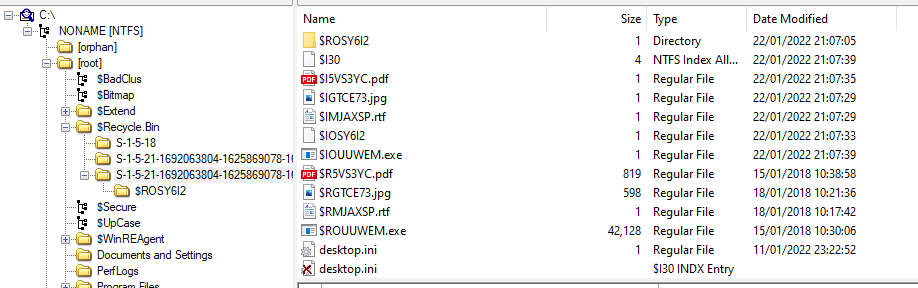
One $I record described a PDF of 837,990 bytes, its original desktop lab path, and deletion at 2022-01-22 21:07:35. Another described a 43,138,368-byte FTK Imager installer deleted four seconds later. Parsing the metadata separately from the retained content showed exactly which values came from the Recycle Bin record rather than from the recovered file.
Restoring a deleted file did not immediately erase all evidence of the earlier deletion. The Recycle Bin index still retained a record visible to the forensic tool. I also tested a file too large for the desktop Recycle Bin. It did not create the same Recycle Bin pair, yet FTK Imager still exposed file remnants. That made recovery possible in the exercise, but did not guarantee that every byte would remain available after later writes reused the storage.
That lab separated three ideas that are easy to conflate:
- removing a file from the user’s normal directory view
- recording a deletion through the Recycle Bin
- overwriting the file’s data on disk
A missing file does not by itself prove that its content has disappeared, and a recovered record does not prove that every part of the original file remains intact.
Timestamp behaviour under file operations
The next set of experiments compared NTFS timestamps after opening, copying, moving, and editing files. I recorded the values before and after each operation rather than assuming that “last accessed” meant the last time a user viewed the content.
The results showed several complications. A file’s creation timestamp could be later than its modification timestamp when content had been copied from an older source. Copying to another directory or volume created a new filesystem context, while moving within the same volume could preserve more of the existing metadata. Saving an edited file changed the modification time, and last-access updates depended on the operation and the system’s filesystem configuration.
The controlled operations produced this working comparison:
| Operation | Observed timestamp behaviour |
|---|---|
| Open without saving | The source did not reliably record a new access time under the default configuration |
| Copy to another directory | The destination access value changed while source content times remained available for comparison |
| Move within the volume | The move behaved like a directory-entry change and preserved more source metadata |
| Move to another volume | Windows created a new destination file and removed the old entry, so the result resembled copy followed by deletion |
| Edit and save | The modification time changed when the save occurred |
| Change last-access policy | Later reads could update access metadata that had previously remained unchanged |
I also checked the NTFS setting controlling last-access updates. Enabling or disabling that behaviour changes the evidential value of the timestamp. Updating every read would add filesystem writes, while current NTFS behaviour can also defer the on-disk update; an apparent read therefore does not guarantee an immediate timestamp change.
The lab also contained files created in 2022 whose preserved modification dates came from 2014 or 2018. That ordering was not inherently suspicious; it was consistent with copied content retaining an older modification time. I performed the copy, move and rename tests on byte-identical copies of the same JPEG, confirmed by their matching SHA-256 digest. Their differing filesystem histories therefore came from the operations rather than different image content.
I stopped treating one timestamp as a complete account of an event. A defensible timeline needs the operation, source and destination volumes, filesystem settings, and supporting artefacts to be considered together.
Prefetch and programme execution
Windows Prefetch records provided a view of programme execution. Using PECmd and WinPrefetchView, I examined executable names, run counts, last-run times, referenced paths, and files loaded around execution.
In a controlled exercise, the Notepad Prefetch entry had hash 9FB27C0E, a run count of three, and a recorded last run at 2022-02-03 21:24:43. Launching Notepad again changed the entry and increased its size because another referenced file was added. Most referenced paths were Windows API DLLs, but the user file supplied the activity-specific context.
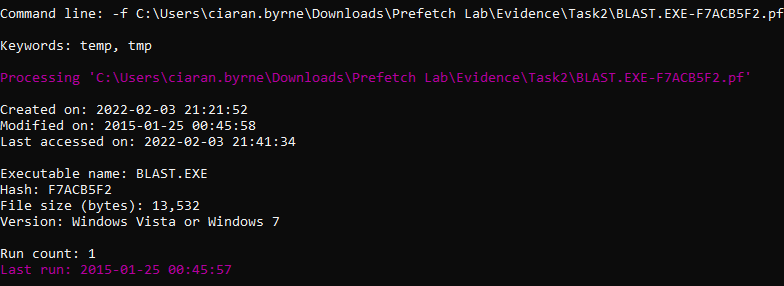
In a supplied investigation dataset, the BLAST.EXE Prefetch record reported one run and an embedded last-run value of 2015-01-25 00:45:57. The .pf copy being processed had filesystem creation, modification, and access timestamps in 2022; those values described the evidence copy, not execution of BLAST.EXE.
The same supplied evidence associated Notepad with several text files:
TEST PF ON ENCASE 7.TXTHOMEWORK.TXTWIN8 PREFETCH.TXT- two separate
CHANGES.TXTpaths
The secure-deletion utility SDELETE had a reported run count of four. Prefetch could support repeated execution and referenced paths even though the intended purpose of every run still required other evidence.
PECmd made bulk processing, CSV output, and command-line analysis practical. WinPrefetchView offered a quicker graphical view across a folder of records. Comparing both outputs reinforced a useful working habit: use the parser suited to the volume of evidence, then verify important values against another view or the source record.
Prefetch can support an execution claim, but it is not a complete process log. Configuration, operating-system version, retention, and cleanup affect what survives. I used it as one part of the timeline rather than treating a missing record as proof that a programme never ran.
LNK files and Jump Lists
LNK shortcut files contain considerably more than a path displayed in Explorer. I used LECmd to examine target and link timestamps, long and short filenames, volume identifiers, MFT entry and sequence values, host information, drive type, and references to fixed or removable storage.
One controlled LNK pointed to My Computer\Documents\FTK-Manual.pdf. Its metadata identified a fixed disk, machine desktop-utdahhf, a source MAC address, volume serial 4A5FEA72, and distinct source and target timestamps. Copying or moving the target changed location, drive, and volume values while preserving file-specific identity fields where appropriate.
Comparing those values helped distinguish information about the shortcut itself from information carried about the target. The Shell Link TrackerDataBlock stores DROID and DROID-birth GUID pairs used by the Link Tracking service. In the exercise, moving a target to another volume changed the volume-related value while the file-related value could persist. MFT entry and sequence numbers supplied context for whether a filesystem record had been reused.
Jump Lists connected applications with recently accessed destinations. In the exercises, a custom Jump List recorded browser destinations, invocation arguments, private-window use, application paths, and link counts. Automatic destination files exposed recent items maintained by Windows for several applications.
The Edge custom Jump List contained five links. Its arguments referenced recently closed visits to SANS digital-forensics posters, DFIR Training, and Champlain University, plus a private-window invocation. The application path resolved to the installed Edge executable, while the reported Jump List size referred to the source Jump List rather than the browser binary.
Parsing the embedded LNK records added host, path, volume, and filesystem detail that was not obvious from the Jump List summary alone. The two artefacts worked best as a pair: the Jump List associated activity with an application, while the LNK data added information about the target and the storage from which it was accessed.
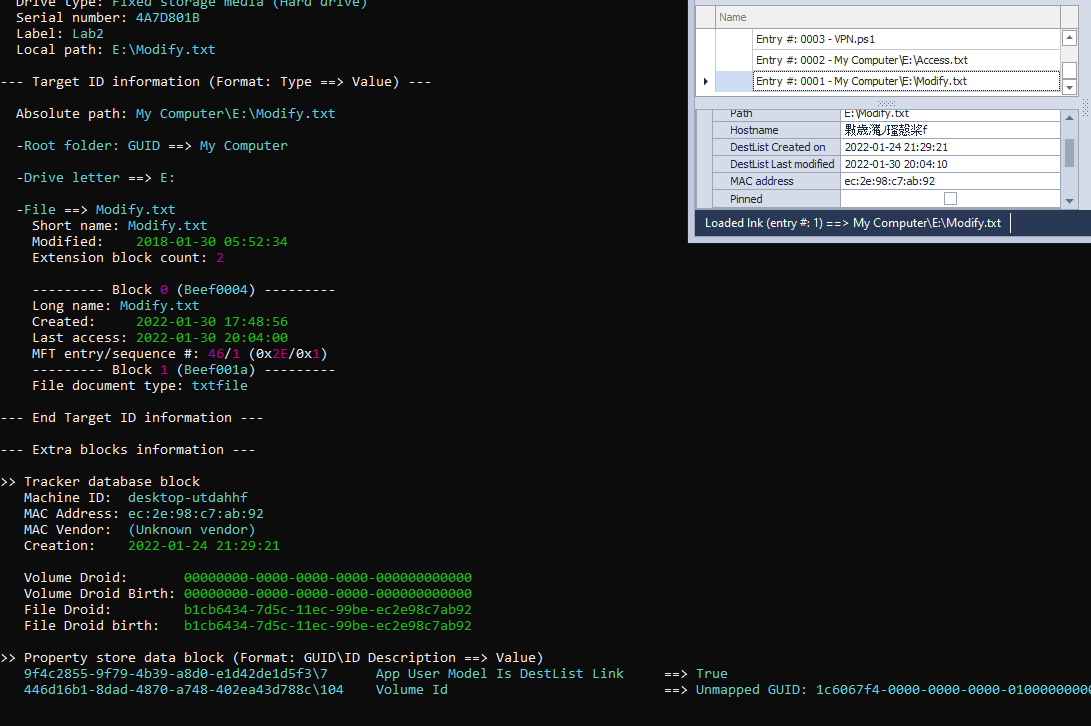
LECmd and JumpList Explorer agreed on core creation values, path information, and source-device detail. LECmd exposed additional embedded LNK fields such as root folders, long and short names, volume data, and machine identity. The graphical view made application-oriented browsing quicker; the command-line parser was easier to use across many files and to export for analysis.
Registry hives as system history
The registry exercises moved from user activity to the wider system profile. I extracted protected hives and separated machine-level data from user-specific NTUSER.DAT and UsrClass.dat records.
From the SAM and related hives, I examined local account identifiers, creation and logon information, password-change times, hints or comments, and the machine security identifier. Other keys described:
- computer name and registered organisation
- Windows version, build, installation time, and last shutdown
- network interfaces, DHCP lease information, and the last assigned address
- firewall and User Account Control configuration
- timezone and processor architecture
- Prefetch and last-access timestamp settings
- mounted volumes and drive letters
The lab datasets included both current and historical values. I had to distinguish a value recorded by the operating system from an inference about user activity. A configured network address, for example, describes system state; it does not on its own prove who was operating the machine at the time.
Building a supplied system profile
One supplied registry set described a Windows 7 Enterprise Service Pack 1 x86 installation named USGCBWIN7X86. I recovered:
- three profile directories: Public, Administrator, and
usgcb_admin - the renamed built-in administrator account through its relative identifier and SID
- last logon and logon-count values
- registered owner
USGCBand organisationNIST - installation at
2011-10-12 19:20:33 - shutdown at
2011-10-12 21:47:25 - the last assigned network address, DHCP domain, lease time, and gateway MAC
- a wired network profile
- Windows Firewall enabled
- User Account Control configured to prompt on the secure desktop
- page-file clearing disabled at shutdown
- last-access updates disabled
- Prefetch enabled for application launch and boot
- Eastern Standard Time
These values came from several hives and keys, not one summary record. Account data came from the SAM; machine naming, network interfaces, control settings, and shutdown data came from SYSTEM; installation and owner data came from SOFTWARE; user activity required the user hives.
The earlier registry exercise used a separate supplied system named Neptune-57. Its SAM and security data exposed account identifiers, creation and logon values, comments or password hints, and the shared machine/domain SID. Comparing the two datasets reinforced that a SID component can identify the machine or domain while the final relative identifier distinguishes an account.
Thumbnail caches and image traces
Windows thumbnail databases retain generated previews at several sizes. I copied known images into controlled locations, opened selected directories, and then examined which records appeared in the Thumbcache databases.
The controlled images appeared in the 32-pixel and 48-pixel Thumbcache databases. The cache viewer could recover the preview and dimensions, but the database alone did not initially provide the original path. After correlating against Windows.edb, the tool resolved 51 entries, including the known lab locations and source-file metadata.
The cache contained some, but not all, of the copied images. Files whose directories had not been opened did not necessarily receive a rendered thumbnail. Where records existed, the tools could recover the preview, dimensions, cache identifier, and in some cases location information when correlated with the Windows search database.
This experiment showed why absence is difficult to interpret. A missing thumbnail does not prove that an image was never present; the user interface may simply never have rendered it. Conversely, a cached preview can survive after the source file has moved or disappeared, making it useful for identifying previously viewed content.
USB devices and mounted storage
I used registry records to reconstruct the last connected USB storage device in a supplied image. The investigation linked vendor and product identifiers, friendly name, volume GUID, drive letter, first and last connection times, removal time, and the user associated with the mounted volume.
The completed correlation identified:
| Field | Recovered value |
|---|---|
| Vendor and product | Kingston DataTraveler 3.0 |
| Vendor and product identifiers | 0951 and 1666 |
| Drive letter | F: |
| Volume GUID | 607c034a-171f-11e8-bdea-186590e11fea |
| First connection | 2018-02-21 17:01:51 |
| Last connection | 2018-02-21 17:01:51 |
| Removal | 2018-02-21 17:03:24 |
| User profile | forensics |
| Programme referenced from the device | time.exe |
UserAssist and related user-hive data then connected an executable with the removable device. The result came from a four-source correlation rather than one definitive key:
| Evidence source | Contribution to the reconstruction |
|---|---|
USBSTOR |
Kingston vendor and product identifiers identified the physical storage device |
| Mounted-device records | The volume GUID linked the device’s volume to drive F: |
MountPoints2 |
The volume’s presence in the forensics user hive connected it with that profile’s context |
| UserAssist and execution data | The time.exe reference connected a programme with the mounted volume without claiming that a particular file was copied |
That chain is stronger than reporting a USB serial number alone because it connects device, volume, user context, and activity.
Shellbags and folder navigation
Shellbags record folder-view information within user registry data. I generated navigation activity across local drives, an optical or mounted image, Control Panel, and a shared location, then reviewed the resulting entries.
The generated data retained navigation to the local C: drive, a mounted D: image, the EFI\BOOT path, and the Manage Accounts area in Control Panel. That supported navigation to the account-management interface, but not proof that an account was created. A Windows Security event for account creation or modification would be needed for that stronger claim.
The supplied UsrClass.dat dataset showed access to C:, D:, E:, and F:, with the latest recorded drive access on C: at 2018-03-20 01:54:54. It also contained:
- tool archives for Registry Explorer/RECmd, LECmd, JLECmd, and HashMyFiles under
C:\Tools - a
vboxsrvnetwork host andToolsshare - paths including
template,text,exe,misc,lab-stego,pdfs, andpics - MFT entry
23413and sequence2forLECmd.zip - a
BagMRU\0\1path resolving toDesktop\My Computer\C:\Tools
A sequence value of two indicated reuse of that MFT record after an earlier allocation. Shell item structure identified the source as Windows Vista or later, with the wider case context narrowing the likely version.
The records showed drive and directory paths, access times, network-share names, MFT entry and sequence numbers, and operating-system-dependent shell item structures. A supplied UsrClass.dat dataset therefore showed navigation through several local and shared directories even where the underlying content was no longer available.
Shellbags can therefore support a claim that a user profile navigated to a location, including a removable or network path. They do not automatically prove that a specific file was opened. I paired them with LNK files, Jump Lists, mounted-device records, and event logs where the question required more than directory access.
Correlating evidence
Across the labs, the same investigative pattern kept recurring:
- identify the question before choosing an artefact
- preserve and parse the relevant source
- record what the field actually represents
- compare it with another artefact or known test action
- separate direct evidence from inference
A crash, deletion record, registry value, or timestamp can look decisive in isolation. Correlation is what turns it into a defensible account. Prefetch can support programme execution, Jump Lists and LNK files can connect applications to targets, registry hives can describe accounts and devices, and Shellbags can show navigation. None of them replaces the others.
The labs also exposed several common overstatements:
- A Recycle Bin record proves a deletion event, not that all content was securely erased.
- A creation time later than modification time can result from copying an older file.
- Missing Prefetch is not proof that an executable never ran.
- A LNK file can preserve information about a target that is no longer present.
- A Jump List records an application relationship, not necessarily every action performed inside that application.
- A registry configuration value describes state, not automatically the user responsible for it.
- A thumbnail suggests rendering by the shell, while its absence may mean only that the directory view never generated one.
- USB presence does not prove that a particular file was copied without supporting file or execution evidence.
- A Shellbag supports folder navigation, not the opening of every file beneath that folder.
The method remains the useful result: understand the source, test assumptions, and build conclusions from more than one record. I later applied that artefact-specific foundation in the Windows Endpoint Forensics Investigation, where Prefetch, registry, LNK, Shellbag, mapped-share, and event evidence had to agree before supporting a stronger incident finding.