Historical lab record — not a current build guide (reviewed 23 August 2026). This page describes a 2021 Windows Server 2019 and Windows 10 Enterprise exercise. Windows 10 has since reached end of support, Microsoft now advises against using
.localfor an Active Directory DNS namespace, and the pfSense download workflow has changed. Check current vendor documentation before rebuilding any part of the lab.
Lab snapshot
- Lab context
- Individual 2021 VMware learning lab recorded as one Windows Server 2019 domain controller, one Windows 10 Enterprise workstation, and pfSense on a private host-only network.
- Work completed
- I installed AD DS and DNS, created a new forest, worked with directory users and groups, configured the workstation's internal DNS, and prepared it to join the domain.
- Identity and infrastructure
- Active Directory Domain Services
- DNS-based domain discovery
- LDAP and Kerberos relationships
- Users and privileged groups
- Workstation domain join
- Validated boundary
- I configured the nekrotic.local forest, internal DNS, account-management steps, and the workstation's network and domain-join settings. I did not record a post-restart domain logon, Kerberos exchange, port scan, or exploitation test.
Why I built the lab
I built this environment in 2021 to understand how a Windows domain connected identity, name resolution, authentication, and administration. The lab was deliberately small: one server acted as the domain controller and DNS server, one Windows workstation was prepared as a domain member, and pfSense connected the private lab network to VMware NAT.
The useful lesson was the dependency chain. A workstation cannot join or use a domain merely because it can reach a server by IP address. It needs the domain’s DNS service to locate the relevant controllers and services; directory objects then provide the identities and group relationships; Kerberos provides the normal domain authentication path; and the domain controller holds authority that can affect every joined system.
This is an intentionally narrow historical companion to the broader systems-administration lab series. It documents the AD DS build in detail rather than trying to represent the whole SYS-255 module or a production directory design.
What I configured and validated
The lab covered the following stages. The validation boundary is intentionally narrow: I describe the configuration I performed and do not turn an unrecorded follow-up test into a completed result.
| Lab stage | What I completed | Validation boundary |
|---|---|---|
| AD DS installation | Selected the AD DS role and entered the domain-controller promotion workflow | I did not record every wizard option or prerequisite result |
| Forest creation | Selected Add a new forest with nekrotic.local as the root domain |
The Directory Services Restore Mode secret is intentionally excluded |
| DNS | Created the forward and reverse-zone structure and used the host-record workflow | I did not export every A, PTR, or service-location record |
| Users and groups | Added a lab user to Domain Admins through group membership |
This was not a complete review of nested permissions or Group Policy |
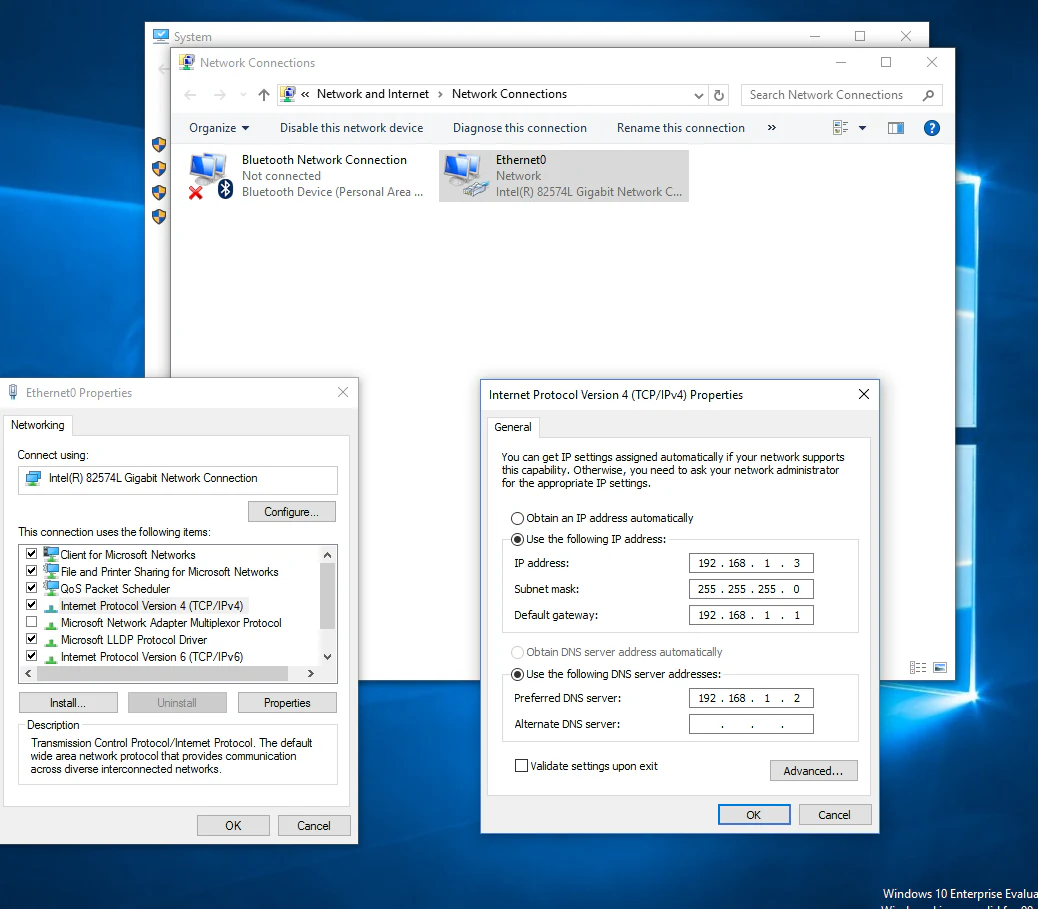
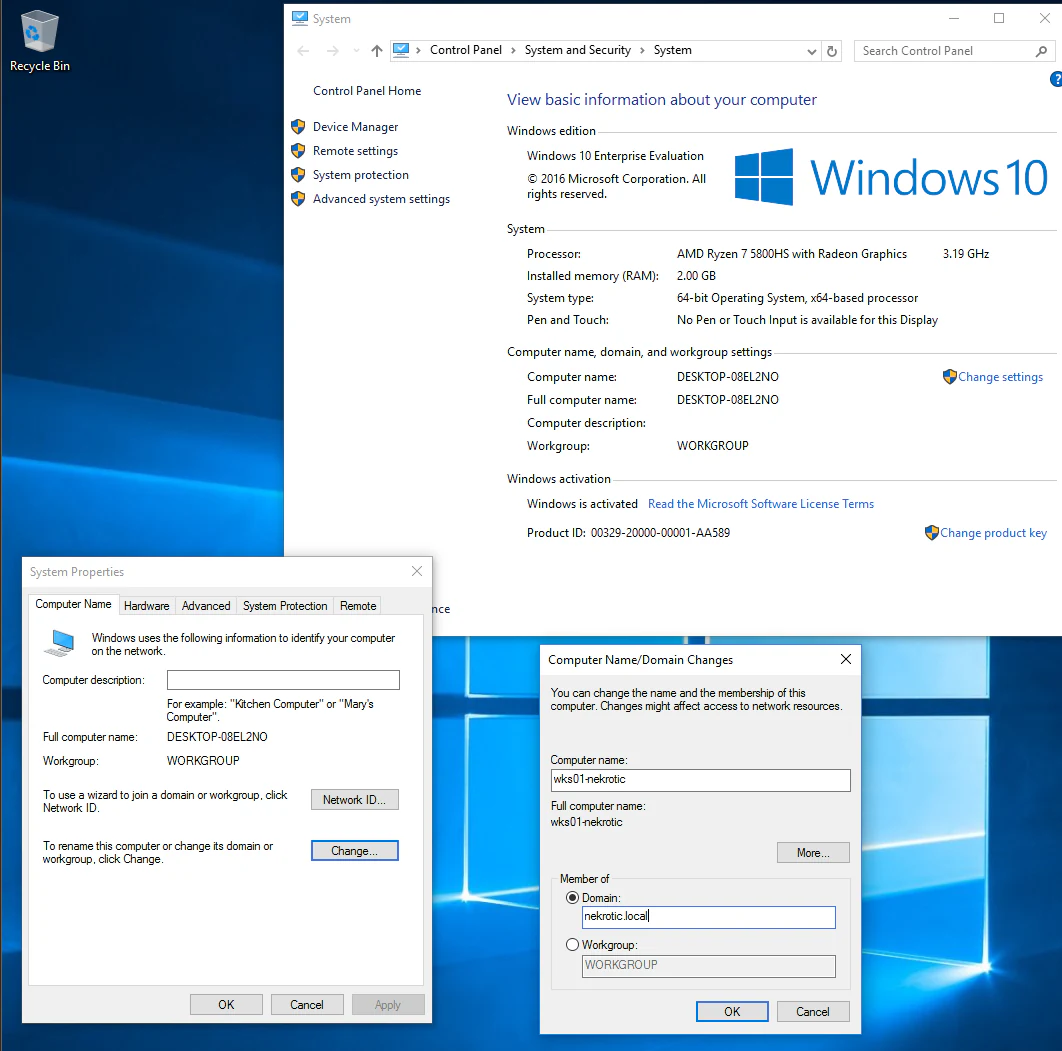
| Workstation preparation | Set static IPv4 and internal DNS values, then entered wks01-nekrotic and nekrotic.local for the join |
I did not record the success dialogue, restart, domain logon, or Kerberos tickets |
I did not perform or record a complete security assessment of this environment. Port scanning, event-log analysis, packet capture and exploitation are therefore outside the results presented here.
How the domain services fitted together
Active Directory Domain Services supplied the directory and security boundary for the lab. DNS, LDAP, and Kerberos played different roles within it:
- DNS allowed the workstation to resolve the private domain and locate domain-controller services through the records published in the domain zone.
- LDAP provided a protocol for querying and managing directory objects and attributes; it did not itself create the directory’s structure.
- Kerberos provided ticket-based domain authentication. In simplified terms, the client authenticated to the Key Distribution Centre, obtained a ticket-granting ticket, and then requested service tickets for resources it needed to use.
Those roles were related rather than interchangeable. If the workstation used an external resolver, that resolver would not know the private domain’s service records. If time or identity state was wrong, Kerberos could fail even when basic IP connectivity worked. If privileged group membership was too broad, a routine account-management decision could create domain-wide impact.
Recorded lab environment
These values reproduce the 2021 lab record; they are not sizing or naming recommendations.
| System | Recorded role and resources | Private lab network |
|---|---|---|
| Windows Server 2019 Evaluation | AD DS and DNS; 2 GB RAM, 2 logical cores, 60 GB disk | ad01-nekrotic, 192.168.1.2/24, gateway 192.168.1.1 |
| Windows 10 Enterprise Evaluation | Domain workstation; 2 GB RAM, 2 logical processors, 60 GB disk | wks01-nekrotic, 192.168.1.3/24, gateway 192.168.1.1, DNS 192.168.1.2 |
| pfSense | Route between VMware NAT and the host-only network; 256 MB RAM, 1 logical core, 20 GB disk | 192.168.1.1 on the host-only side; DHCP on the NAT side |
The 192.168.1.0/24 addresses are RFC 1918 private space recorded for this historical lab. The environment has been dismantled, and the historical names and addresses are not live or reused.
Installing AD DS and creating the forest
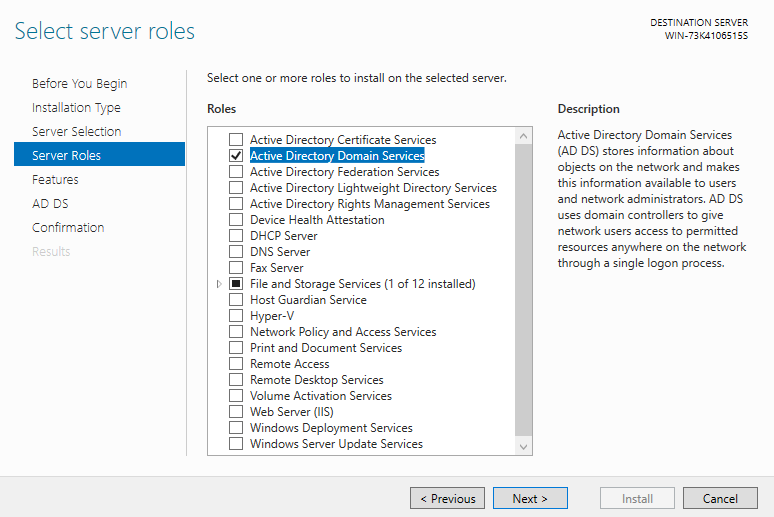
I added Active Directory Domain Services through Server Manager’s role-based installation workflow. Installing the role placed the AD DS components on the machine; the server did not become a domain controller until the later promotion stage.
For promotion, I selected Add a new forest and entered nekrotic.local as the root domain name. The wizard also required a Directory Services Restore Mode password, which is neither visible nor published.
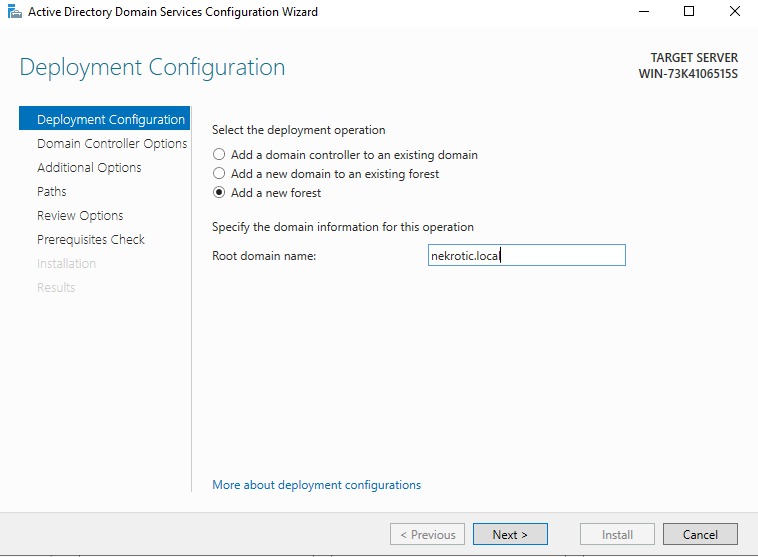
nekrotic.local forest. The recovery password is not shown or published.Internal DNS and domain discovery
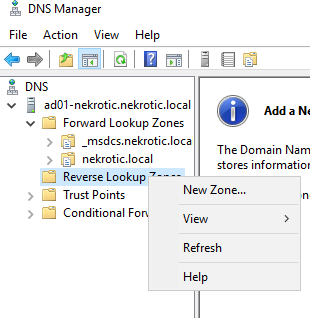
The promoted server also provided DNS for the lab. I worked with the forward zone for nekrotic.local and a reverse zone for the 192.168.1.0/24 network. Forward records map names towards addresses; pointer records support the reverse relationship.
The workstation’s preferred DNS server was set to the domain controller at 192.168.1.2. That was the decisive client-side dependency: an internet resolver could answer public queries but could not locate the private nekrotic.local services.
Directory objects, privilege, and the workstation join
In Active Directory Users and Computers, I worked with a standard domain user and a separate administrative account. Administrative rights came from membership of Domain Admins, not from the account’s display name. That made group membership the important security relationship.
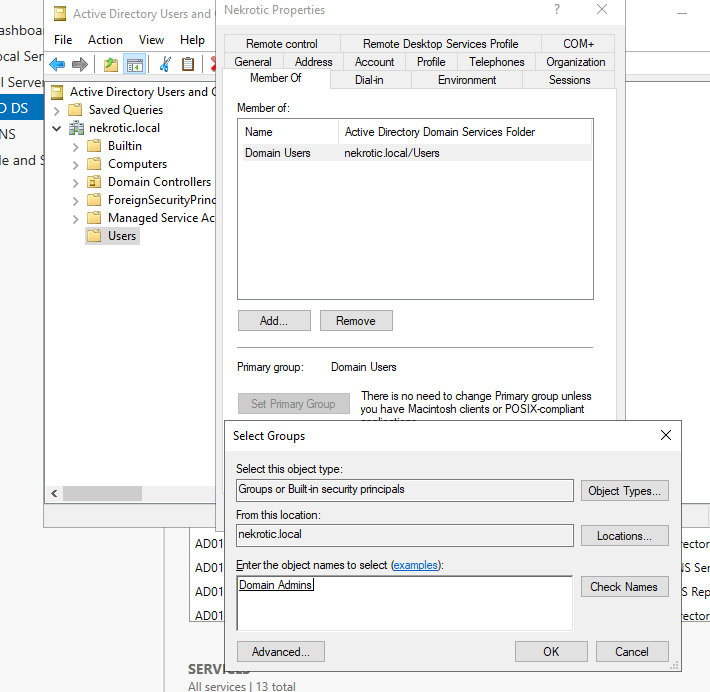
Domain Admins. The exercise demonstrated privilege through group membership; it was not a complete review of inherited or nested permissions.After configuring the workstation’s internal DNS, I entered wks01-nekrotic as the computer name and nekrotic.local as the domain. Windows then required an account permitted to perform the join and a restart before domain sign-in would be available.
What the configuration means defensively
The security lesson came directly from the relationships above. The domain controller combined identity, authentication, DNS, and privileged administration on one host. A mistake in that host, its privileged groups, or its audit policy could therefore affect the whole domain rather than one endpoint.
Current Microsoft guidance gives the historical observations a firmer modern boundary:
- protect
Domain Adminsand other highly privileged groups, use least privilege, and avoid using privileged accounts for routine browsing or workstation activity; - administer the directory from secured administrative hosts and protect domain controllers as critical infrastructure;
- configure suitable advanced audit policy and monitor account, group, policy, directory-service, and authentication events;
- verify SMB signing policy against the Windows versions in use rather than assuming that a 2021 default still applies.
The current references are Microsoft’s Active Directory security practices, events-to-monitor guidance, and SMB signing overview. They support the defensive recommendations; they do not retrospectively prove that those controls were configured in this lab.
Historical download-link review
I checked the three original product links on 23 August 2026.
| 2021 component | Link status at review | Current interpretation |
|---|---|---|
| Windows Server 2019 Evaluation | Still opens the Microsoft Evaluation Center page and offers ISO or VHD evaluation media | Appropriate to the historical lab. For a new comparison lab, Microsoft also publishes a Windows Server 2025 evaluation. |
| Windows 10 Enterprise Evaluation | No longer opens an evaluation download; it redirects to Windows 10 end-of-support guidance | The 2021 link is historical only. Microsoft’s current client evaluation is Windows 11 Enterprise. |
| pfSense Community Edition | Still live, but now routes downloads through the Netgate Installer workflow | The page listed pfSense CE 2.8.1 at review time. A rebuild must follow the current installer and hardware guidance rather than the 2021 ISO steps. |
Microsoft records that general Windows 10 support ended on 14 October 2025, subject to separate LTSC and Extended Security Update lifecycles. The Windows 10 release information should be checked for the precise edition and servicing state.
Limitations and what I would change now
This was a small 2021 learning lab rather than a production directory deployment:
- I recorded selected configuration stages rather than creating a reproducible infrastructure build;
- I did not validate replication, resilience, backup, recovery, delegated administration, or a formal hardening baseline;
- I did not capture a final domain logon, Kerberos trace, Group Policy result, event-log export, port scan, or exploitation test;
- one domain controller, one client, and one firewall demonstrate relationships but not replication, resilience, or production operations.
For a modern repeat, I would use supported Windows evaluation images, choose a subdomain of a registered DNS name rather than .local, record the exact build and patch levels, and preserve a small validation pack: DNS service-location queries, domain-join result, Kerberos tickets, resultant policy, selected audit events, and configuration exports. I would also use a defined hardening baseline and test the controls rather than turning the original checklist into unverified recommendations.
The 2021 lab still demonstrates an important step in my progression: I moved from treating Windows machines as isolated endpoints to understanding identity, naming, authentication, privilege, and telemetry as one connected system. Its value is that relationship, not the age of the interface or the exact clicks used to build it.