Project snapshot
- Authorised scope
- Individual CMP309 Android Development project presented through a final 162-second emulator demonstration and architecture and execution-flow diagrams.
- My contribution
- I designed and implemented the activity flow, Firebase login and registration paths, recipe model, and SQLite helper.
- Technical focus
- Android activity flow
- Firebase Authentication
- SQLite CRUD
- Local data modelling
- Search and record navigation
- Demonstrated outcome
- The 162-second demonstration shows successful sign-in followed by recipe creation, full-list and query-based retrieval, record viewing, update, deletion, and a refreshed result list. It does not demonstrate successful registration, persistence across a restart, or multi-device use.
Why I am keeping this project
CyberPlatter was my 2023 CMP309 Android Development project: a personal recipe manager with Firebase Authentication for identity and an on-device SQLite database for recipe records.
It was also the first project I completed without feeling confident in the result. I was dissatisfied with parts of the design when I finished it, and I do not want to rewrite that experience as a polished product story. Its value is narrower and more honest: I completed a working local data flow, attempted to separate interface and storage responsibilities, and could already identify problems in my own implementation.
I used a 19-slide presentation, code excerpts, architecture diagrams and a 162-second emulator recording to demonstrate the application. This retrospective distinguishes between:
- behaviour visible in the demonstration;
- implementation documented by the diagrams and code screenshots; and
- improvements that were only proposed.
An earlier concept note described categories, network downloads, a content provider, cloud preferences, and social sharing. Those features do not appear in the final architecture or demonstration and are not presented as completed work.
What I set out to build
The final application was smaller than that early concept. A user could enter through login or registration, reach a main page, add recipes, browse or search stored entries, open one record, and then update or delete it.
Each recipe contained five values in the documented RecipeModal class:
- name;
- description;
- ingredients;
- method; and
- a database identifier.
Firebase handled account identity. Recipe contents were stored separately in a local SQLite database named Recipe.db. The recipe model did not include a user identifier, so I cannot claim that local records were partitioned or access-controlled by Firebase account.
Architecture and execution flow
The original architecture diagram separated Android presentation files from two data-handling classes. The execution-flow diagram added the external Firebase dependency and the local SQLite database.
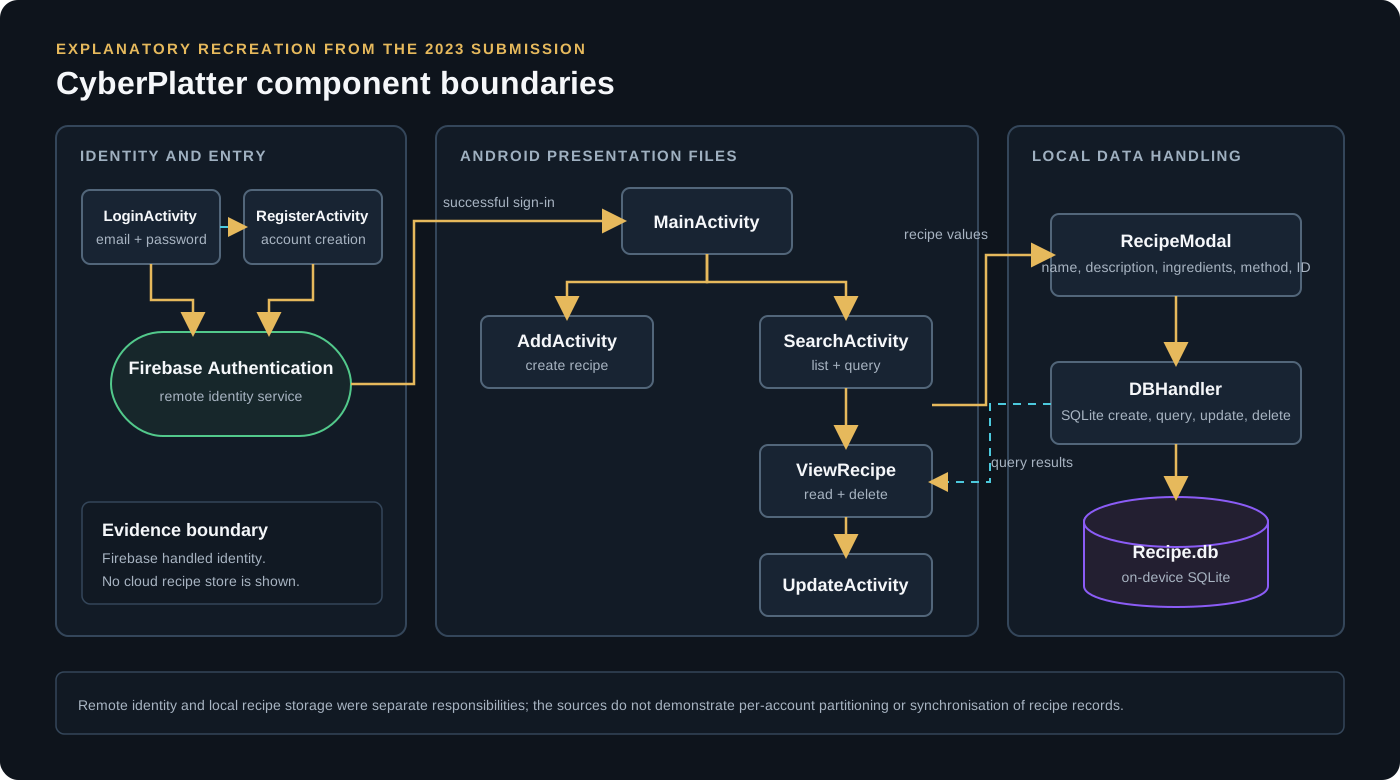
DBHandler connected the recipe model to local SQLite storage.The activity layer contained two related flows:
LoginActivity <-> RegisterActivity
       |
       v
Firebase Authentication
       |
       v
MainActivity
   |          |
   v          v
AddActivity  SearchActivity -> ViewRecipe -> UpdateActivity
The presentation describes RecipeModal as the object passed into data operations. DBHandler owned the SQLite schema and the documented insert, lookup, update, delete, and list queries. That kept SQL access out of the individual activity descriptions and gave the interface layer a common route into local storage.
I structured the main components around these responsibilities:
| Component | Documented responsibility |
|---|---|
RecipeModal |
Store the recipe name, description, ingredients, method, and ID behind getters and setters |
DBHandler.onCreate |
Create the recipe table and its initial columns |
DBHandler.onUpgrade |
Drop the existing table and recreate it when the database version changes |
| Insert and list queries | Add a recipe and populate the search/list view |
CheckDetails |
Return one selected recipe as a RecipeModal object |
| Update and delete operations | Modify or remove the row represented by a selected recipe object |
The upgrade behaviour is a particularly important boundary. Dropping and recreating the table is simple during coursework development, but it destroys existing data rather than migrating it. The presentation correctly identified non-destructive migration as future work.
What the demonstration actually shows
The 162-second emulator recording shows state changing across one continuous session.
| Demonstrated stage | Observation in the recording | What it supports |
|---|---|---|
| Entry and identity | The registration screen opens, the flow returns to login, and submitted credentials reach the main page | Login and navigation worked for the demonstrated account; successful account creation was not shown |
| Create | Two sample recipes are entered through the add screen and then appear in the recipe list | Insert and list retrieval worked in that session |
| Search | The list first shows all stored entries and then narrows after a query | Both full-list and query-based retrieval were exercised |
| Read | Selecting a result opens its name, description, ingredients, and method | A selected database record could be retrieved and presented |
| Update | One record is edited, renamed, and shown with the changed values | The update path wrote changes that were visible to a later read |
| Delete | The updated record is removed; the interface reports one affected recipe and the refreshed list contains the remaining entry | The delete path changed the local data set and the subsequent query reflected it |
In sequence, the demonstrated path was:
successful login
    -> main page
    -> create two recipes
    -> list and search stored recipes
    -> open one recipe
    -> update and re-read it
    -> delete it
    -> confirm the remaining list
This demonstrated a complete CRUD path inside one running emulator session. I did not test restart persistence, offline behaviour, successful new-account registration, invalid-input handling, multi-user isolation, concurrent access, device compatibility, or a clean reproducible build.
Where the design fell short
The final presentation included a critical analysis rather than claiming the application was finished. Its most important limitations were:
- Destructive upgrades. Changing the database version dropped the table instead of preserving and migrating existing records.
- Weak validation. Duplicate recipes and other invalid inputs needed clearer rejection and error handling.
- No recovery path. Local records had no backup or restore mechanism, so losing or replacing the device could also lose the recipe collection.
- No synchronisation. Firebase authenticated the user but did not synchronise recipe data between devices.
- Unverified account separation. The recipe model had no user identifier, so I did not demonstrate recipe ownership being enforced per authenticated account.
- Readable local storage. The presentation identified at-rest database encryption as future work; the implemented database was not described as encrypted.
- Static layouts. The add and update screens could overflow on different display sizes and needed scrolling and more responsive layout behaviour.
- Coarse data modelling. Ingredients were stored as one field. Quantities, prices, shopping lists, and meal planning would have required a separate related structure rather than more text parsing.
- No reproducibility test. I did not demonstrate a clean build, automated test suite or dependency-locked setup, so the project should not be treated as reproducible from a fresh environment.
I occasionally described the database as reliable, efficient or secure, but I did not perform the testing needed for those claims. The demonstrated result was a functioning local CRUD workflow, not measured performance, security, reliability or production readiness.
What I would change before treating it as a serious application
The first change would be to define the data and identity rules before adding more screens. If authentication is part of the product, the design should state whether recipes belong to a device, an account, or both, and the schema and access path should enforce that decision.
I would then replace destructive upgrades with versioned migrations, introduce field and uniqueness constraints, define observable failure states, and test create, search, update, delete, restart, and upgrade behaviour independently. Backup and synchronisation would need a conflict model rather than simply copying the SQLite file between devices.
The interface would also need to be tested across screen sizes and content lengths. Long ingredients and methods are normal recipe data, so scrolling, saved form state, and interruption during editing should be requirements rather than later fixes.
Finally, I would make reproducibility part of the definition of done: dependency locking, automated tests and a clean build from a fresh checkout rather than relying on one successful emulator session.
What the project demonstrates now
CyberPlatter should not be read as my current Android engineering standard. It is a bounded historical project showing that I implemented and demonstrated an authenticated, multi-screen CRUD application while still making several weak architectural and validation choices.
The useful progression is not that every part succeeded. Remote identity and local recipe storage were connected through the interface, the full record lifecycle worked in one emulator session, and the surrounding ownership, migration, recovery, validation and testing design remained incomplete.